Breva EN 12/20
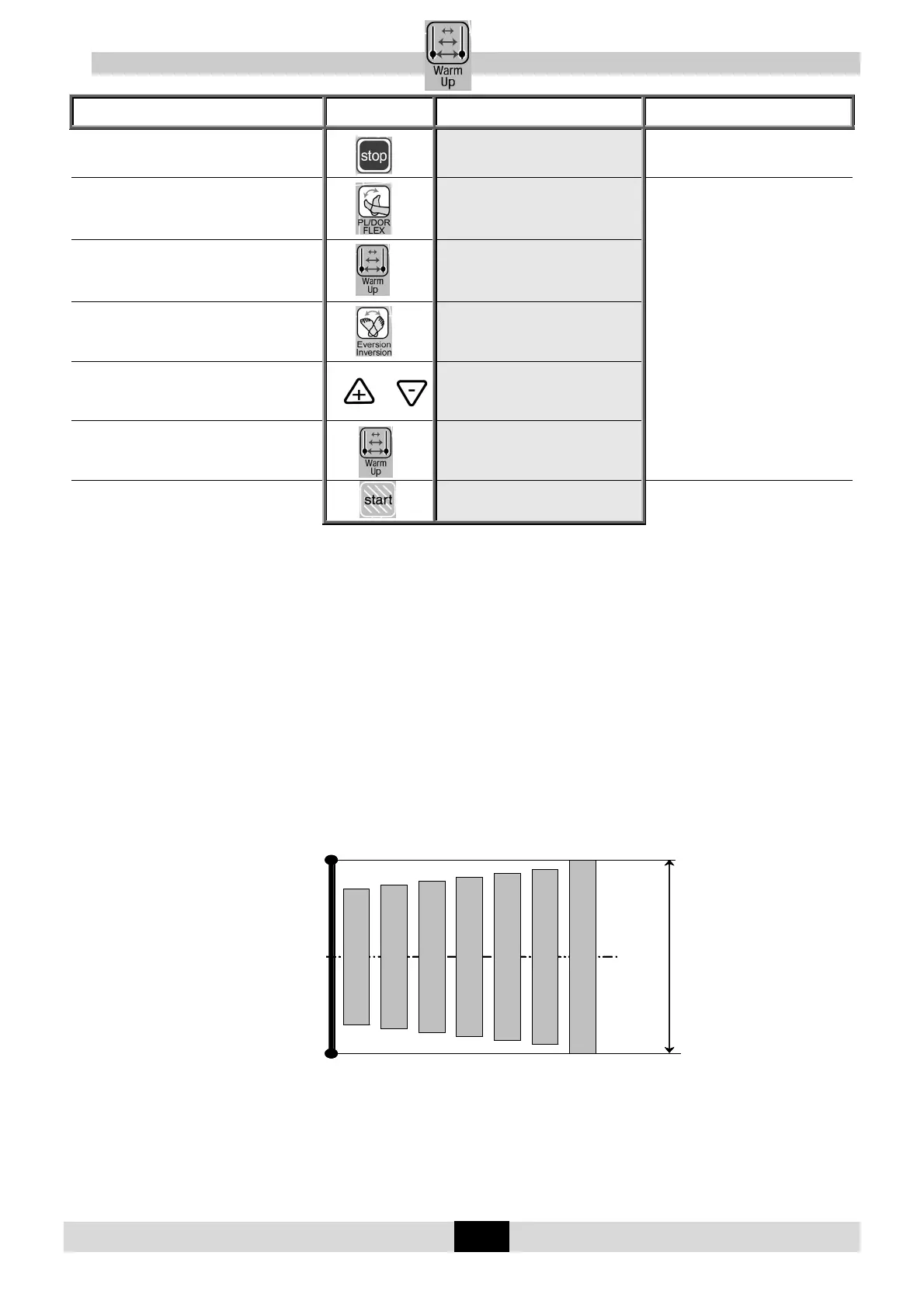
11.12. To use the WARM UP key
Beginning
Keys to
press
Display Remarks
To stop the unit
PL/FLEX DOR/FLEX
20 STOP 10 5
Check that the hand control is not
locked (See page 7).
To select the
Plantar Flexion/Dorsiflexion movement
PL/FLEX DOR/FLEX
20 STOP 10 5
To set movement values, see page 8.
To select Warm Up mode
PL/DOR FLX W.UP
20 STOP 10 5
OR
To select the
Inversion/Eversion movement
INVERSION/EVERS.
RIGHT:+ LEFT:-
To select the right or left foot
or
EV Right INV
10 STOP 10 10
To select Warm Up mode
EV W UP RIGHT INV
10 STOP 10 10
To start the movement
EV W UP RIGHT INV
10 RUN 10 10
The angle display changes with the
current movement.
Warm Up rules.
The device KINETEC
®
Breva starts at 70% of the full ROM, increasing 5% of the range each full cycle
until the pre-set ROM is reached.
Note:
- The parameters should only be modified while the unit is stopped.
- Pauses and ByPass mode are not available during warm up cycles.
- The Warm Up cycles are only performed when the movement is first started.
- To start a new Warm Up session, press the "Warm Up" key twice.
- The calculation mode used enables the pre-set ROM to be reached in approximately seven full
cycles.
Example:
For a Warm Up treatment with a pre-set ROM from 40° to 30°.
The first cycle starts at 32° plantar to 22° dorsal, increasing 5% of the range each cycle.
30°
-40°
-5°
Cycle 1 (70%)
Cycle 2 (75%)
Cycle 3 (80%)
Cycle 4 (85%)
Cycle 5 (90%)
Cycle 6 (95%)
Cycle 7 (100%)
Amplitudes de mouvement programmées
30°
-40°
-5°
Cycle 1 (70%)
Cycle 2 (75%)
Cycle 3 (80%)
Cycle 4 (85%)
Cycle 5 (90%)
Cycle 6 (95%)
Cycle 7 (100%)
Cycle 1 (70%)
Cycle 2 (75%)
Cycle 3 (80%)
Cycle 4 (85%)
Cycle 5 (90%)
Cycle 6 (95%)
Cycle 7 (100%)
Cycle 1 (70%)
Cycle 2 (75%)
Cycle 3 (80%)
Cycle 4 (85%)
Cycle 5 (90%)
Cycle 6 (95%)
Cycle 7 (100%)
Amplitudes de mouvement programmées


 To Next Page