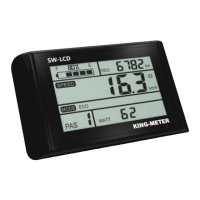
The K5248 LCD is a display unit designed for e-bikes, providing various functions and information to enhance the riding experience. Manufactured by KING-METER TECHNOLOGY CO., LTD, located at No.15, Chenchang Road, Beichen Dist. Tianjin, 300134, CN, this display aims to offer clear and concise details regarding the e-bike's operation.
Function Description
The K5248 display offers a comprehensive set of functions, including:
- Battery power indication: Shows the current battery level as a percentage.
- Speed indication: Displays current speed, maximum speed, and average speed.
- Distance indication: Tracks both single trip distance (TRIP) and total odometer distance (ODO).
- Walk assist & Headlight indication: Provides visual cues for walk assist mode and headlight status.
- Error code indication: Alerts the user to system malfunctions with specific error codes.
- Various setting parameters: Allows users to customize display settings such as backlight brightness, display unit, speed limit, and wheel size.
- Color Theme switch: Offers four different color themes for personalized display preferences.
Important Technical Specifications
- Material and Color: K5248 products are made of PC material, designed to withstand temperatures between -20 to 60°C. The shell material ensures normal usage and good mechanical performance.
- Dimensions: The manual includes detailed diagrams with specific measurements for the display unit.
- Power Consumption: When the e-bike is powered off, the display will shut down, and the leakage current of the display is less than 1µA. If the e-bike is not used for more than 10 minutes, the display will automatically shut down.
- Display Unit: Supports both Metric (km/h) and Imperial (Mile/h) units for speed and distance.
- Speed Limit: Settable range for maximum speed is 12km/h to 40km/h.
- Wheel Size: Settable values include 16, 18, 20, 22, 24, 26, 700C, and 28 inch to ensure accurate speed and mileage display.
Usage Features
Normal Operation:
- On/Off: Long press the "MODE" button to turn the display on or off. The display will work normally once the controller powers on.
- User Interface: The normal display interface shows current speed, PAS level, battery percentage, and allows switching between TRIP and ODO distance.
- Color Theme Switch: Long press the "UP", "DOWN", and "MODE" buttons together for more than 2 seconds to cycle through four available color themes.
- Walk Assist Mode: Press and hold the "DOWN" button for 2 seconds to activate walk assist mode, where the e-bike travels at a constant speed of 6km/h. This function is intended for pushing the e-bike by hand, not for riding.
- PAS Level Selection: Short press the "UP" or "DOWN" button to switch PAS levels. The default range is 0-3 levels, with level 1 being the lowest and level 3 the highest motor output power.
- Battery Indicator: The battery power is shown as a percentage bar. When fully charged, the power bar shows 100%.
- Headlight On/Off: Long press the "UP" button for 2 seconds to turn the backlight on and off, and the controller will be informed to turn the headlight on or off accordingly.
- Error Code: When an e-bike electronic control system fails, the display automatically indicates an error code. A detailed list of error codes is provided in Appendix 1.
User Settings:
- To enter user settings, ensure the power is on, then press and hold the "UP" and "DOWN" buttons at the same time for 2 seconds. The display will enter the setting interface.
- Backlight Brightness Setting: Press "UP" and "DOWN" to change brightness, short press "MODE" to switch to the next setting option.
- Display Unit Setting (Metric / Imperial): Press "UP" and "DOWN" to select between km/h (metric) and Mile/h (imperial). Short press "MODE" to confirm and switch to the next setting option.
- Speed Limit Setting: Press "UP" and "DOWN" to adjust the maximum speed. Short press "MODE" to confirm and switch to the next setting option.
- Wheel Size Setting: Press "UP" and "DOWN" to select the appropriate wheel diameter for accurate speed and mileage. Short press "MODE" to confirm and switch to the next setting option.
- Version Information Interface: This interface displays the software version number, useful for display maintenance.
- To save and exit the setting interface, long press "MODE".
Maintenance Features
- Troubleshooting (FAQ):
- Q: Why can't turn on the display? A: Please check whether the battery is turned on or the leakage lead wire is broken.
- Q: How to deal with the error code display? A: Contact the e-bike maintenance station in time.
- Quality Assurance and Warranty Scope:
- Warranty Information: King-Meter will be responsible for all faults arising during normal operation that are caused by a quality defect.
- Warranty Period: The warranty time is 24 months from the day the display leaves the factory.
- Conditions Not Covered by Warranty:
- Shell opened.
- Connector damaged.
- After display out of factory, the shell is scratched or damaged.
- Lead wire of display scratch or break.
- The fault or damage is caused by force majeure (such as fire, earthquake, etc.) or natural disasters (such as lighting, flooding, etc.)
- Product exceeded warranty period.
- Error Code Definition (Appendix 1):
- 21: Current Abnormal
- 22: Throttle Abnormal
- 23: Motor phase problem
- 24: Motor Hall defect
- 25: Brake Failed
- 30: Communication Abnormal
- General Notes for Users:
- Be careful with safety during use. Do not attempt to release the connector when the battery is powered on.
- Try to avoid hitting the display.
- Do not split the waterproof sticker to avoid affecting waterproof performance.
- Do not modify system parameters to avoid parameter disorder.
- If an error code appears, have the display repaired.

 Need help?
 General












 To Next Page