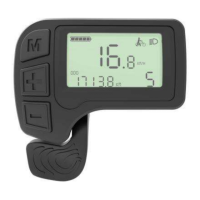
The KM3209 LED display is a user-friendly interface designed to enhance the e-bike riding experience by providing essential information and control functions. This device is crafted from durable PC plastic, ensuring robust mechanical properties and an operating temperature range of -20 °C to 60 °C, making it suitable for various environmental conditions.
Function Description
The KM3209 LED display offers a comprehensive suite of functions to keep riders informed and in control. Key features include:
- Battery Indicator: Displays the battery capacity in five levels, with the last indicator flashing when the battery is under-voltage, prompting the rider to recharge as soon as possible. If the battery has communication capabilities, the display shows the battery capacity with a 1-second delay; for batteries without communication, there's a 3-second delay. If communication between the display and battery is lost for more than 5 seconds, the display will show battery capacity data from the controller.
- Real-time Speed Display: Shows the current riding speed, allowing riders to monitor their pace.
- Distance Display (Trip & ODO): Riders can switch between single trip distance (TRIP) and total odometer (ODO) data by pressing the "MODE" button, providing flexibility in tracking travel distances.
- PAS Level Adjustment: Enables riders to shift between five PAS (Pedal Assist System) levels, ranging from 1 to 5, to adjust the motor's output power. The preset PAS level is 1. This adjustment is made by pressing either the "UP" or "DOWN" button.
- Light State Indicator: Shows whether the e-bike's headlight is on or off.
- Error Code Display: Automatically reports error codes when the e-bike's electronic control system malfunctions. This feature helps diagnose issues quickly, with a detailed error list provided in the manual for troubleshooting.
- Walk Assist Function: Activated by pressing and holding the "UP" button for 2 seconds, this mode provides assistance when pushing the bike. Releasing the button exits walk assist mode. It's important to note that this function should only be used when pushing the bike, not while riding.
- Headlight Control: Riders can turn the headlight on or off by pressing and holding the "DOWN" button for over 2 seconds.
- Multiple Parameter Setting: Allows users to customize various parameters, including limit speed, wheel size, and metric/inch units.
- Mobile Phone Charging (USB Interface): For models equipped with a USB interface, the display provides 5V/500mA charging power for mobile phones. Charging can be initiated by connecting the phone when the display is off and then powering on the display, or by simultaneously pressing and holding "MODE," "DOWN," and "UP" for 2 seconds when the display is already on. Unplugging the phone automatically terminates charging.
- Communication Protocol: The display communicates with the controller following ANANDA's EN13849:2017 protocol V11.0_1.3.4 and above, ensuring compatibility and reliable data exchange.
- ADST Function Support: The display supports the ADST function, with detailed information available in the "ADST updated too (standard version)" instruction.
Usage Features
The KM3209 LED display is designed for intuitive operation, making it easy for riders to access and adjust settings.
- Power ON/OFF: To power on the display and supply power to the controller, hold the "MODE" button for 1 second. To shut off the e-bike power, hold the "MODE" button for 2.5 seconds while at a working state. The display consumes less than 1uA of current when shut down. If the e-bike is not used for more than 10 minutes, the display will automatically turn off.
- User Interface Navigation: The display's interface is straightforward, showing speed, trip/ODO, and battery status. Buttons are clearly defined: "MODE" for switching displays and confirming settings, "UP" for increasing values or activating walk assist, and "DOWN" for decreasing values or controlling the headlight.
- Single Trip Distance Clearance: To reset the single trip distance (TRIP) data to zero, press "MODE" and "DOWN" simultaneously for 2 seconds.
- Parameter Setting Menu: To enter the setting menu for limit speed, wheel size, and metric/inch units, ensure the display is powered on with a speed of zero, then hold "UP" and "DOWN" for 2 seconds.
- Limit Speed Setting: The default limit speed is 25km/h, with a configurable range from 12km/h to 25km/h. This setting prevents the motor from supplying power when the e-bike exceeds the set speed, enhancing rider safety. Use "UP" or "DOWN" to select the desired value, then press "MODE" to confirm and proceed to the next setting.
- Wheel Size Setting: The preset wheel size is 26 inches. This setting is crucial for accurate speed, TRIP, and ODO readings. The available wheel sizes include 16, 18, 20, 22, 24, 26, 700C, 28, and 29 inches. Adjust with "UP" or "DOWN," then press "MODE" to confirm and move to the next setting.
- Metric/Inch Setting: The default unit is Metric. Riders can switch between Metric and Inch units using "UP" or "DOWN," then press "MODE" to confirm and proceed.
- Exiting Settings: While in the setting state, a short press of "MODE" confirms the current input and moves to the next setting. To save all settings and exit, hold the "MODE" button. If no operation is performed within 10 seconds, the display will automatically exit the setting state.
Maintenance Features
To ensure the longevity and optimal performance of the KM3209 LED display, certain maintenance guidelines should be followed.
- Installation: The display should be fixed securely on the handlebar, and its angle adjusted for optimal viewing. Ensure the two plugs from the display and controller are connected when the power supply is off.
- Handling Precautions: Avoid plugging and unplugging the display when it is electrified. Prevent collisions that could damage the unit. Do not remove the stickers, as this could lead to water ingress.
- Parameter Settings: It is strongly advised not to arbitrarily change the background parameter settings of the instrument, as this could compromise normal riding performance.
- Troubleshooting: If the display malfunctions, it should be sent for repair immediately. For error code displays, contact the e-bike maintenance station in a timely manner.
- Warranty: King-Meter provides a 36-month warranty from the factory departure date for faults arising from normal operation due to quality defects. The warranty does not cover issues such as an opened shell, broken connectors, scratches or damage after leaving the factory, scratched or broken lead wires, damage caused by force majeure (e.g., fire, earthquake, natural disasters), or products exceeding the warranty period.
- Cable Connection: For any issues with the display not turning on, riders should check if the cable is properly connected to the controller. The standard connector line sequence includes Red (VCC) for display power, Black (GND) for ground, Yellow (TX) for data transmission, Green (RX) for data reception, and Blue (K) for the power cable to the controller. Note that some waterproof connectors may obscure the internal wire colors.
- Software Version: The instruction manual is based on the general software version 1.0. Actual software versions on some vehicles may vary slightly, and the actual version used should take precedence.

 Need help?
 General











 To Next Page