EasyManua.ls Logo

King-Meter K5242 LCD - User Manual

King-Meter K5242 LCD
22 pages
Print Icon
To Next Page IconTo Next Page
Loading...
CMACEWHEEL EBIKES CO., LTD
info@cmacewheel.com
CMacewheel.com
USERS GUIDE
K5242 LCD
Content
Question and Answer IconNeed help?

Do you have a question about the King-Meter K5242 LCD and is the answer not in the manual?

Summary

Preface

1. Appearance and Dimensions

1.1 Material and Color

Details the K5242 product's material, color, temperature range, and dimensions.

2. Function and Button Definition

2.1 Function description

Lists the primary functions of the K5242 display, such as battery, speed, and distance.

2.2 Normal Display Content

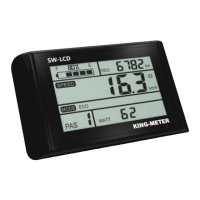
Illustrates the standard display interface and its various indicators.

2.3 Button definition

Defines the 5 buttons on the K5242 display: MODE, UP, DOWN, and POWER ON.

3. Note for Users

4. Installation Instruction

5. User Settings

5.1 On; Off

Describes how to turn the K5242 display on and off using the MODE button.

5.2 User interface

Presents the normal display interface of the K5242, showing speed, PAS, and battery status.

5.3 Walk assist Mode

Explains how to activate and use the Walk assist mode for pushing the e-bike.

5.4 PAS Level Selection

Details how to switch between PAS (Pedal Assist System) levels using UP/DOWN buttons.

5.5 Battery capacity indication

Describes how the K5242 display shows battery power as a percentage bar.

5.6 Speed;Single trip distance;ODO

Covers various display modes for speed, trip distance, ODO, max speed, and average speed.

5.6.1 Real time speed, Single trip distance (TRIP) indication interface

Explains the default display showing real-time speed and single trip distance.

5.6.2 Max speed, ODO indication interface

Details how to view maximum speed and ODO (total mileage) via button press.

5.6.3 Average speed, remaining range (TO GO) indication interface

Describes the interface for average speed and estimated remaining range (TO GO).

5.7 Error code

Informs that the display shows error codes when the e-bike system fails.

6. User Settings

6.1 Wheel Size Setting

Explains how to set the wheel size for accurate speed and mileage display.

6.2 Speed Limit Setting

Details how to set the speed limit for the e-bike, including 'no limit' option.

6.3 Backlight Brightness Setting

Describes how to adjust the backlight brightness of the K5242 display.

6.4 Display Unit Setting

Explains how to select between Km/h (metric) and Mile/h (imperial) units.

6.5 Speed sensor magnetic stone number setting

Details setting the number of magnets for accurate speed measurement.

6.6 Zero start setting

Explains the setting for zero start (0) or non-zero start (1) for the e-bike.

6.7 Driver Mode Setting

Describes the three riding assist modes: PAS only, throttle only, or both.

6.8 PAS Power Sensitivity Setting

Explains how to adjust the sensitivity of the Pedal Assist System (PAS).

6.9 PAS power start strength setting

Details how to set the starting strength for the PAS.

6.10 Controller current limit setting

Explains how to set the current limit for the controller, from 1A to 30A.

6.11 Pas Magnetic Number Setting

Describes setting the number of magnets for the PAS, options 5/8/12.

7.USB charging function

8. Preparation Before Startup

9. FAQ

10.Quality Assurance and Warranty Scope

Appendix 1: Error Code Definition

Overview

The K5242 LCD is a display unit designed for e-bikes, offering a variety of function modes to meet riding needs. It is manufactured by CMACEWHEEL EBIKES CO., LTD.

Function Description:

The K5242 display provides several key functions for e-bike users:

  • Battery capacity indication: Shows the remaining battery power as a percentage bar. When fully charged, it displays 100%. Each cell in the bar represents 10% of battery capacity.
  • Speed indication: Displays the current real-time speed of the e-bike.
  • Distance display: Includes both single trip distance (TRIP) and total mileage (ODO) display. The single trip distance can be cleared by simultaneously pressing the [mode] and [down] buttons for 2 seconds when the speed is zero. The ODO represents the total mileage of the e-bike.
  • Walk assist indication: Allows the e-bike to travel at a constant speed of 6km/h when the "DOWN" button is pressed and held for 2 seconds. This function is intended for pushing the e-bike by hand and should not be used while riding.
  • Backlight setting: Adjustable backlight brightness with three options: 1 (darkest), 2 (standard), and 3 (brightest). The default setting is 3.
  • Error code indication: Automatically displays error codes when the e-bike electronic control system fails. A detailed list of error codes and their solutions is provided in Appendix 1. The e-bike cannot be driven until the fault is eliminated.
  • Various setting parameters: Allows users to customize several aspects of the e-bike's operation.

Important Technical Specifications:

  • Material and Color: The K5242 products are made of black and white PC.
  • Operating Temperature: The shell material ensures normal usage and good mechanical performance within a temperature range of -20 to 60°C.
  • Dimensions:
    • Display unit: 84.5mm (width) x 72mm (height) x 6mm (thickness).
    • N5 button: 51.10mm (length) x 54.45mm (width) x 20.20mm (height), with a mounting diameter of Ø22.20mm.
  • USB Charging Function: A USB interface is installed under the N5 button, providing charging power for mobile phones with an output current of 500mA. Charging automatically terminates when the phone is unplugged.
  • Automatic Shut-down: If the e-bike is not used for more than 10 minutes, the display will automatically shut down.
  • Leakage Current: When the display is off, the leakage current is less than 1µA.

Usage Features:

  • On/Off: Long press the "MODE" button to turn the display on or off. When the display is on, the controller powers on simultaneously.
  • PAS Level Selection: Short press the "UP" or "DOWN" button to switch between PAS (Pedal Assist System) levels. The default range is 0-5 levels.
  • User Settings Access: When the speed is zero, press the [up] button for two seconds to enter the setting interface. A password (1801) is required to access setting items. Short press [mode] to enter or switch between setting interfaces.
  • Wheel Size Setting: Allows selection of wheel diameters (20, 22, 24, 26, 700C, 28, and 29 inch) to ensure accurate speed and mileage display.
  • Speed Limit Setting: Configurable speed limit from 8km/h to 45km/h. "99" indicates no speed limit (default).
  • Display Unit Setting: Choose between Km/h (metric system) and Mile/h (Imperial system).
  • Speed Sensor Magnetic Stone Number Setting: Parameters can be set from 0-99, with a default of 1, indicating the number of external speed measuring magnets.
  • Zero Start Setting: Configurable for zero start (0) or non-zero start (1) of the e-bike. Default is 1 (non-zero start).
  • Driver Mode Setting: Select from three riding assist modes: 0 (PAS assist only), 1 (throttle mode only), or 2 (coexistence of both assisted modes). Default is 2.
  • PAS Power Sensitivity Setting: Adjusts the sensitivity of the PAS system, with a range of 3 (highest sensitivity) to 24 (lowest sensitivity). Default is 3.
  • PAS Power Start Strength Setting: Configurable start strength from 0 to 5. Default is 3.
  • Controller Current Limit Setting: Adjusts the current limiting value from 1A to 30A. Default is 20A.
  • PAS Magnetic Number Setting: Set according to the number of magnets on the disk installed on the e-bike (5, 8, or 12). Default is 12.

Maintenance Features:

  • Safety Precautions:
    • Avoid releasing the connector when the battery is powered on.
    • Avoid hitting the display.
    • Do not split the waterproof sticker to maintain waterproof performance.
    • Do not modify system parameters to prevent disorder.
  • Error Code Handling: If an error code appears, the display should be repaired, and the e-bike maintenance station should be contacted.
  • Warranty:
    • King-Meter is responsible for faults arising from normal operation due to quality defects.
    • Warranty period is 24 months from the factory departure date.
    • Warranty does not cover: opened shell, damaged connector, scratched/damaged shell after factory departure, scratched/broken lead wire, force majeure (fire, earthquake, lightning, flooding), or products exceeding the warranty period.

King-Meter K5242 LCD Specifications

General IconGeneral
BrandKing-Meter
ModelK5242 LCD
CategoryBicycle Accessories
LanguageEnglish

Related product manuals