Device Options (Mac Environment)
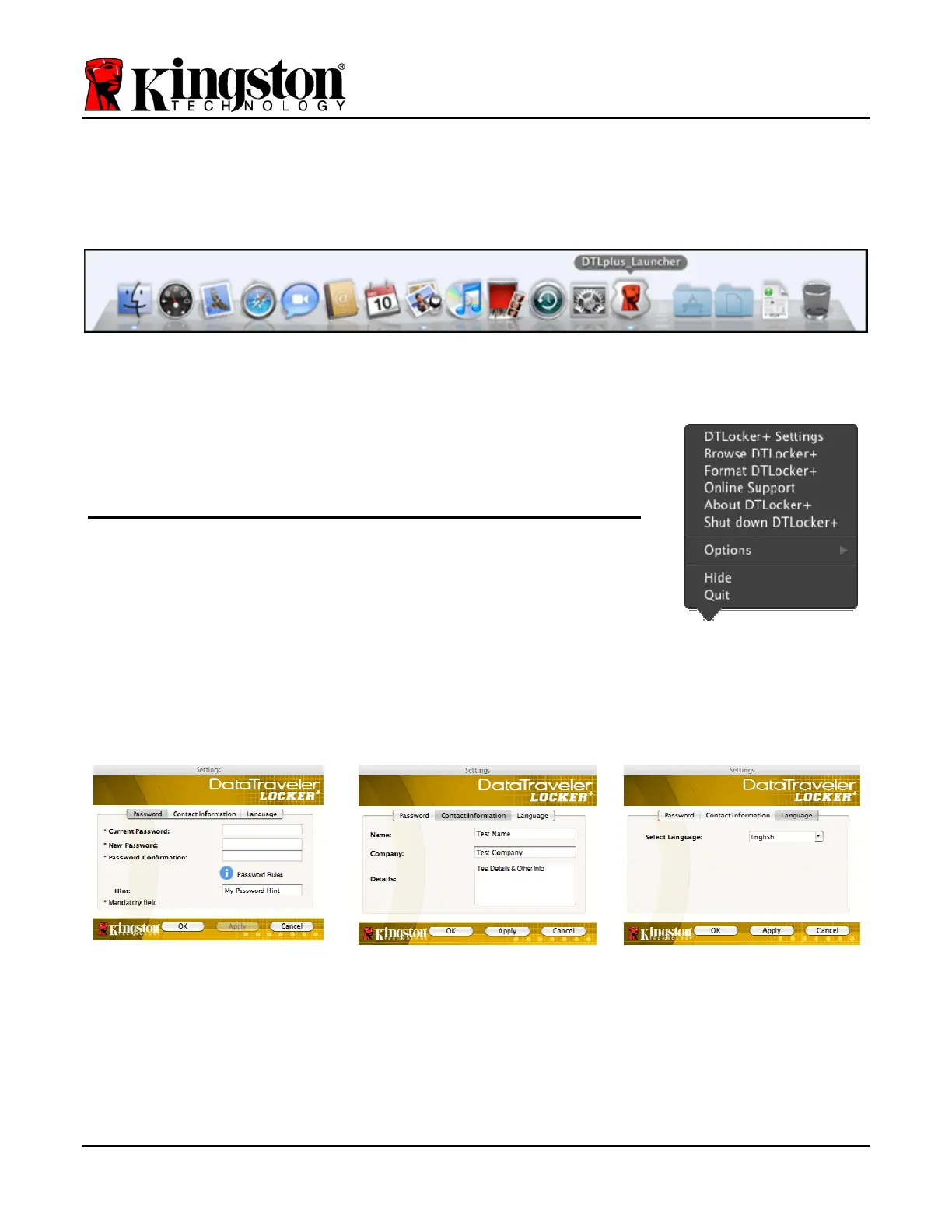
While you are logged into the device, there will be a ‘DTLplus_Launcher’ icon located in the
Mac OS X Dock as seen in
Figure 9.1 below:
Figure 9.1 – DTL+ Icon In Mac OS X Dock
Holding down the ‘control’ key on your keyboard and clicking once
on the ‘DTLplus_Launcher’ icon will display the menu shown in
Figure 9.2 to the right.
DTL+ Settings
• Allows you to change your password and/or hint (Figure
9.3
)
• Allows you to add/view/change your contact information
(Figure 9.4)
• Allows you to change your language preference (Figure 9.5)
Figure 9.2
DTL+ Options
Figure 9.3
Change Password
Figure 9.4
Contact Information
Figure 9.5
Select Language
(Note: For security purposes, your current DTL+ password is required to update and/or modify
any of these settings.)
Document No. 48008071-001.A02 DataTraveler
®
Locker+ Page 18 of 22


 To Next Page