Chapter 1 Before Use 1-9
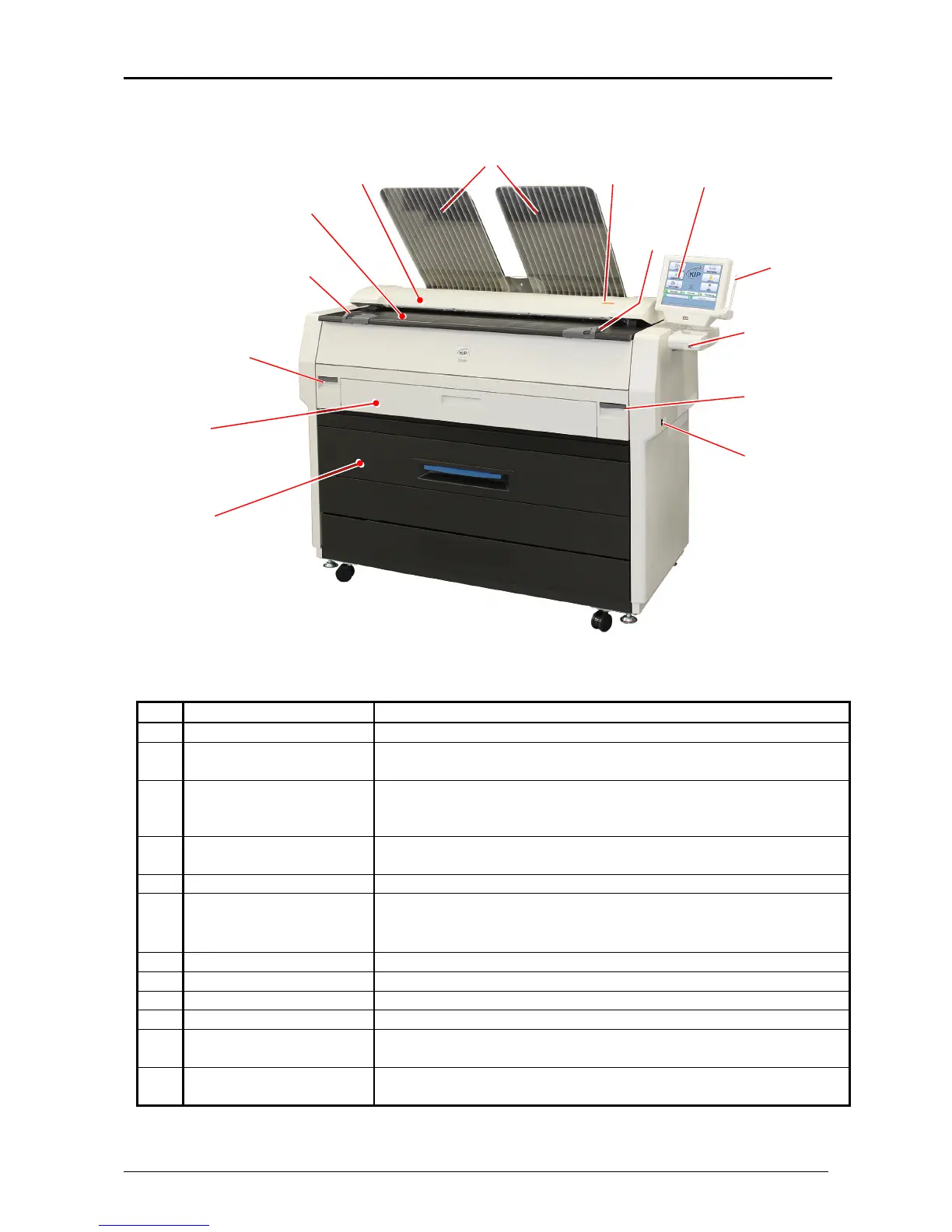
1. 5 Appearance
1. 5. 1 Front view
No. Name Function
1 Main Switch You can turn on/off the KIP 7100.
2 Original Guides Feed the original under the Scanner Unit along the Original
Guides.
3 User Interface This is a Touch Screen, and many kinds of user operation are
available.
PLEASE DO NOT push the LCD area too strong.
4 Emergent Stop Button Press this button when you would like to stop copying or
scanning emergently.
5 Scanner Unit Read the original with this unit when you make scan or copy.
6 Toner Hatch
(Original Table)
Open the Toner Hatch when you replace the Toner Cartridge.
Also put the original here and then feed it into the Scanner Unit
when you make scan or copy.
7 Engine Unit Open Lever Pull up these levers when you open the Engine Unit.
8 Bypass Feeder Feed a cut sheet paper from the Bypass Feeder.
9 Roll Deck Roll media can be loaded here.
10 Print Tray These trays catch ejected prints.
11 Stylus Use this to press buttons on the touch screen.
PLEASE DO NOT use any other pointed object to tap on the UI.
12 USB Port Your USB flash memory storage can be installed here.
5VDC max.
1
45
2
9
3
7
112
6
7
10
12
8



 To Next Page