14
SETTING UP YOUR FOOD PROCESSOR
Installing the Adjustable
Slicing Disc
The Adjustable Slicing Disc is easily adjusted
and makes slicing tasks simple. Follow
these steps for adjusting and installing the
Adjustable Slicing Disc.
Installing the Reversible
Shredding Disc
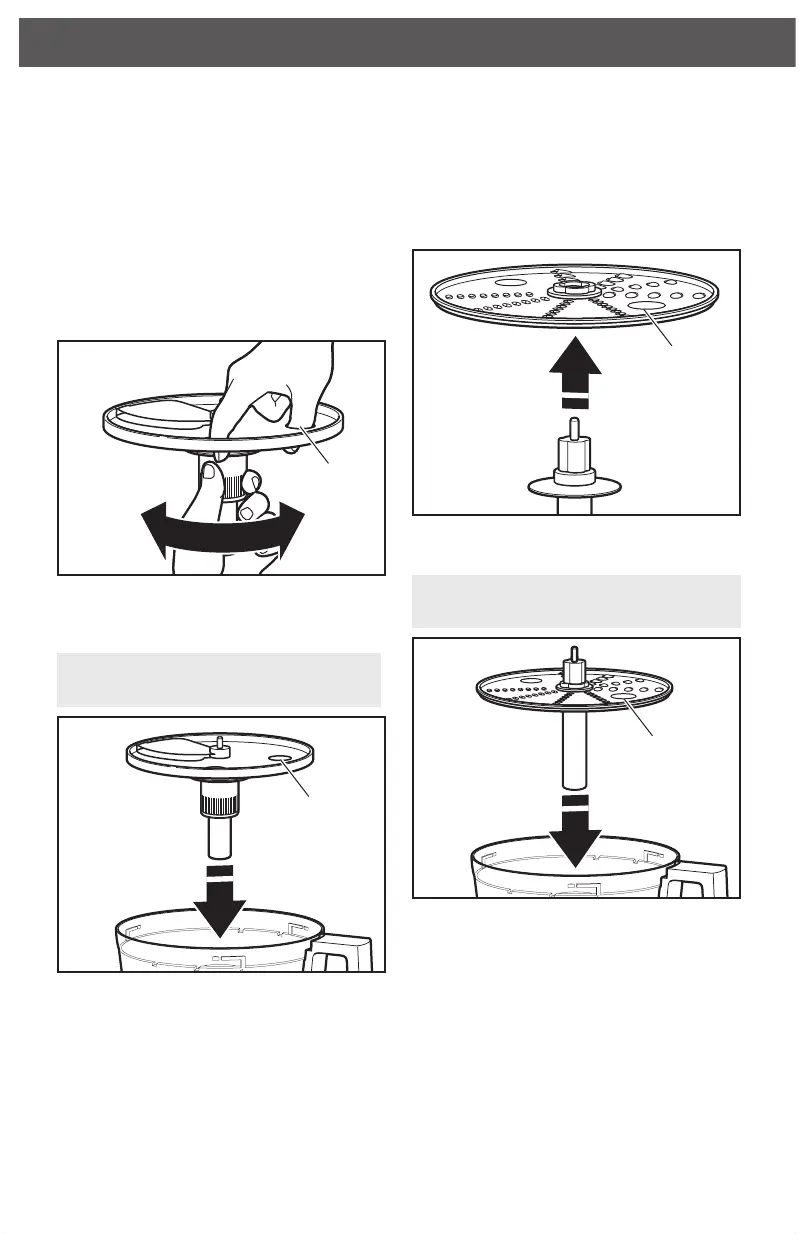
1. Holding the slicing disc, twist the
ridged portion of the shaft clockwise
for thinner slices, or counterclockwise
for thicker slices.
2. With the work bowl installed, hold the
slicing disc by the nger grips and lower
it onto the power shaft.
TIP: You may need to turn the disc
until it drops down into place.
3. Install the work bowl cover, being sure it
locks into place.
1. Holding the reversible shredding disc
by the 2 nger grips, insert the shredding
adapter into the hole in the bottom of
the disc.
2. With the work bowl installed, slide the
drive adapter onto the power shaft.
TIP: You may need to turn the disc/
adapter until it drops down into place.
3. Install the work bowl cover, being sure it
locks into place.
Finger Grip
Finger Grip
Finger Grip
Finger Grip
W10529658B_01_EN_v02.indd 14 10/24/14 10:38 AM



 To Next Page
 Loading...