English
15
OPERATING THE TOASTEROPERATING THE TOASTER
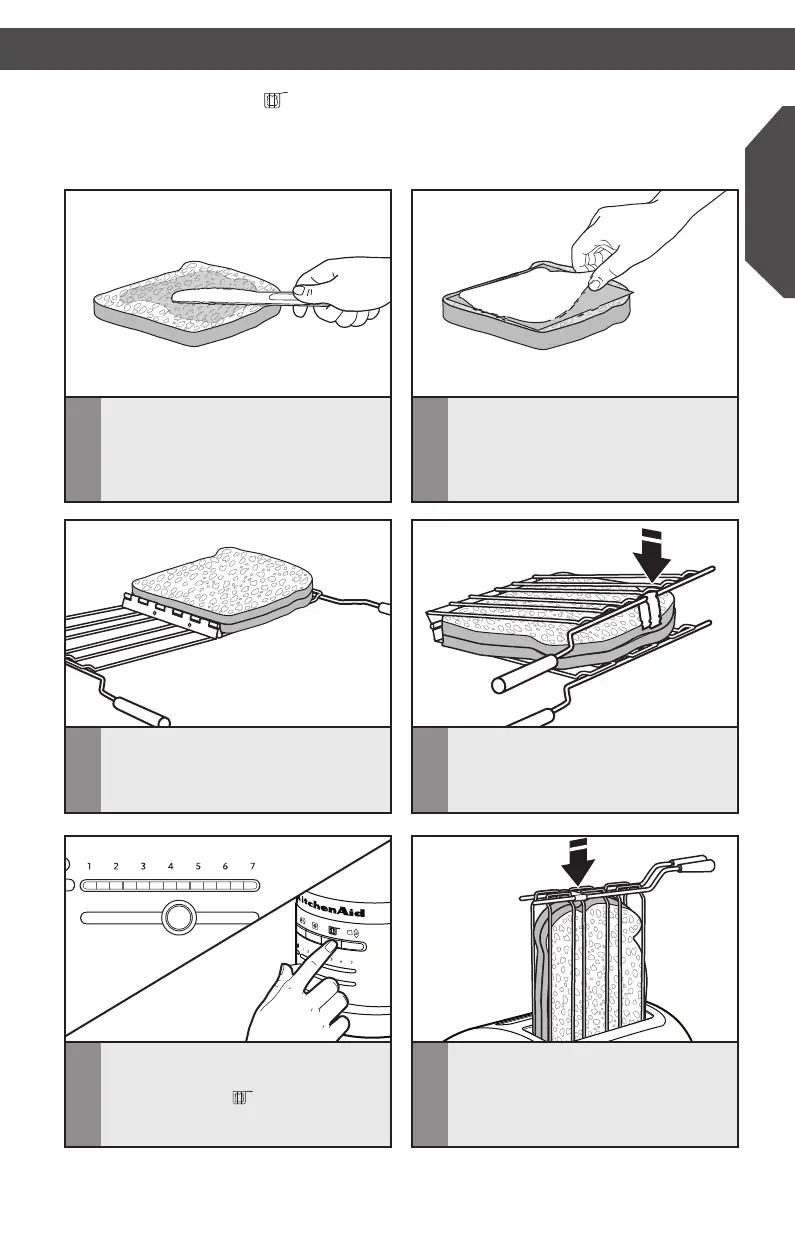
1
Lightly butter the outside of the
sandwich bread – do not butter the side
that will face the filling. Buttering the
outside of the bread will slow browning
and help warm the filling.
3
Open the Sandwich rack by spreading
the handles apart. Then, place an edge
of your sandwich flush with the bottom
channel of the rack, as shown.
2
Fill the sandwich with desired
ingredients, but do not overfill it! Thinly
sliced ingredients – like ham, turkey, and
cheese – work best.
4
Press the Sandwich rack handles
together to grip the sandwich. Close
the clip to keep grids together.
Toasting Sandwiches ( )
Your Toaster features a special “Sandwich” setting to be used exclusively with the
KitchenAid Sandwich rack to toast sandwiches made with thinly sliced meats and cheeses.
5
Set the Shade control to the desired
level of brownness, then press
the SANDWICH ( ) button.
6
Insert the Sandwich rack into the
toaster slot, with your sandwich inside,
as shown. The Toaster will automatically
lower the Sandwich rack and start
toasting.
W10506838B_01_EN_v02.indd 15 2/12/14 5:32 PM


 To Next Page
 Loading...