English
17
CARE AND CLEANINGOPERATING THE TOASTER
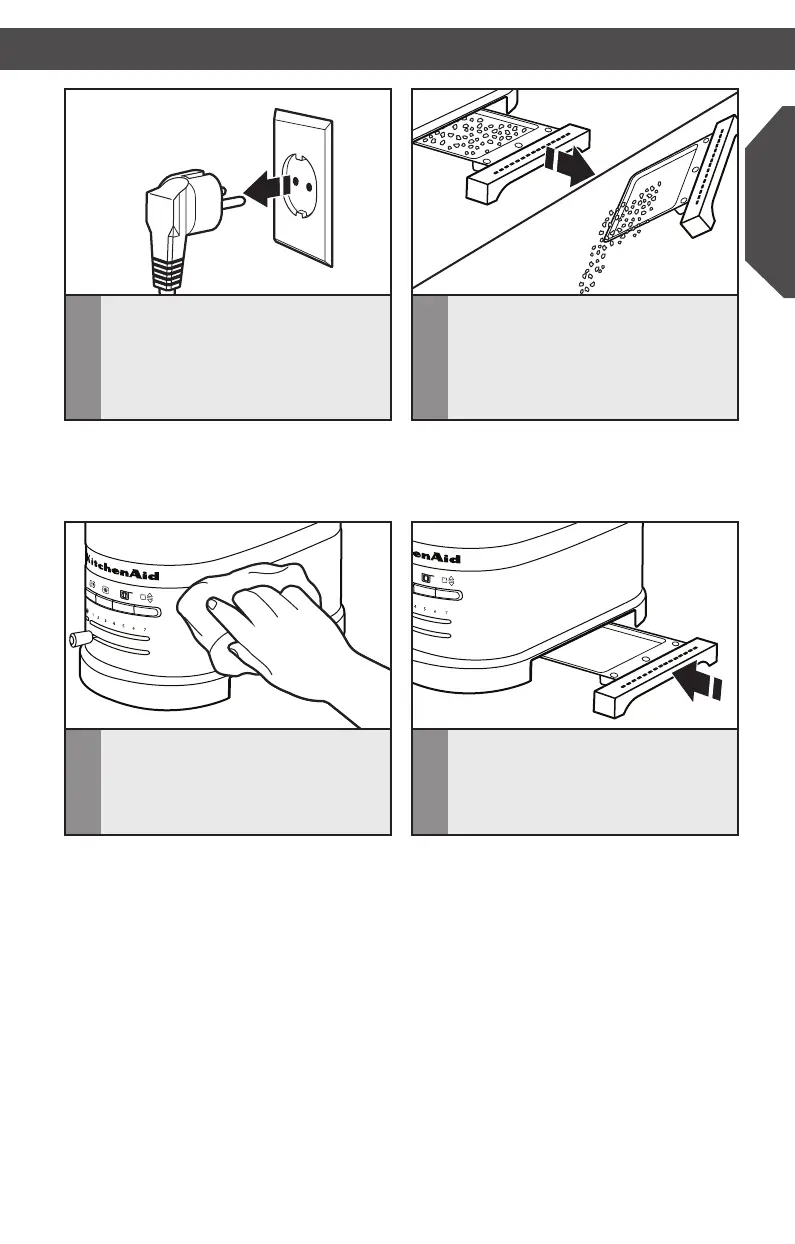
1
Unplug the Toaster and let it cool
before cleaning.
2
Grasp the center of the crumb
tray then slide it out. Shake the
crumbs into a waste container. It is
recommended that the crumb tray
be emptied after each use. Crumb
tray is hand-wash only.
3
Wipe Toaster with a soft, damp
cotton cloth. Do not use paper
towels, abrasive cleansers or liquid
cleaning products. Do not immerse
Toaster in water.
4
Return crumb tray to toaster. Press
itinrmlyuntilitclicksintoposition.
Do not use the Toaster without the
crumb tray in proper position.
IMPORTANT: The tray will be hot immediately following a toasting cycle.
NOTE: If grease or oil splatters on the Toaster, wipe splatters away immediately using
a soft, damp cotton cloth.
NOTE: KitchenAid does not recommend the use of a toaster cover.
W10506838B_01_EN_v02.indd 17 2/12/14 5:32 PM


 To Next Page
 Loading...