EasyManua.ls Logo

KitchenAid 5KSM156 - Optional Attachments

KitchenAid 5KSM156
244 pages
Print Icon
To Next Page IconTo Next Page
To Previous Page IconTo Previous Page
Loading...
14
OPERATING THE STAND MIXER
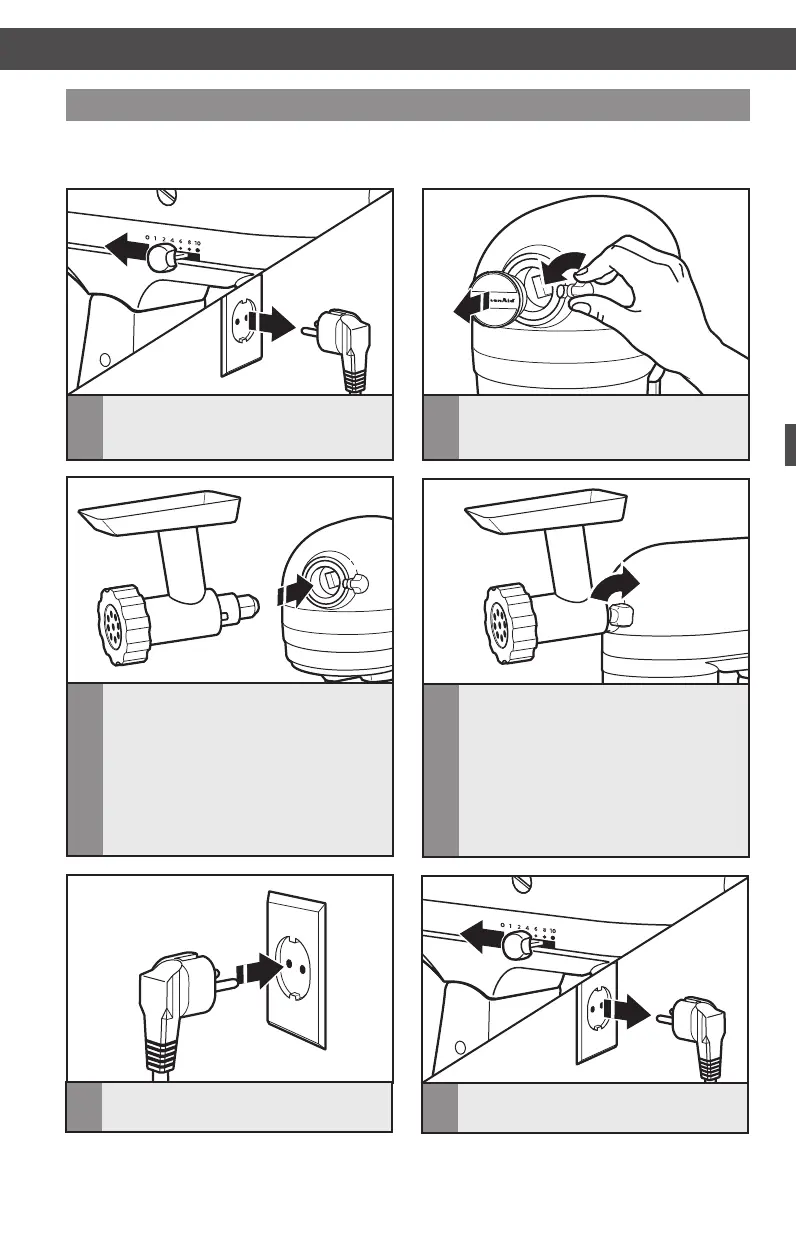
KitchenAid offers a wide range of optional attachments such as food grinders or pasta

Optional attachments
4


secured to Stand Mixer.
3
Insert attachment shaft housing into



be necessary to rotate attachment



on the hub rim.
1
To attach: Turn speed control
to “O”. Unplug Stand Mixer.
2


hub cover.
6
To remove: Turn speed control
to “O”. Unplug Stand Mixer.
5
Plug into proper electrical outlet.

Table of Contents

Related product manuals