4-8
n
KitchenAid 2015 Microltration Dishwashers
COMPONENT ACCESS
Removing the User Interface
1. Unplug dishwasher or disconnect power.
2. Perform the procedure “Remove Outer Door Panel & UI”
on page 4-7.
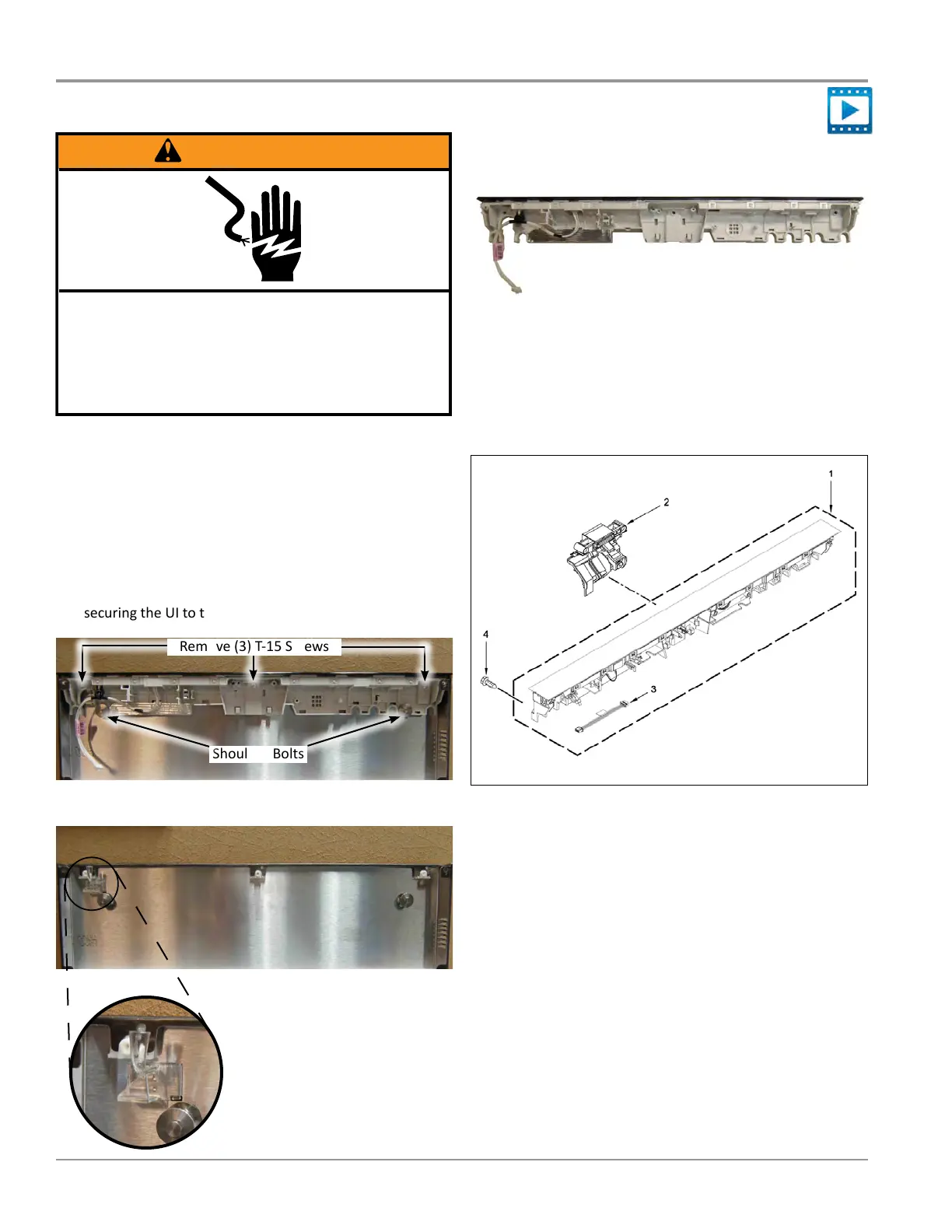
3. Use a 5/16” driver to remove the two (2) shoulder bolts
shown below in Figure 1.
4. Use a T-15 TORX driver to remove the three (3) screws
securing the UI to the outer door panel (see Figure 1).
Remove (3) T-15 Screws
Shoulder Bolts
Figure 1
Figure 2
Removing User Interface
WARNING
Electrical Shock Hazard
Disconnect power before servicing.
Failure to do so can result in death or
electrical shock.
Replace all parts and panels before operating.
Figure 5
UI and Latch Components
1. Console Assembly (UI)
2. Latch Assembly
3. 4-Wire Jumper
4. Screw
Figure 3 - Light Pipe
NOTE: The light pipe is not
removed during UI replacement.
It remains axed to the outer
door panel. (See Figure 3.)
User Interface and Latch Parts
Console Assembly (User Interface)
Figure 4




 To Next Page