32
Protos 3400(X)
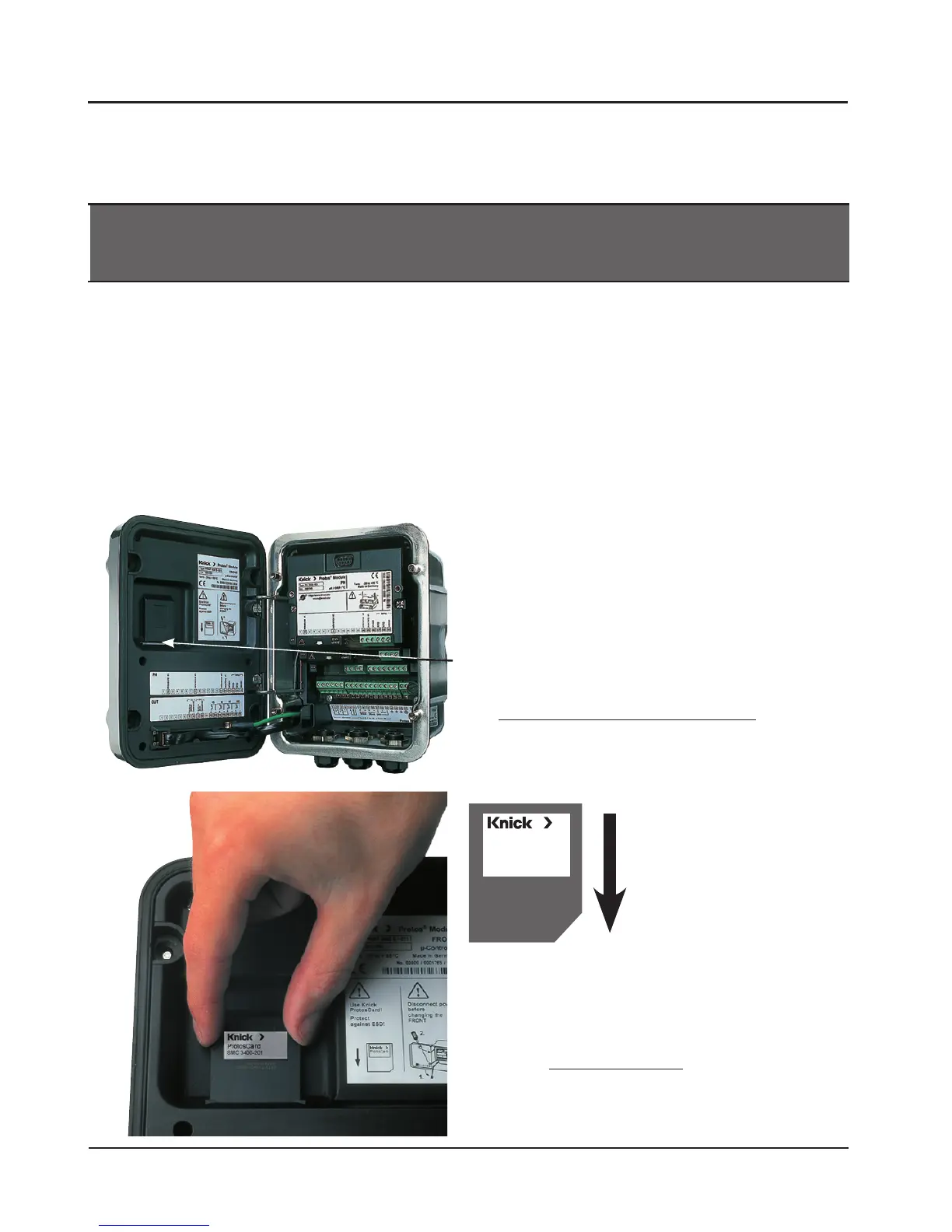
Inserting and replacing the SmartMedia card
1. Opening the analyzer
• Loosen the 4 front screws
• Open the FRONT module at its right side
(pivot hinge inside at the left)
• The slit for inserting the SmartMedia card is
located at the inner side of the FRONT module
2. Inserting the SmartMedia card
• Remove SmartMedia card from its package
without touching the contact surface
• Insert card in the slit at the inner side of the
FRONT module
Inserting the SmartMedia Card
To release an additional function via TAN, see Pg 6: Release of options
The SmartMedia card may be inserted or replaced with the power supply
switched on. Protect against electrostatic discharge!
When closing the device, make sure that the sealing is properly seated and
clean.
Warning!
Do not touch the terminal compartment, there may be dangerous
contact voltages!
Inserting the
SmartMedia card:
The label must be facing
you.
3. Removing the SmartMedia card
• To avoid data loss, please first open the
Maintenance menu.
• Select “Close memory card” to terminate
software access to the SmartMedia card.
Now the card can be taken out.



 To Next Page