17
Minnesota | Poll Pad Guide
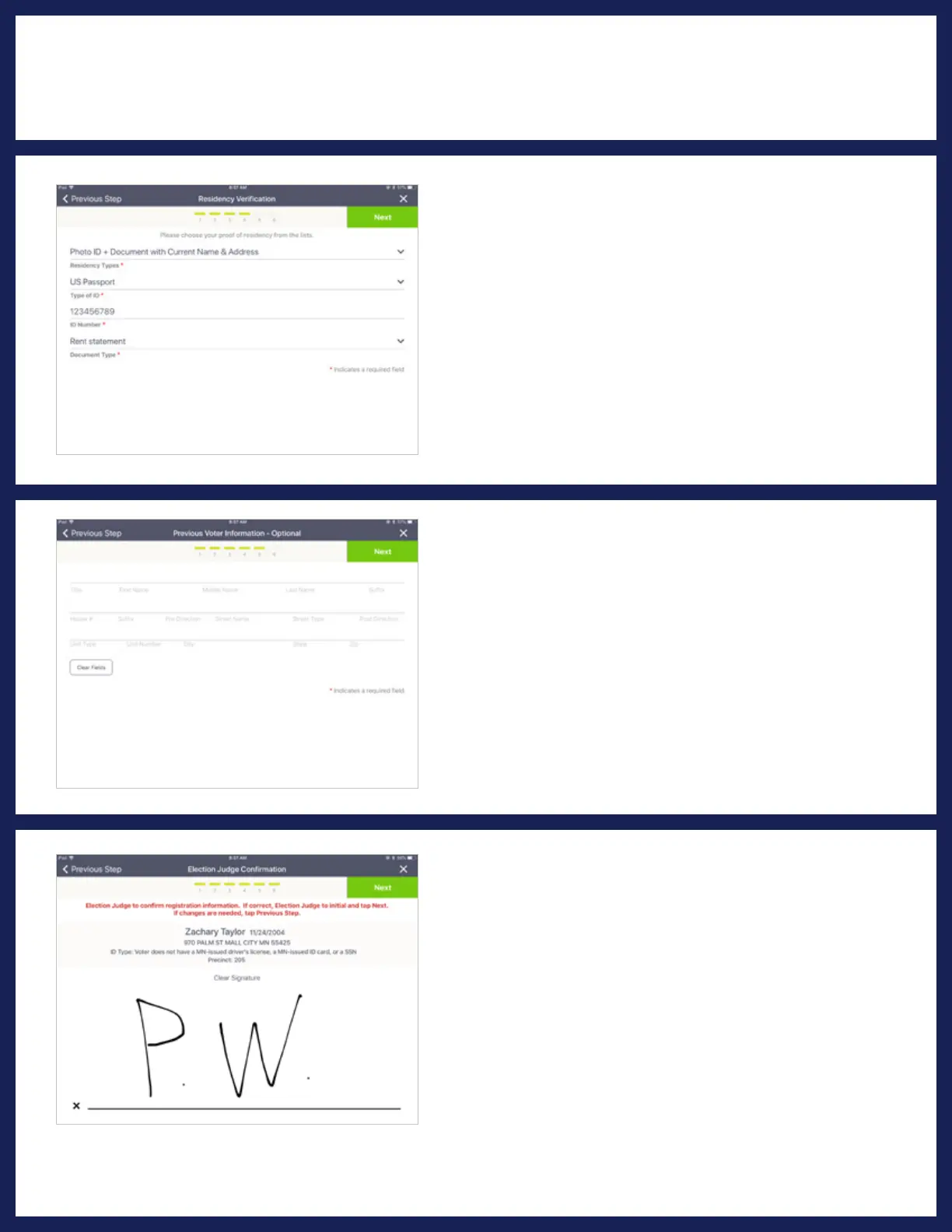
❾ CONFIRM & INITIAL
Election Judge to confirm that all the information
is correct, then initial on the line and press Next.
❽ PREVIOUS ADDRESS
If the voter has updates to their previous
registration, such as name or address change,
enter their previous information and press
CONTINUE.
NOTE: If there are no registration updates, SKIP these actions and
press CONTINUE.
PROCESSING VOTERS | REGISTRATION UPDATE
❼ VOTER'S IDENTIFICATION
& PROOF OF RESIDENCY
Select the voter identification type using the drop-
down menus. Press on the matching option
to select. Once you have made the correct
selections, press Next.
NOTE: If you have scanned an ID, the ID number will auto populate.
To complete a voucher form, see VOUCHER section.



 To Next Page