24
Minnesota | Poll Pad Guide
PROCESSING VOTERS | VOUCHER FORM
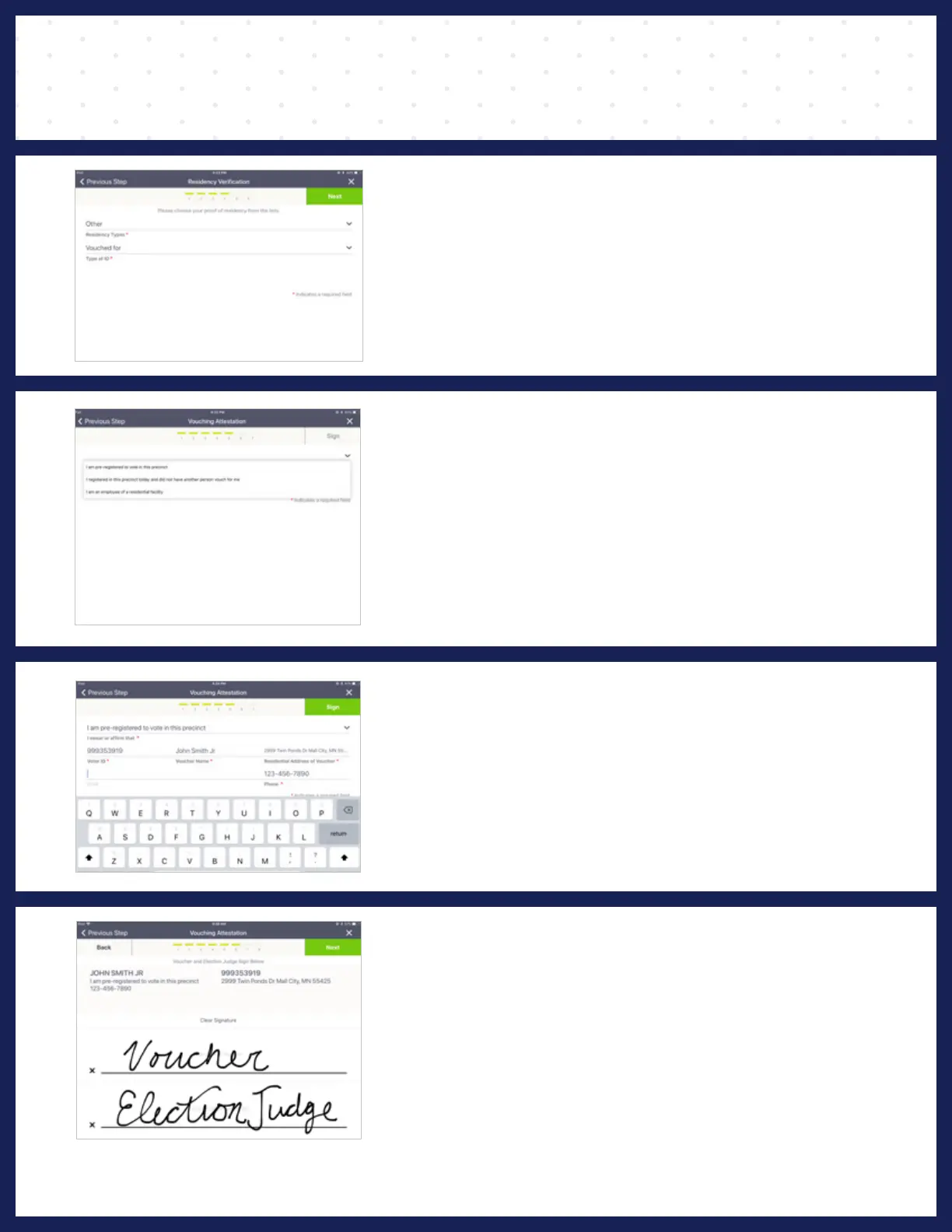
STEP ❶
On the ‘Residency Verification Page', select
‘Other’ from the Residency Types drop-down.
Then select 'Vouched For' from the Type of ID
drop-down. Press Next.
STEP ❷
Select Voucher Definition from the drop-down.
Example:
• I am an employee of a residential facility.
• I am pre-registered to vote in this precinct.
• I registered in this precinct today and did not have another
person vouch for me.
NOTE: If it is a residential facility, you must type the name of the facility.
STEP ❸
Type the voucher's Voter ID number. If registered
in this precinct, the remaining fields will auto
populate. Type the voucher's phone number then
press Sign.
NOTE: The voucher’s voter ID can be located on another Poll Pad or the
Greeter List
STEP ❹
Voucher and Election judge both must sign their
names. Press Next.
Follow the promts on the remaining screens to
finish the process.
NOTE: If you need to redo a signature, press "Clear Signature".



 To Next Page