Chapter 1
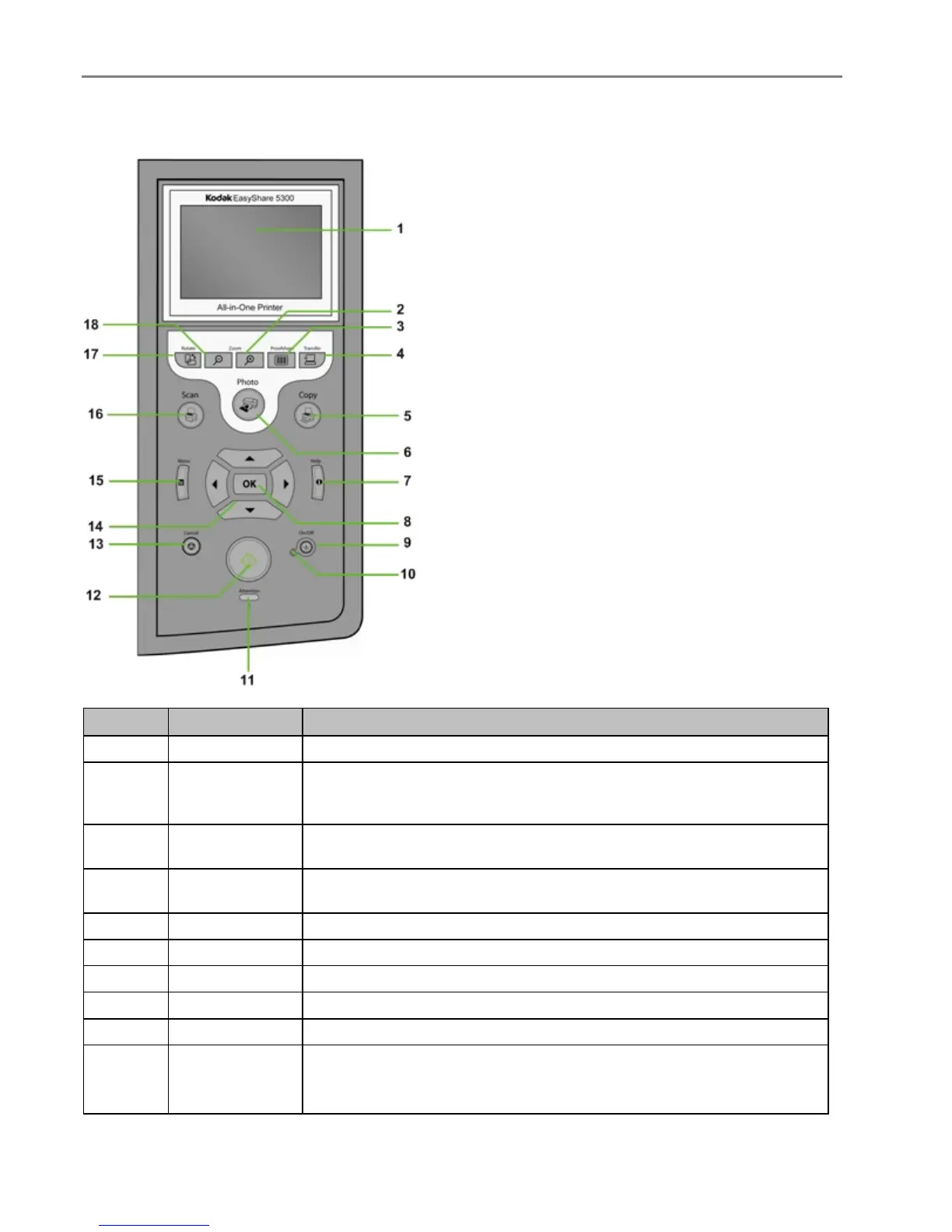
Control Panel Layout
Number Name Description
1
LCD display Displays photos, messages, status, and menus.
2
Zoom
+ button
When in Photo Preview mode, magnifies the photo to 1.5X. Subsequent
presses zoom in 0.5X increments to a maximum of 5X. When in Multiview,
displays the current photo in preview mode.
3
Proofsheet
button
When there are pictures on an inserted memory card or connected USB
host device, pressing Proofsheet displays the Proofsheet menu.
4
Transfer button
Transfers images from device connected to a USB host port, PictBridge,
or Picture Transfer Protocol (PTP).
5
Copy button Press to enter Copy mode. Lit when in Copy mode.
6
Photo button Press to enter Print mode. Lit when in Print mode.
7
Help button Displays the Help menu.
8
OK button Used for selection in conjunction with the 4-way Navigation button.
9
On/Off button Turns your EasyShare AiO on or off.
10
On/Off Light
Green when Starting Up, Ready, or in Standby mode.
Flashes red when in an error state.
Is not lit when in Sleep mode.
2 Kodak EasyShare 5300 AiO














 To Next Page