3-40 A-61504 October 2007
Scanner Time
• Actual (GMT): displays the Greenwich Mean Time of the scanner.
• Corresponding local time: displays the scanner’s Greenwich Mean
Time in the PC’s local time zone.
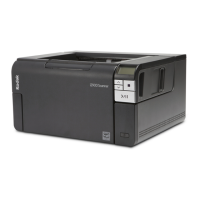
Calibrate — displays the Calibration window allowing you to perform
an Image or UDDS calibration.
• Image calibration: optimizes your scanner to achieve the best image
quality and feeding performance. Frequent calibration is not
necessary or recommended.
• UDDS calibration: ensures that the ultrasonics system that detects
multi-feeds and document edges is properly adjusted for best
performance. Frequent calibration is not necessary or recommended.
Use the calibration target provided with your scanner. Be sure to use a
good, clean calibration target.
1. Click Calibrate. The Calibration dialog box will be displayed.
2. Select Image or UDDS from the Type drop-down box.
• If you select Image, use the image calibration target provided
with your scanner. Be sure to use a good, clean calibration target.
Place the calibration target in the input elevator face up and click
OK.
IMPORTANT:If the White Background Accessory is installed, it
must be replaced with the black background stirps,
and the scanner must be restarted prior to
calibration.
• If you select UDDS, place a 20 lb. or 75 g.m2 bond sheet of
paper in the input elevator. Do not use the image calibration
target and click OK.
Refresh: displays the scanner time.



 To Next Page