4-2 A-61504 October 2007
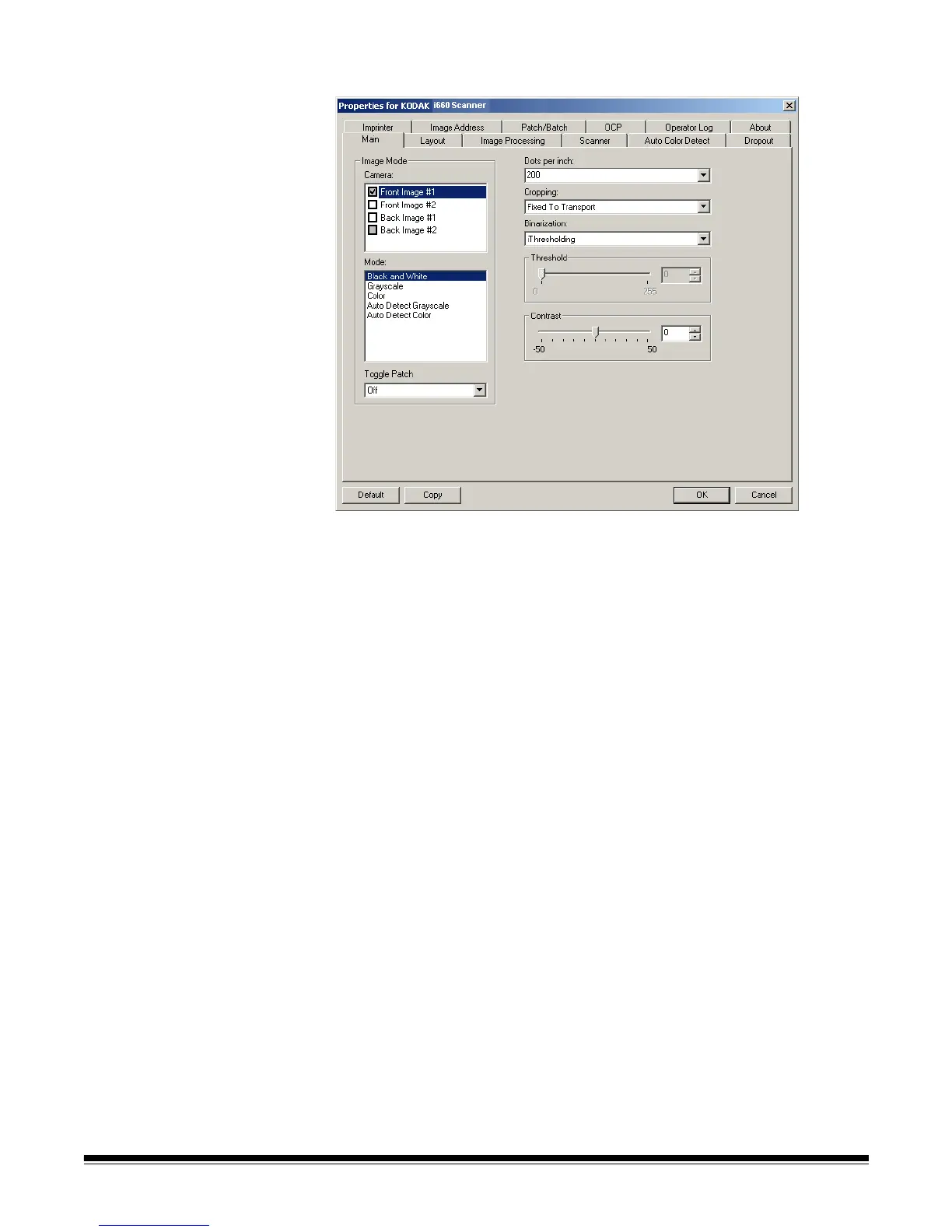
Main tab The Main tab provides the following options:
Image Mode
Camera — the selections in the Camera box list the available sides
(front and back) of an image where you can define individual image
processing values. Options include: Front Image #1, Front Image #2,
Back Image #1 and Back Image #2.
The Kodak Scanner drivers allow you to control the camera settings
independently. Some settings apply only to black and white images,
others apply to color/grayscale images. By selecting the appropriate
camera and image mode, you can control the scanner’s output.
Mode — provides the following options:
• Black and white: if you want your electronic image to represent all
elements of your document in black and white.
• Grayscale: if you want your electronic image to have a range of
varying shades of gray from black to white.
• Color: if you want your electronic image to be in color.
• Auto Detect Grayscale: sets auto color detect for grayscale. See
the section entitled, “Auto Color Detect tab” for more information.
• Auto Detect Color: sets auto color detect for color. See the section
entitled, “Auto Color Detect tab” for more information.



 To Next Page