Chapter 2 How to use the menu CVS-126
2-12 0093132702-08
8 To stop editing, press [Knob].
9 After finishing the edit, press the [MENU]
key.
10 Select the [register] in the confirmation
menu.
11 Press the [MENU] key. Then, the edit is
finished.
2.16 Explanation of Sonar
Switch-over of Sona-Tone
TM
The Sona-Tone
TM
can be output to the built-in
speaker by selection.
The schools of fish and condition of bottom on
the display of echo sounder can be confirmed
by hearing the sonar.
1 Press the [MENU] key.
2 Select the [System] [Sona-tone]. (See
[2.1 How to operate the menu])
3 Press the [ ] key.
4 Select the [ON] or [OFF] of [Sona-tone].
(Press the [
] key or [ ] key)
5 Press the [MENU] key to close the menu.
Connection of External Speaker
Connect the external speaker with amplifier
(option) so that you can hear the sonar easily.
Caution: The Sona-Tone
TM
is always
output. Adjust the speaker volume
with the volume provided on the
speaker.
Caution: The external speaker is an
option.
2.17 Explanation of Menu Item
The various items in the menu are explained.
Inner-hull
The reduction in sensitivity due to signal
attenuation in Inner-hull use can be corrected.
(Setting: - 50 to 50: Through-hull: 0)
1 Press the [MENU] key.
2 Select the [Adjust] [Gain (TD)]. (See
[2.1 How to operate the menu])
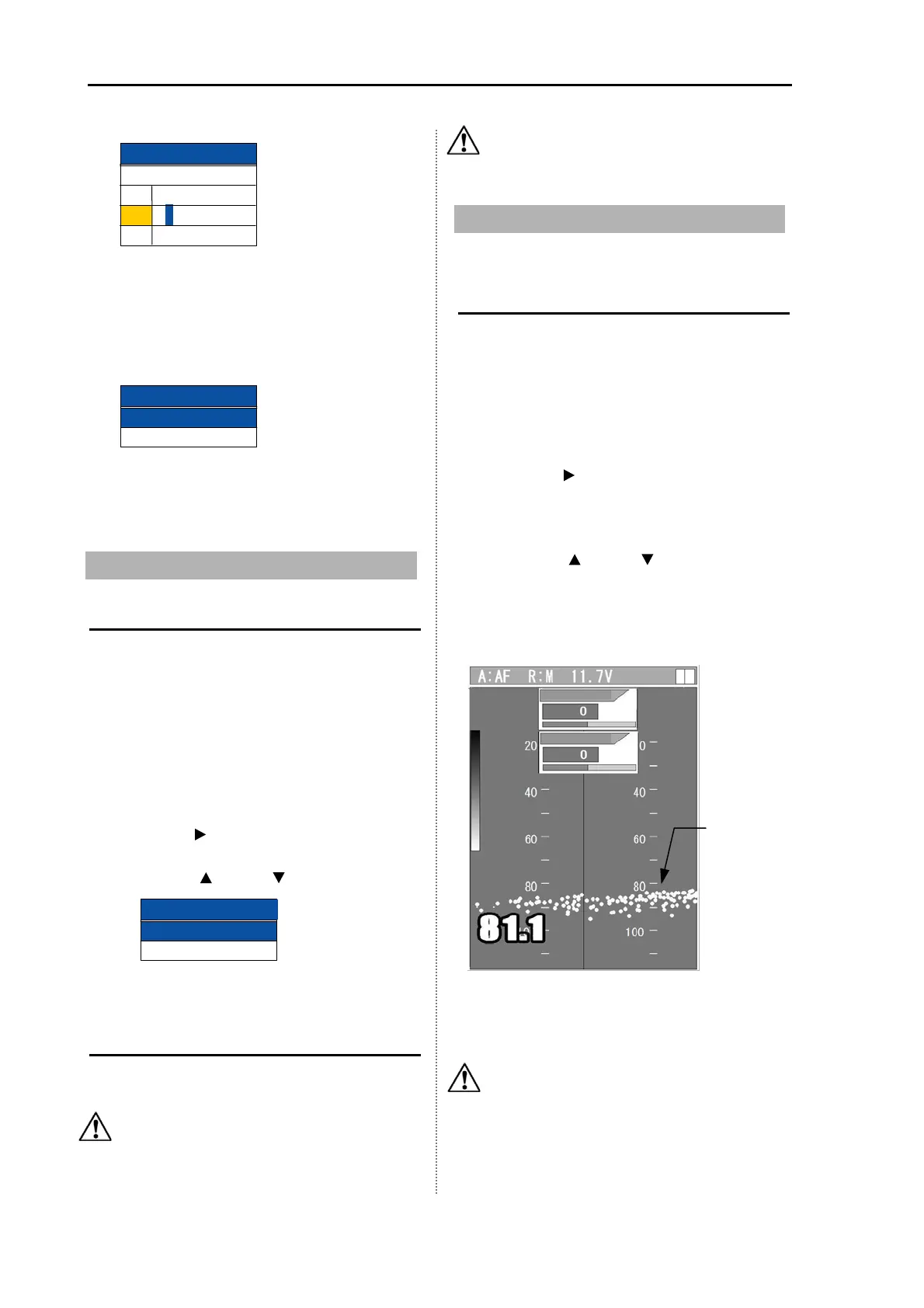
3 Press the [ ] key. The image displays
bottom only. It may show very strong fish
targets.
4 Select the [Gain (TD) H] or [Gain (TD) L].
(Press the [
] key or [ ] key)
5 Set a value to display the sea bottom
continuously without interruption. For high
frequency, turn [Knob] and for low
frequency, turn [Knob].
6 Press the [MENU] key to close the menu.
Caution: Gain (TD) setting value widely
varies upon installation conditions
such as material of hull and
installation method. Low frequency
(50 kHz) may not be used due to large
signal attenuation in some cases.
Edit end
Registered
Not registered
1
2
3
P I C0 0 0 0 1
P I C0 0 0 02
P
I C0 0 0 03
Image comment
No. Comment
Bottom
Gain (TD)
Gain (TD) L
Gain (TD) H
Gain (TD) H
Gain (TD) H
Gain (TD) L
Sonar tone
OFF
ON
Sona-tone



 To Next Page