7.Commands
You can change various settings with the "F" key on the "Function" panel and the number keys
on the "Settings" panel.
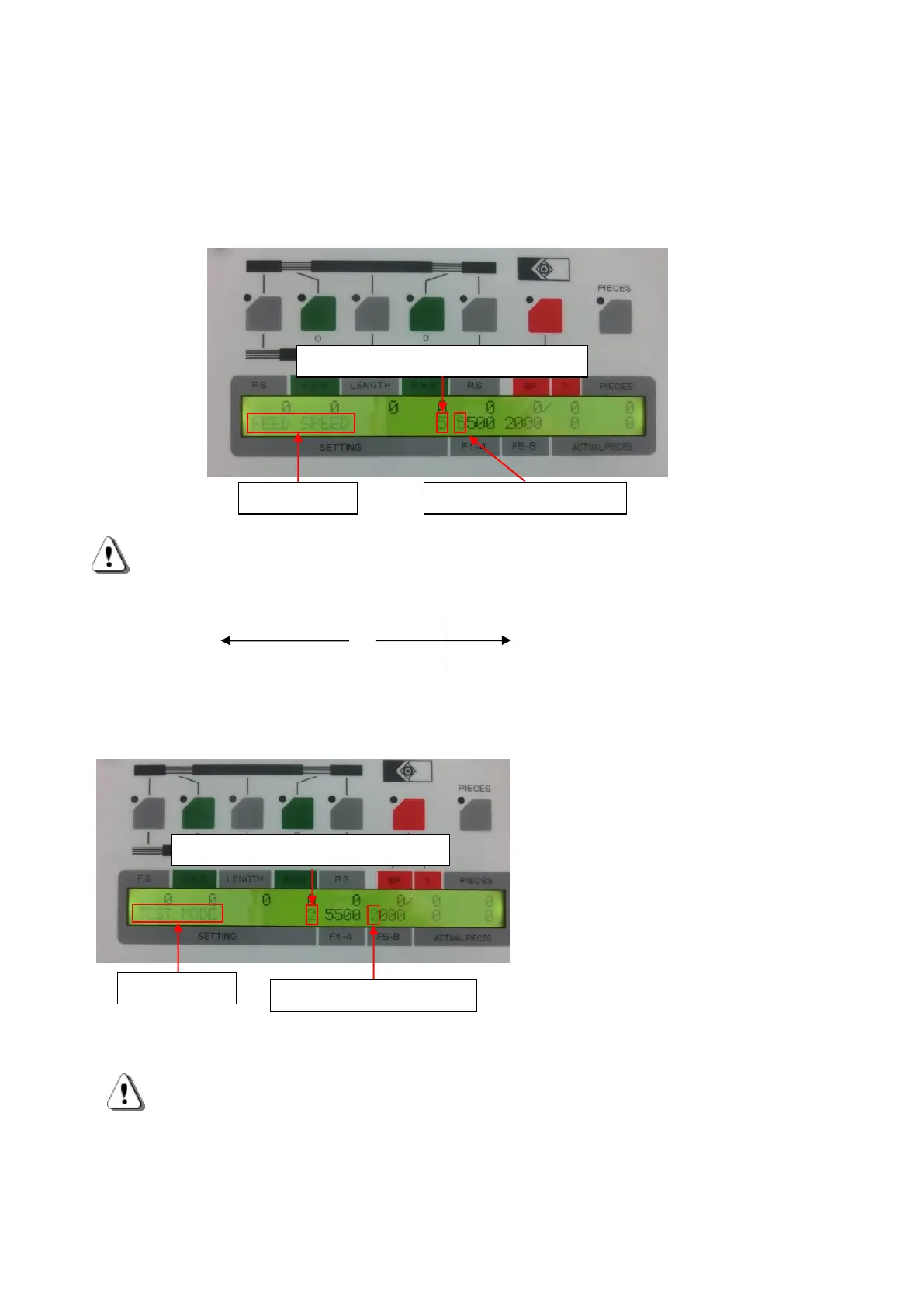
・F1(FEED SPEED)
If you press [F] and then [1], "FEED SPEED" will blink..
Touch keys 1 to 9 on the setting panel and press the [SET] button. The display changes from blinking to
lit and the belt roller speed is entered.
Motor step out might be occurred for certain kinds of tubes when processed with higher speeds.
The speed of belt rollers or cutter is variable to be adjusted with this kind of case.
1 2 3 4 5 6 7 8 9
SLOW NORMAL FAST
8 and 9 only to be activated with Error Free Mode. ([F] → [5] → [2] → [SET])
If you press [F] and then [5], "TEST MODE" will
blink.
Press [2] on the settings panel and press the
[SET] button.
The mode will be [Error Free Mode].
If processing is performed at speeds 8 and 9
without changing to [Error release mode], "SET
ERROR (SPEED)?" Will be displayed and
processing will not be possible.
C372A does not use F2-4 and F6-8.



 To Next Page