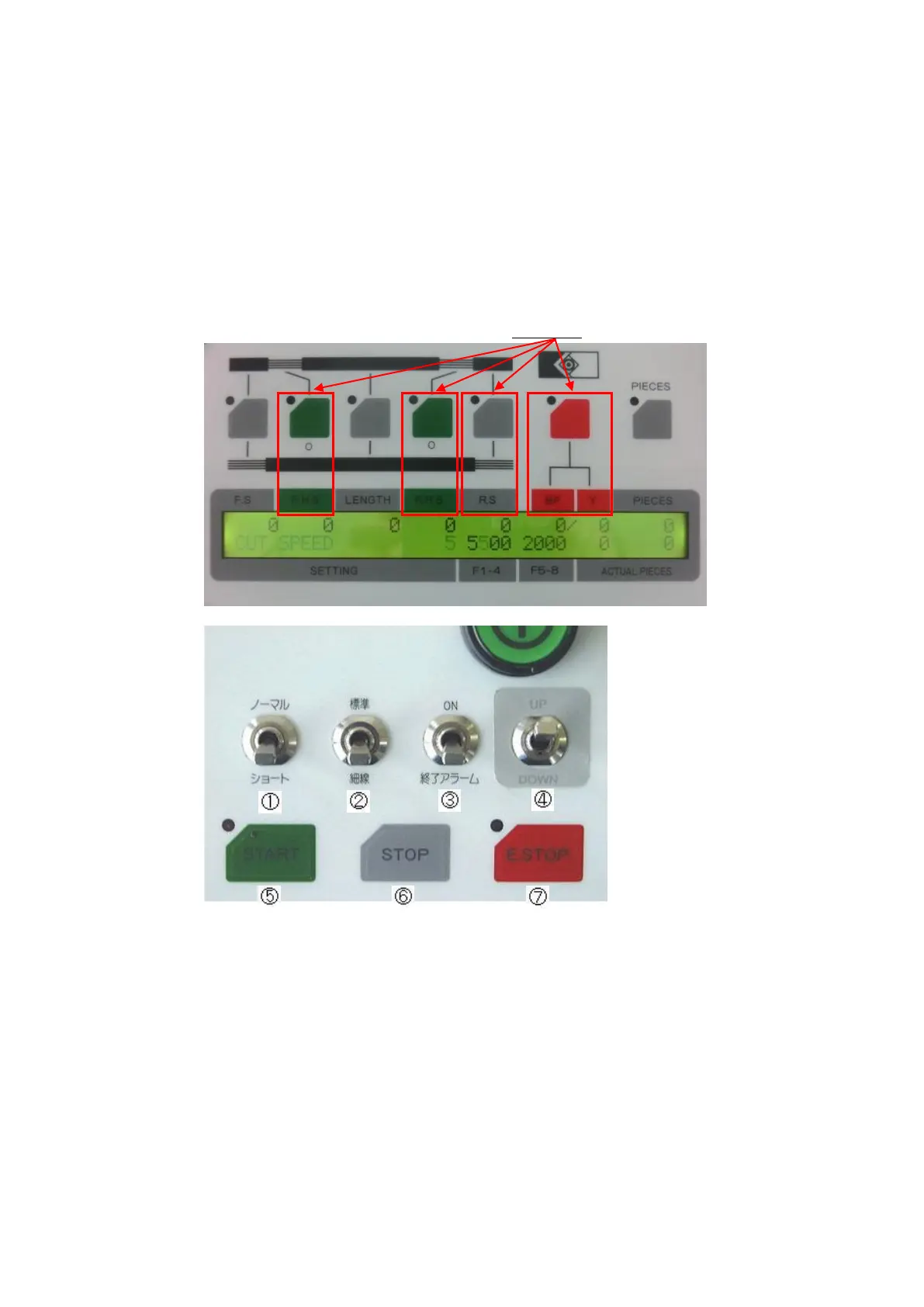
2. Control panel
[LENGTH] : Length of cut tube
[PIECS] : Number of pieces to be processed
[PIECES/UNIT] : [PIECS]→[Y/.] For example, you can set this when you need 20 bundles of
50pieces totaling 1000 pieces.
[IDLE TIME] : [PIECS]→[Y/.]→[Y/.]
By inputting the time, you can set the automatic start of the batching.
After processing the specified number of pieces, the device stops for the length of time
specified here and then starts again automatically. Unit:second
Other buttons such as [F.H.S][R.H.S][R.S][BLADE] are not in use.
・Toggle Switches
①[NORMAL/SHORT]:※Not in use
②[S.W / T.W]:※Not in use
③[ON / OFF ALARM]:Beeps when the programmed process is finished
④[UP / DOWN]:Opens and closes the belt rollers
・Buttons
⑤[START]:To start a process.
⑥[STOP]:To stop a process.
⑦[E.STOP]:To make an emergency stop.



 To Next Page