Using BIOS setup 25
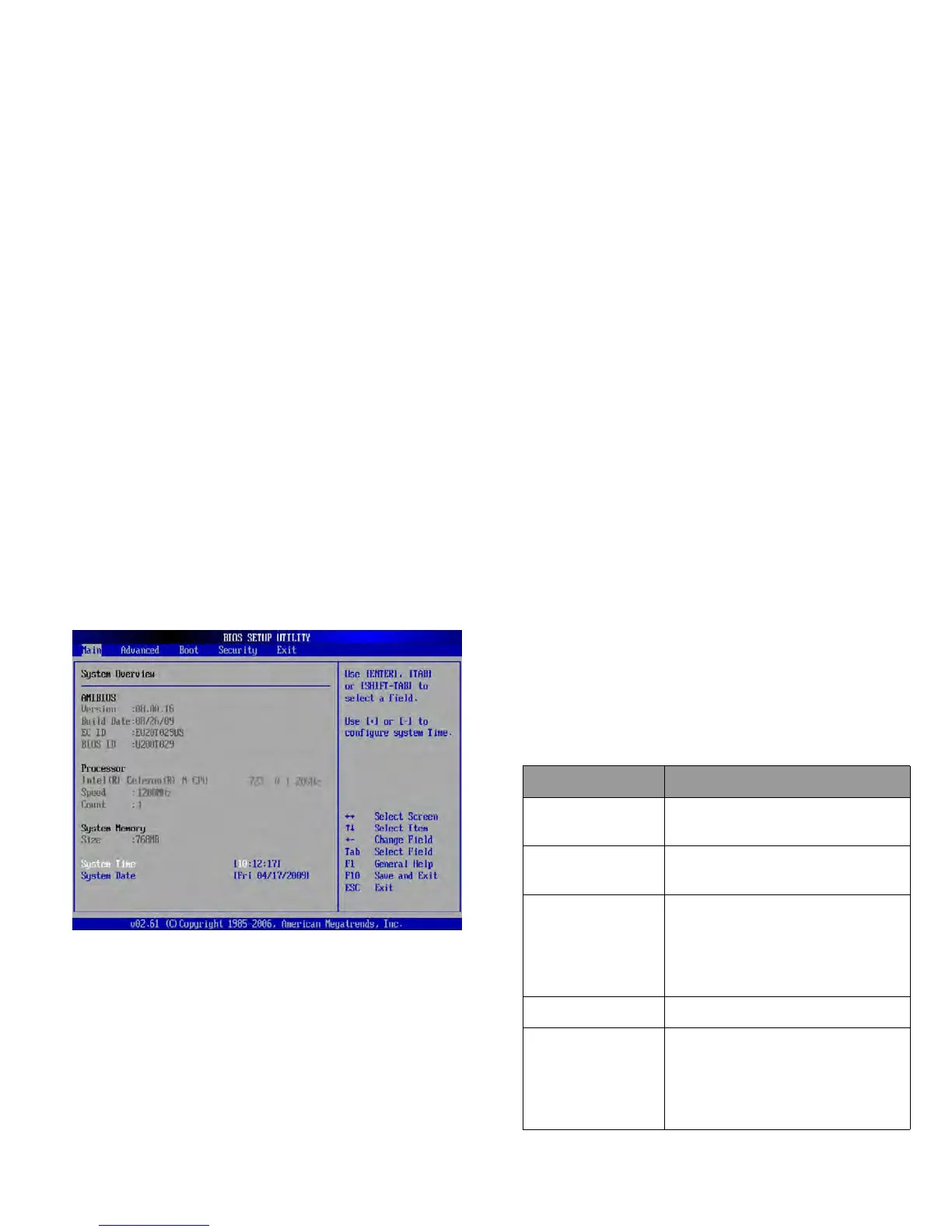
The BIOS setup
main screen will appear as follows.
The BIOS setup screen can be divided into three areas:
• On the top line is the menu bar containing the titles of
available menus. Each menu title contains a specific menu.
• The center left column of the menu contains information
regarding the current settings of the system. If you open a pull-
down menu and select an item that provides multiple options,
the left column will display a submenu where you can make
further selections.
• The right column of the menu provides:
• Help information about the current menu selected.
When a menu item is highlighted, more detailed
information is given.
• Keyboard instructions for moving around and making
selections.
Nav
igating the BIOS setup
screen
Ke
yboard information can be found on the right column of the
screen. A brief description of keyboard usage is listed below:
Key Funct
ion
Left and right
arrow keys (f, )
Selects a menu title.
Up and down
arrow keys (, )
Selects an item or option.
Enter • Displays the sub-menu when an
item with the arrow sign is
selected.
• Opens or closes the option
window when an item is selected.
Tab Jumps from one item to another.
Esc • Exits BIOS setup.
• Returns to the previous menu if
in a sub-menu.
• Closes the options window if one
is open.



 To Next Page