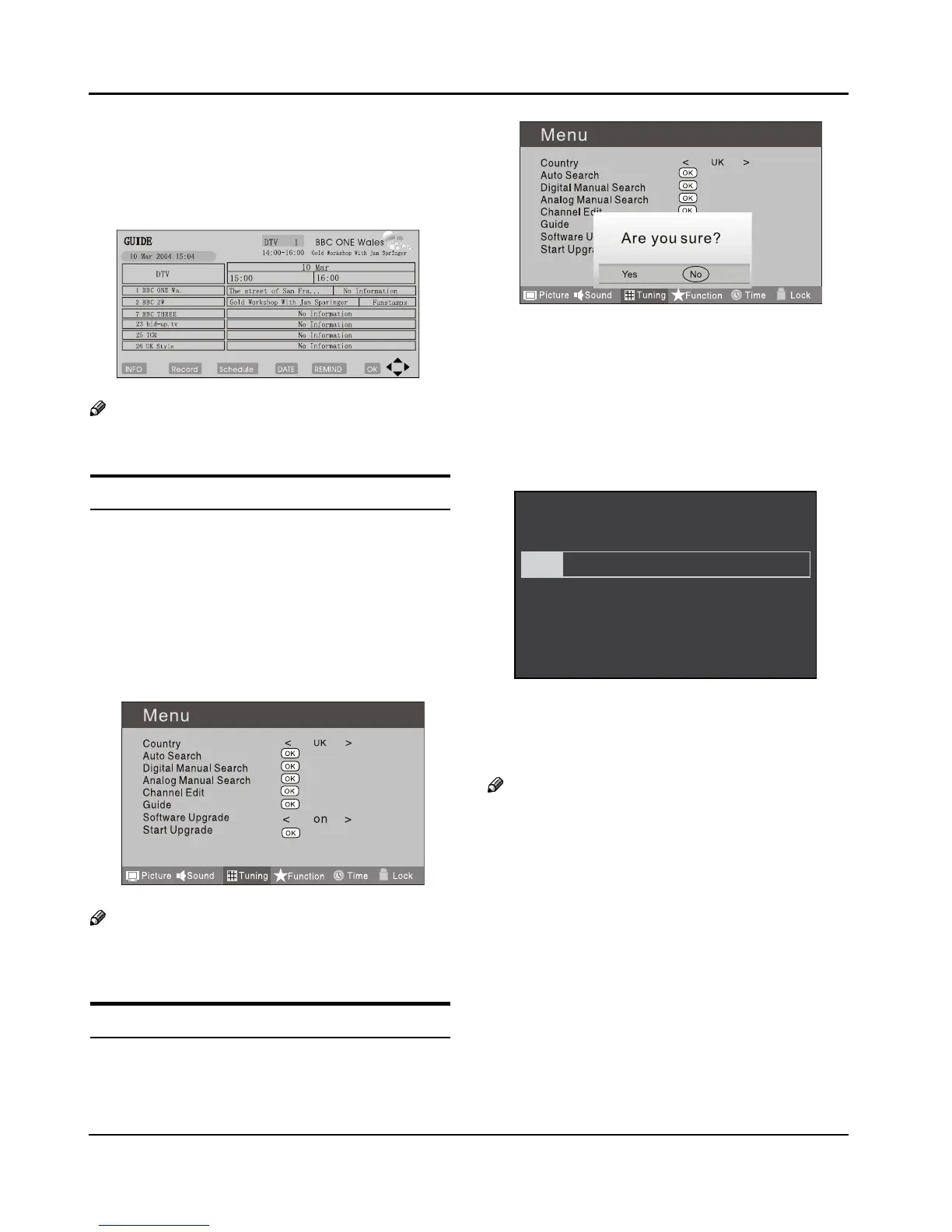
PressC 5 button to select the guide item.
Press OK button to enter the submenu, the
electronic program guide is displayed.
You can quickly call up Guide menu by GUIDE
button on the remote control.
Note
Only DTV mode. ❏
Software Update function
When you get the updating news from the TV shop’s •
web, you can update the operating software using
the Download menu. The data for various units are
transferred consecutively on a special receiving
channel.
You need to search the channel with updating code •
stream.
Note
You can get information from the TV shop or ❏
internet.
Operation
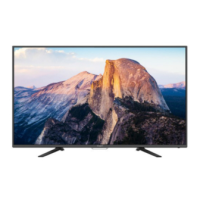
Press A MENU button.
Press B 3 button to select TUNING menu, press
button to enter.
Press
C 5 button to select Software Upgrade item.
Press
D 3 button to set it as On. (The default is O)
The Start Upgrade item can be selected.(The default
E
is grey and cannot be selected).
Press F 5 button to select the Start Upgrade option
and use OK button to enter. Then the TV will restart
and search the upgrade information.
Note
If the upgrade information is received, the TV will ❏
begin to upgrade. Or else, the TV will be back the
DTV source.
Load the receiver identification. This process may
G
also take several minutes. You can press EXIT button
to cancel the download and your TV set will be back
the DTV source.


 To Next Page