After the download has finished, your TV set will H
enter burning state and the indicator light is shining.
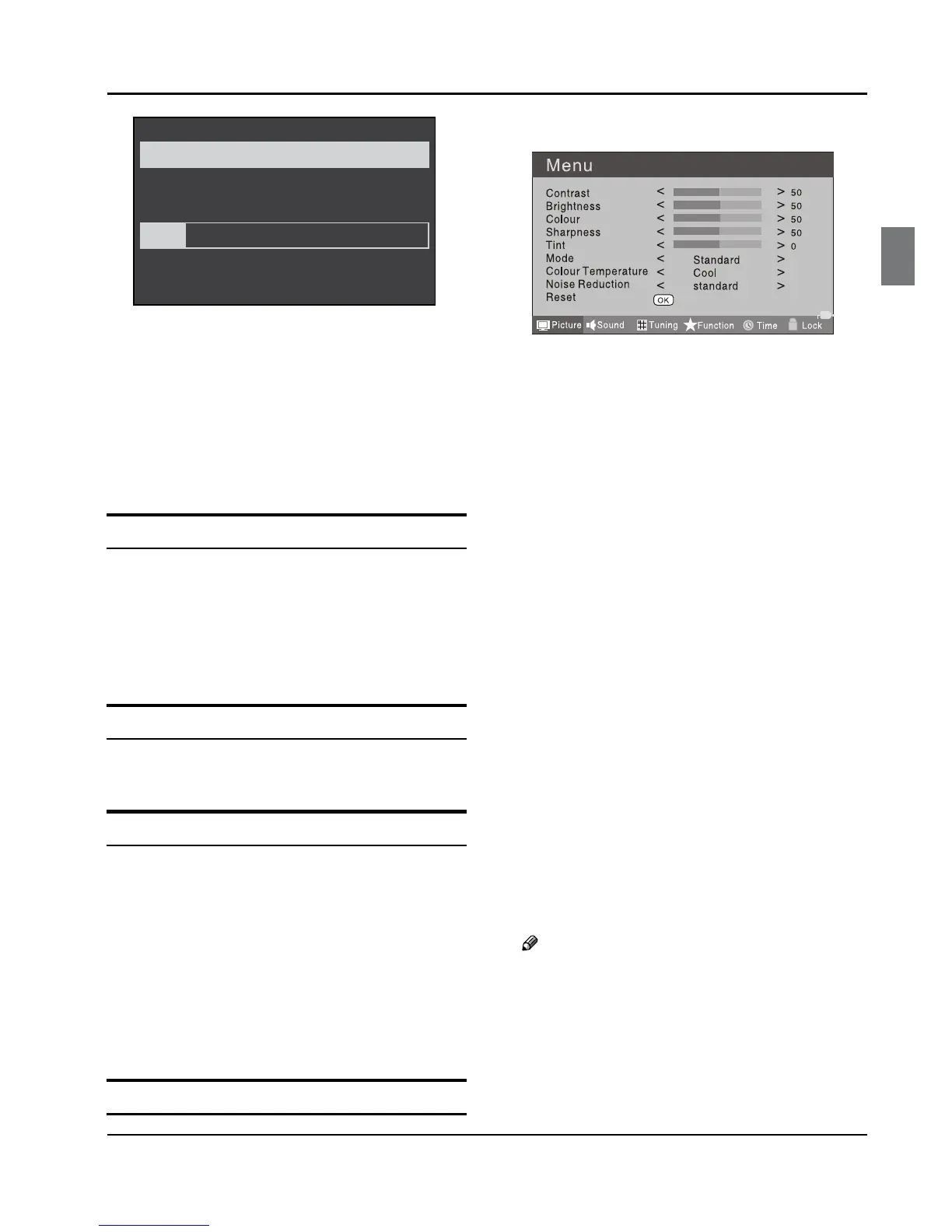
The menu 4 of right appears.
The set will be back the DTV source when the update is
completed.
USING YOUR TV
How to select the TV program
Using Program number button Enter the channel A
number with the number keypad on the remote
control.
Using
B P+/P- button.
Press the P+/P- button to select a channel number.
How to adjust volume
Press V+/V- button on the remote control or the side of
the TV to adjust the volume level.
CH.LIST function
Press CH.LIST button on the remote control will display
Channel List menu, and then press button to enter.
Press5 button to select the channel, and then press
OK button to enter.
ADJUSTING PICTURE
SETTINGS
Changing the Picture Setting
Press A MENU button.
Press B 3 button to select Picture menu, press
button to enter.
Press
C 5 button to select the item requires
adjusting.
Press
D 3 button to adjust the selection item.
When you are satisfied with your choice, press the
E
EXIT button to return to normal viewing or press
MENU button to return to the previous menu.
Contrast ❖
This will adjust the intensity of bright parts in the
picture but keep the dark parts unchanged.
Brightness ❖
This will adjust the light output of the complete
picture, which will mainly aect the darker areas of
the picture.
Colour ❖
This will adjust the saturation level of the colours to
suit your personal preference.
Sharpness ❖
This will adjust the sharpness of fine details in the
picture.
Tint ❖
Allows you to select the colour mix (Tint) of the
picture.
Note
The Tint function is only available in NTSC mode. ❏
Mode ❖
This will select the picture mode. Select Standard/
Mild/User/Vivid according to the program. You can
quickly select the desired mode by P.MODE button on


 To Next Page