17
KONFTEL CC200 OVERVIEW
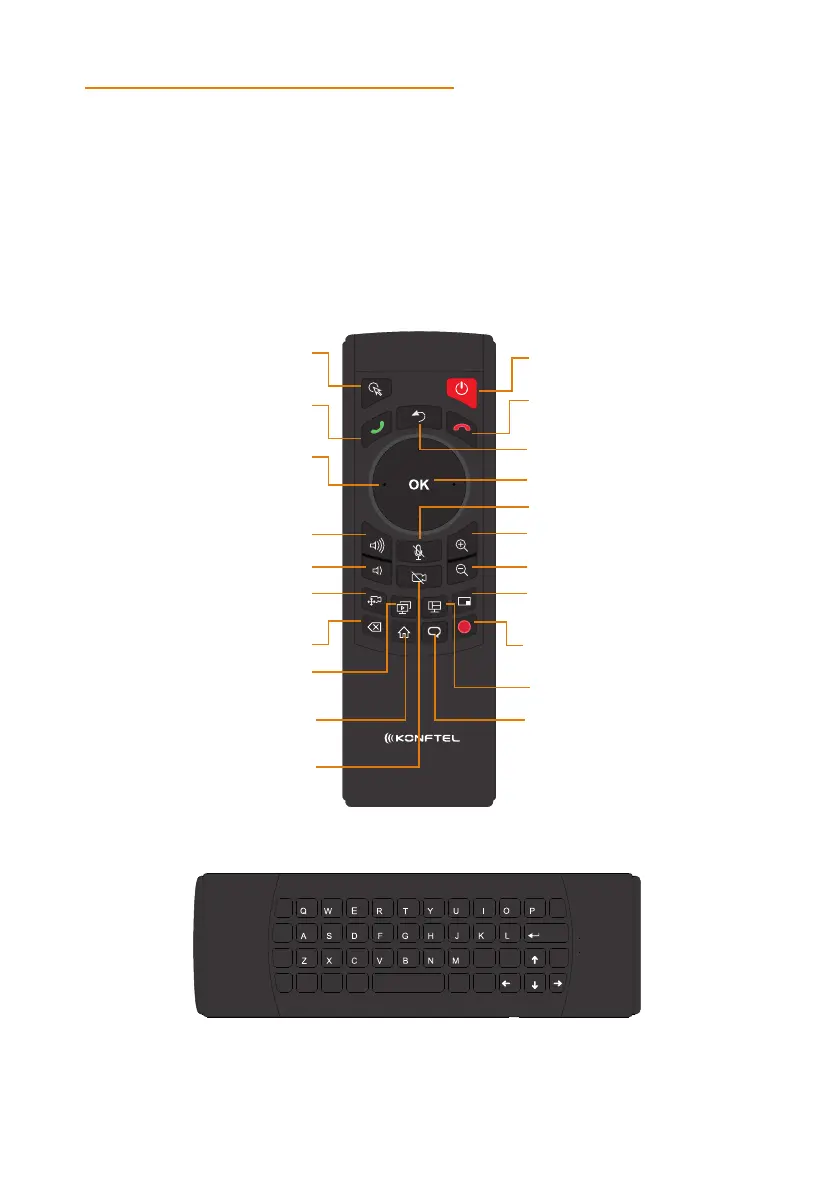
KONFTEL CC200 REMOTE CONTROL
Konftel CC200 supports a remote control with 2.4GHz optical air mouse and qwerty
keyboard features.
Using the Konftel CC200 remote control, you can scroll through menus with the arrow
key and pressing the OK key to select options. You can also display or hide the mouse
pointer using the Mouse key.
Mouse Power
Decline call /
Disconnect
Back
OK
Zoom in
Zoom out
Mute / unmute
Change PiP position
Change layout
Start / Stop Recording
Voice activation
Home
Video mute /
unmute
Call /
Accept Call
Arrow keys to pan, tilt,
and zoom camera and
navigate menus
Increase volume
Decrease volume
Control far /
near camera
Delete
Start / Stop
presentation
ENTER
BACK
DEL
1 2 3 4 5 6 7 8 9 0
! ? # $ & * )(
_ - + = \
%
: , . [
.
, :
PG UP
]
“
FN
<
/ ;
>
HOME ENDPG DWN
CTRL
SHIFT
ESC
CAPS
ALT @
@
SPACE


 To Next Page