25
OPERATION
CONNECTING KONFTEL CC200
Konftel CC200 contains the following standard equipment:
• Konftel CC200 collaboration camera
• Remote control with batteries
• HDMI cable
• 90° HDMI adapter
• Power adapter
• Lens cap for camera
• Wall mount with screws
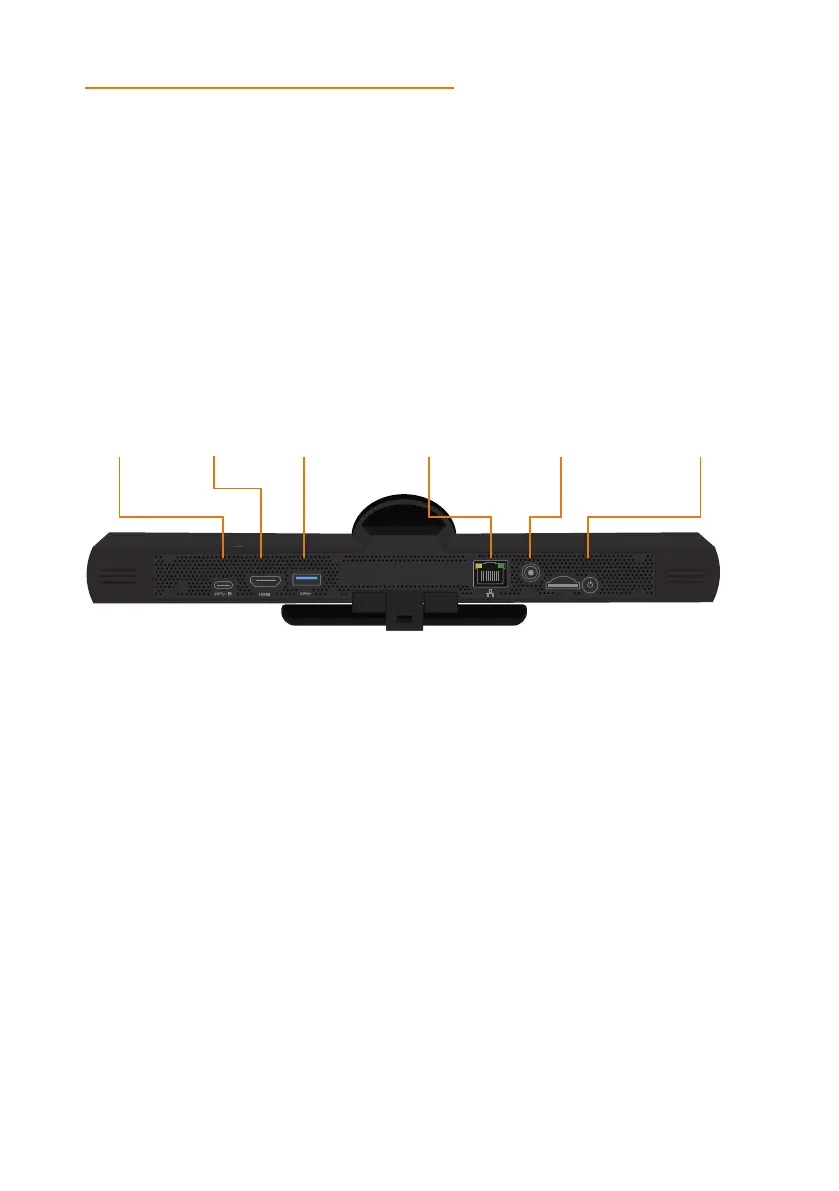
USB C HDMI USB A Ethernet Power ON / OFF
1. Secure the Konftel CC200 endpoint on an external monitor using the hinge at the
bottom of the endpoint.
2. Connect the HDMI cable in the HDMI ports of Konftel CC200 and the external
monitor.
3. Connect the power adapter.
SWITCHING KONFTEL CC200 ON OR OFF
The power button of Konftel CC200 is placed on the rear of the device. You can use the
it to:
• Switch Konftel CC200 on or off.
• Change the Konftel CC200 mode to standby or wake up the device from the standby
mode.
Do one of the following:
• To switch Konftel CC200 on or o, press and hold the power button.
• To change the mode of Konftel CC200 to standby or wake up the device from the
standby mode, press the power button.


 To Next Page