7
A. Water dividing pipe:with seventeen little holes, water will flow out from these little holes. And if no
water flows out, can be disassembled and cleaned
B. Evaporator (ice-making module)
C. Ice full detecting board: Use to detect the inner cabinet is full of ice or not, and to check the the
ice-harvest process is over or not
D.Water supply part
E.Water level detecting switch
F.Water pump
G.Water drainage cap
H.Water tank
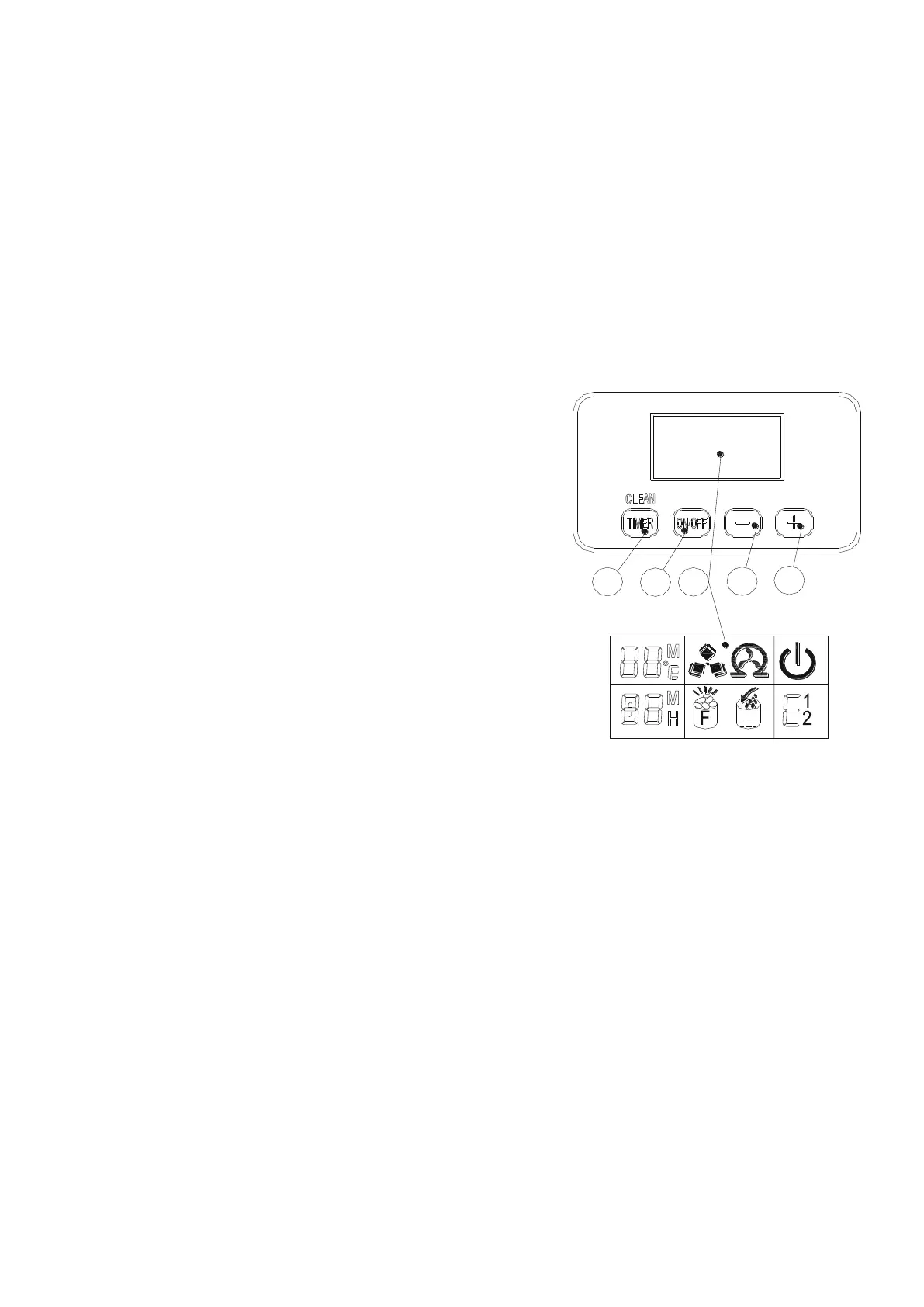
3) Operation panel
A.“TIMER CLEAN”button:
Quickly press this button once, to enter the Timer
setting program; And press this button for more than 5
seconds, to enter the Cleaning program.
B.“ON/OFF”button:
When the unit is off, press this button to turn on the
unit; And during the Self-cleaning program, or normal
ice-making state, press this button to turn off the unit
at once; And also if the unit is set with the Timer,
press this button to cancel the Timer setting.
When the unit is making the ice cube, press this
button for more than 5 seconds, the unit will switch to
ice harvest process by force.
When the machine automatically enters the cleaning
status after it is turned on,press the "timed
cleaning" button to stop the cleaning status and
start ice making
C.LCD display window
1.Environmental temperature display and ice - making
time countdown display.Display ice-making time
countdown with M as the unit display,and display
environmental temperature with F as the unit display.
2.Making ice and deice symbol display,the machine is making ice when the symbol rotate,and
the machine is deice when the symbol flash.
3.Automatic self-cleaning symbol display
4.On/off symbol display
5.Error code display,E1 means the temperature sensor is damaged.,E2 means ice making
anomaly or the refrigerant leaked
6.Water flow in and water shortage display, the arrow flashing indicates that the machine is in
the water, the whole symbol is bright to indicate that the machine is short of water.
7.Ice full alarm,the machine will making ice again when you take out the ice.
8.Setting display.Display timing switch machine with the H as unit display;Display ice making
time setting with M as unit display.
D&E.“-”、“+”button:
Use to adjust the ice-making process duration period length, the default setting is zero, 1
minute adding or decreasing per each pressing of “+” or “-” button.
Also to adjust the delay time of the timer, the default setting is zero, 1 hour adding or
decreasing per each pressing of “+” or “-” button.


 To Next Page