12
OPERATION YOUR UNIT
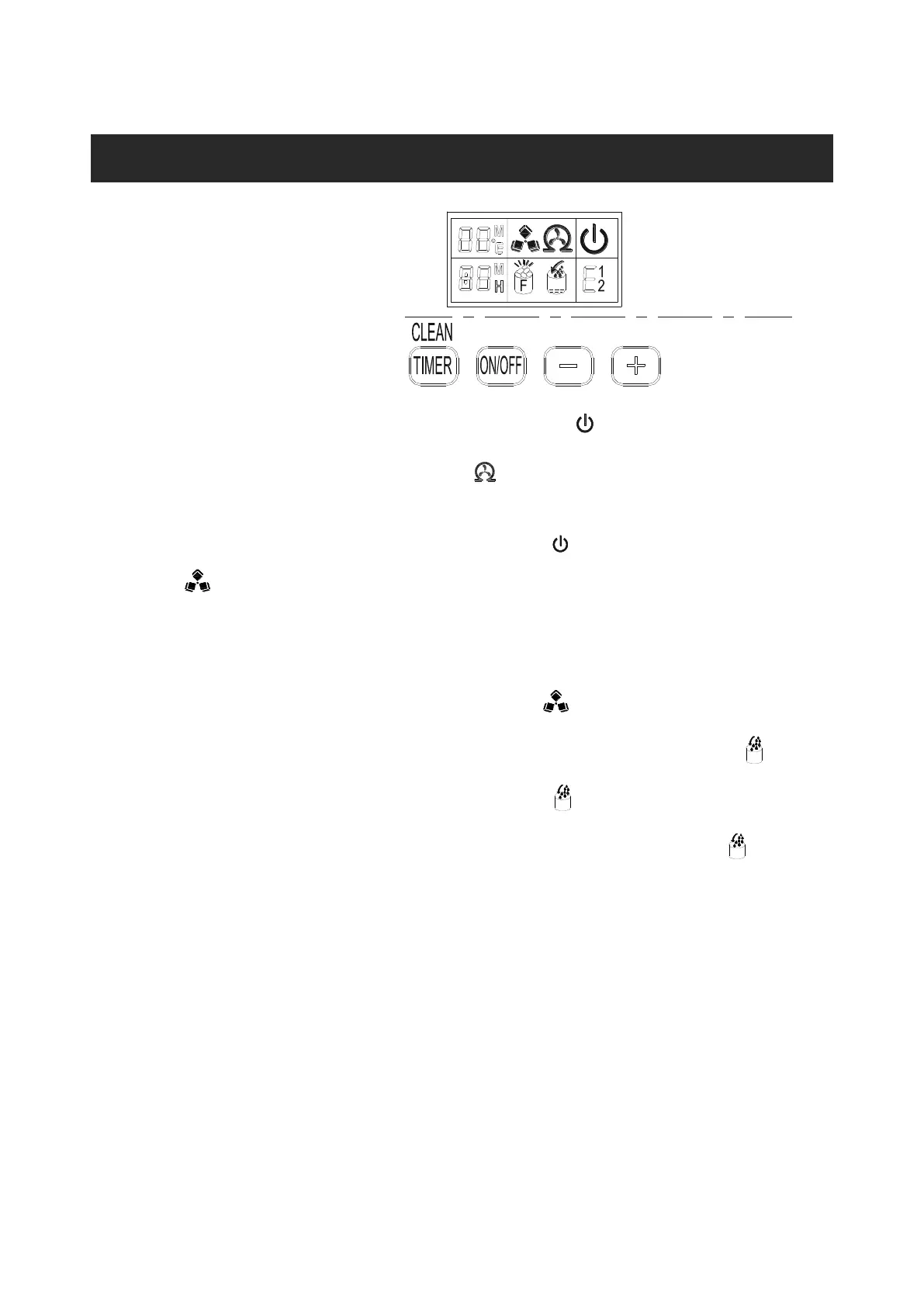
Operation button and display area diagram
Operation the ice-making process
1. Turn on the ice machine: plug the power the symbol of power will flash, press“ON”/”OFF”, the
out tube can input the water from water tank through magnetic valve.The machine will start
self-clean after the water is enough.The symbol will revolve on the LCD. It will drain the water
after 50s cleaning, add water after 50s draining, and clean again after enough water.
Press“Timing/Cleaning”, it will be cancelled if during the cleaning.
After cleaning and then starting to make ice,the symbol will be in the LCD and ice making
symbol symbol rotate;The ambient temperature will be displayed in the upper left of the
display window,“80F”means the ambient temperature is 80F,several minutes later,the flashing
numbers will be displayed in the ambient temperature display area,the flashing number“10M”
means still need 10minutes to finish this ice making cycle.
2. Every ice making cycle finished,enter deicing process,the symbol flash,the external pipe can
add water to the water tank through the electromagnetic valve,and the arrow on the symbol
will flash until the water reach the standard level,then the symbol extinguish,the unit enter
the next ice making cycle;When the water can not reach the standard level,the symbol is
always bright,the unit stop working.After water shortage,the unit needs to be restarted,otherwise it
will start up automatically after 15 minutes.
Note:Each ice making cycle is around 11-20minutes,the ice making time will be changed
according to the ambient temperature and the water temperature change.Especially the first
ice making cycle,the ice making cycle will be longer because of the high water temperature
in the water tank,.But the cie making cycle will not over 35minutes.
3. Adjust the ice thickness ;Press the “+”、“-”button on the control panel to adjust the ice thickness;
The number in the bottom left of the display window is the setting of the ice making time, default is
“0”,press“+”button one time the ice making time will add one minutes,the ice will be thicker;
Press“-”button one time the ice making time will reduce one minutes,the ice will be thinner.Restart
the machine it will go back to default“0”。
Note:The time currently set only changes the next and subsequent ice making cycle.


 To Next Page