Introduction
9
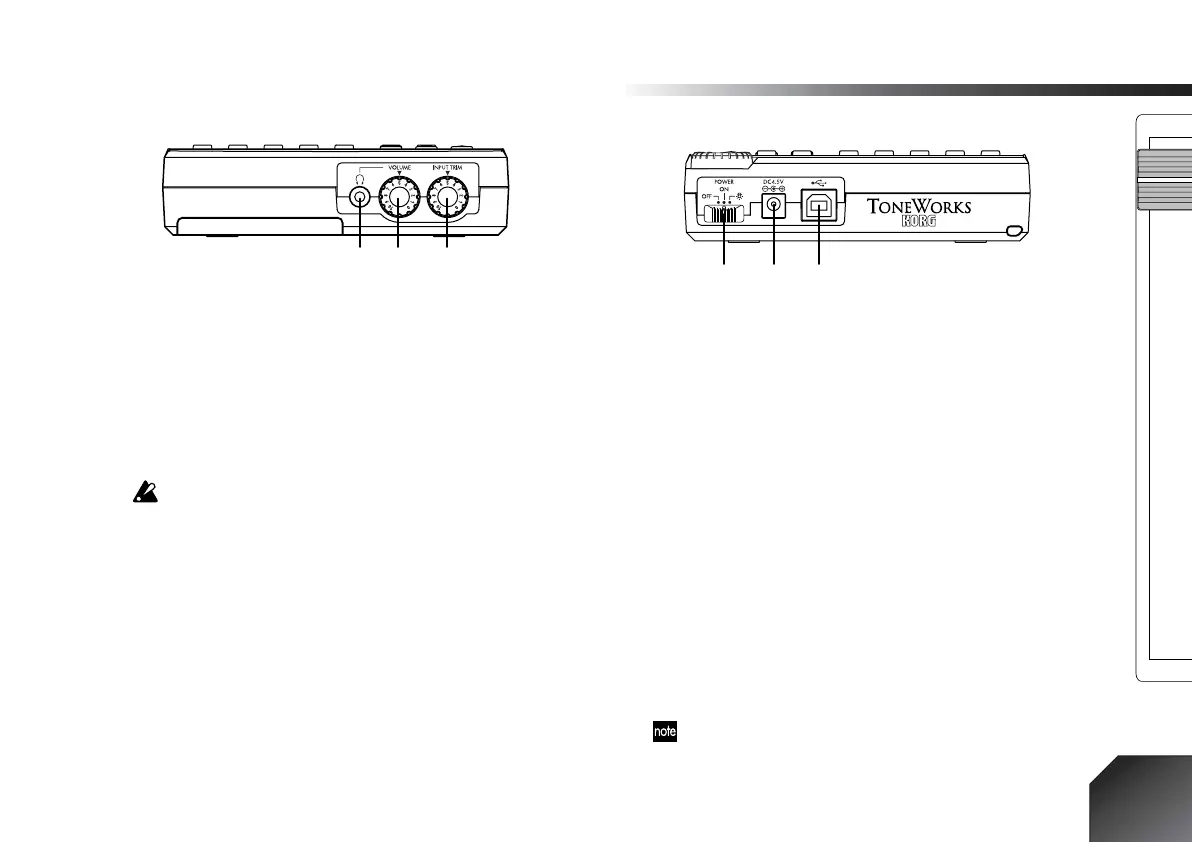
3. Front panel
1. [PHONE] jack
Connect a set of headphones to this jack (stereo mini).
2. [PHONE LEVEL] knob: 0...10
This knob adjusts the volume of the headphones.
Higher settings will produce a louder volume.
3. [INPUT TRIM] knob: 0...10
This knob adjusts the input level.
Raising the level of the [INPUT TRIM] knob when nothing is
connected to an input jack will produce hum or noise.
4. Rear panel
1. [POWER/BACK LIGHT] switch
This switch turns the power on/off, and turns the dis-
play backlight on. (
→
p.14)
2. [DC 4.5V] connector
Connect the included AC adapter to this connector.
3. [USB] connector
Use a USB cable to connect this to your computer.
(
→
p.52)
5. Bottom panel
1. [GUITAR INPUT] switch
Set this switch according to the output level of the gui-
tar that is connected to the [GUITAR INPUT] jack.
LOW:
Use this setting when using a guitar with low
output pickups (such as a single coil pickup).
HIGH:
Use this setting when using a guitar with high
output pickups.
If you are not sure which setting is appropriate, set this to
LOW
. If the sound is still distorted when the [INPUT TRIM]
knob is in the minimum position, set this switch to
HIGH
.
12 3
123







 To Next Page