Introduction
7
Features of the PXR4 and their
function
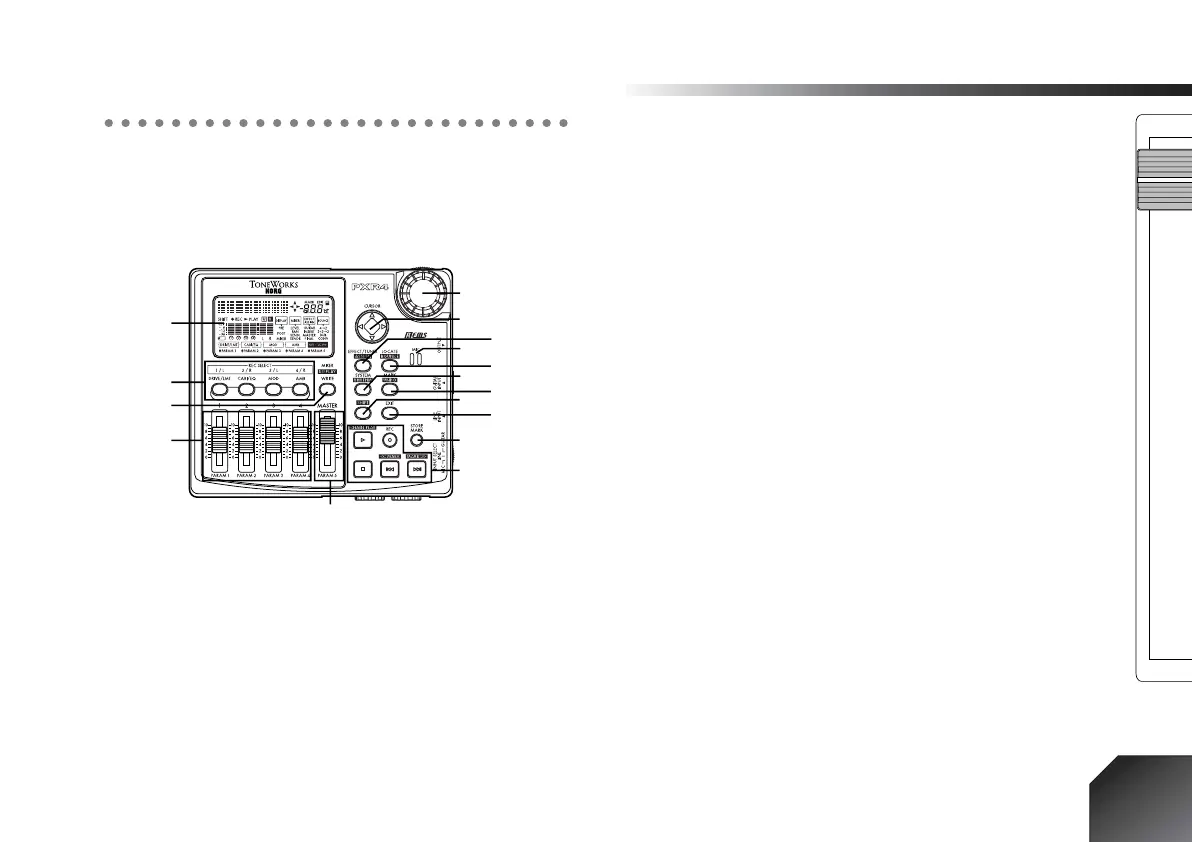
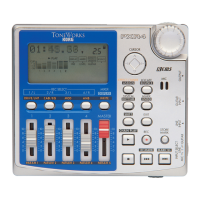
1. Top panel
1. Display
This area displays level meters for recording and play-
back, time information (locate), page information, and
various parameters.
2. [REC SELECT] keys
These keys switch each track between playback and
recording. (
→
p.25, 69)
3. [MIXER] key
This key accesses the mode in which you can adjust
mixer settings (volume, pan, effect send level, etc.).
(
→
p.35, 66)
4. [TRACK] faders
These faders adjust the playback/recording volume of
each track. (
→
p.26, 68)
5. [MASTER] fader
This fader adjusts the overall volume of all tracks.
6. Dial
Use this dial to select parameters or edit their value.
(
→
p.20)
7. [CURSOR] key
Use this key to move between pages. (
→
p.20)
8. MIC (internal mic) (
→
p.12)
9. [EFFECT/TUNER] key
This key accesses Effect mode (
→
p.35). If you are
already in Effect mode, this key accesses Tuner mode
(
→
p.22).
10.[LOCATE] key
This key accesses Locate mode, in which you can view
time counter data. (
→
p.32, 56)
11.[SYSTEM] key
This key accesses a mode in which you can edit tracks,
edit songs, and make system settings. (
→
p.57)
12.[MARK] key
This key accesses Mark mode, in which you can move
to a registered mark or delete a mark. (
→
p.33, 66)
13.[SHIFT] key
By holding down this key and pressing another key,
you can execute the operation printed in highlighted
characters above that key.
1
2
3
4
5
16
15
14
13
12
11
10
9
8
6
7






 To Next Page