Quick start
17
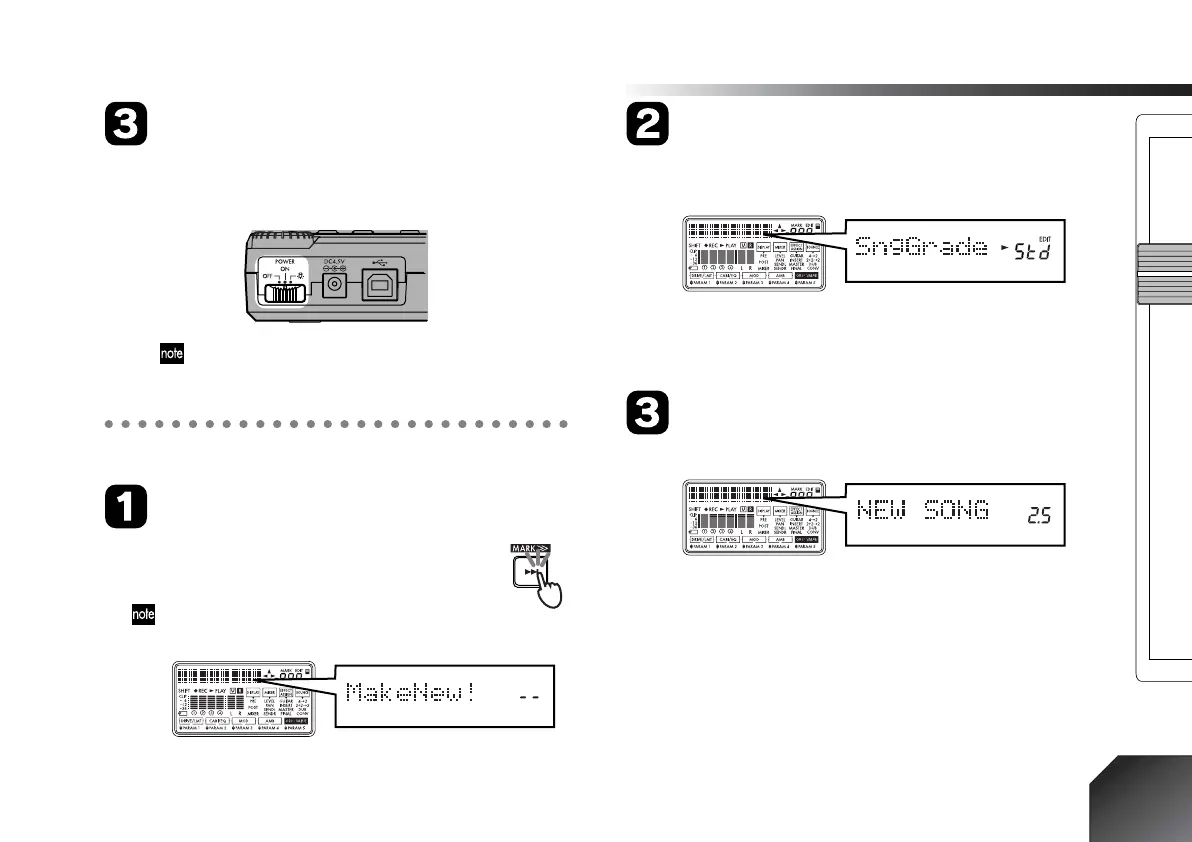
Turn the power on
Turn on the [POWER/BACK LIGHT] switch located
on the rear panel of the PXR4, and the start-up screen
will appear in the display.
If the display is too dark to read, turn on the backlight.
(→p.14)
3. Create a new song (→p.23)
Press the [FF] key
When you select the last recorded song and
(while stopped) press the [FF] key once again,
the display will indicate “MakeNew!”
If no song has been recorded on the card, “Make-
New!” will appear automatically.
Specify the grade of the song
After the display indicates “MakeNew!,” it will indi-
cate “SngGrade.”
Use the dial to select the grade of the song that will be
newly created, and press the [CURSOR] right key.
(→p.23)
This creates a new song
A song named “NEW SONG” has now been created.







 To Next Page