Quick start
18
4. Record (→p.25)
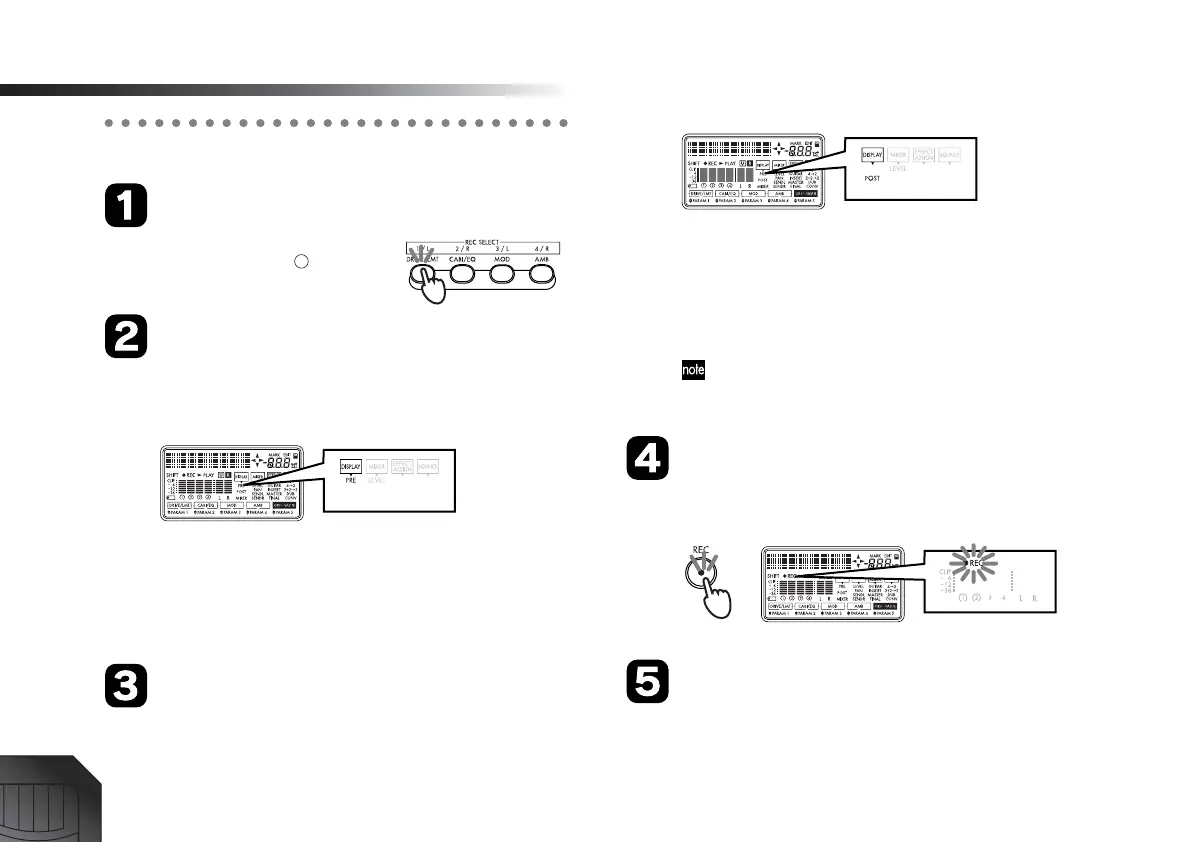
Specify the recording track
Press the track 1 [REC SELECT]
key to make the “ ” symbol
appear for track 1.
Check the input level
Hold down the [SHIFT] key and press the [MIXER] to
switch the “DISPLAY” indicator in the screen to
“PRE” (pre-fader level).
While watching the level meter, turn the [INPUT
TRIM] knob a little at a time to adjust the recording
level.
Set the level as high as possible without allowing the
level meter to reach “CLIP.”
Set the recording level
Hold down the [SHIFT] key and press the [MIXER]
key to switch the “DISPLAY” indicator in the screen to
“POST” (post-fader level).
While watching the level meter, slowly raise the
[TRACK] fader for that track.
As you gradually raise the [TRACK] fader, the level
meter of the input track will change according to the
level of the input track. Set the level as high as possi-
ble without allowing the meter to reach “CLIP.”
To hear the sound that is being input, raise the [PHONE
LEVEL] konb, [MASTER] fader to an appropriate vol-
ume.
Press the [REC] key
Press the [REC] key to enter record-standby mode.
The “REC” icon in the display will blink.
Press the [PLAY] key
When you are ready to perform, press the [PLAY] key.
Recording will start, so begin playing your instru-
ment. During recording, the “REC” icon and “PLAY”
icon will be lit.







 To Next Page