EasyManua.ls Logo

Kramer VM-214DT - Page 54

Kramer VM-214DT
59 pages
Print Icon
To Next Page IconTo Next Page
To Previous Page IconTo Previous Page
Loading...
Kramer Electronics Ltd.
VM-214DT Protocol 3000
52
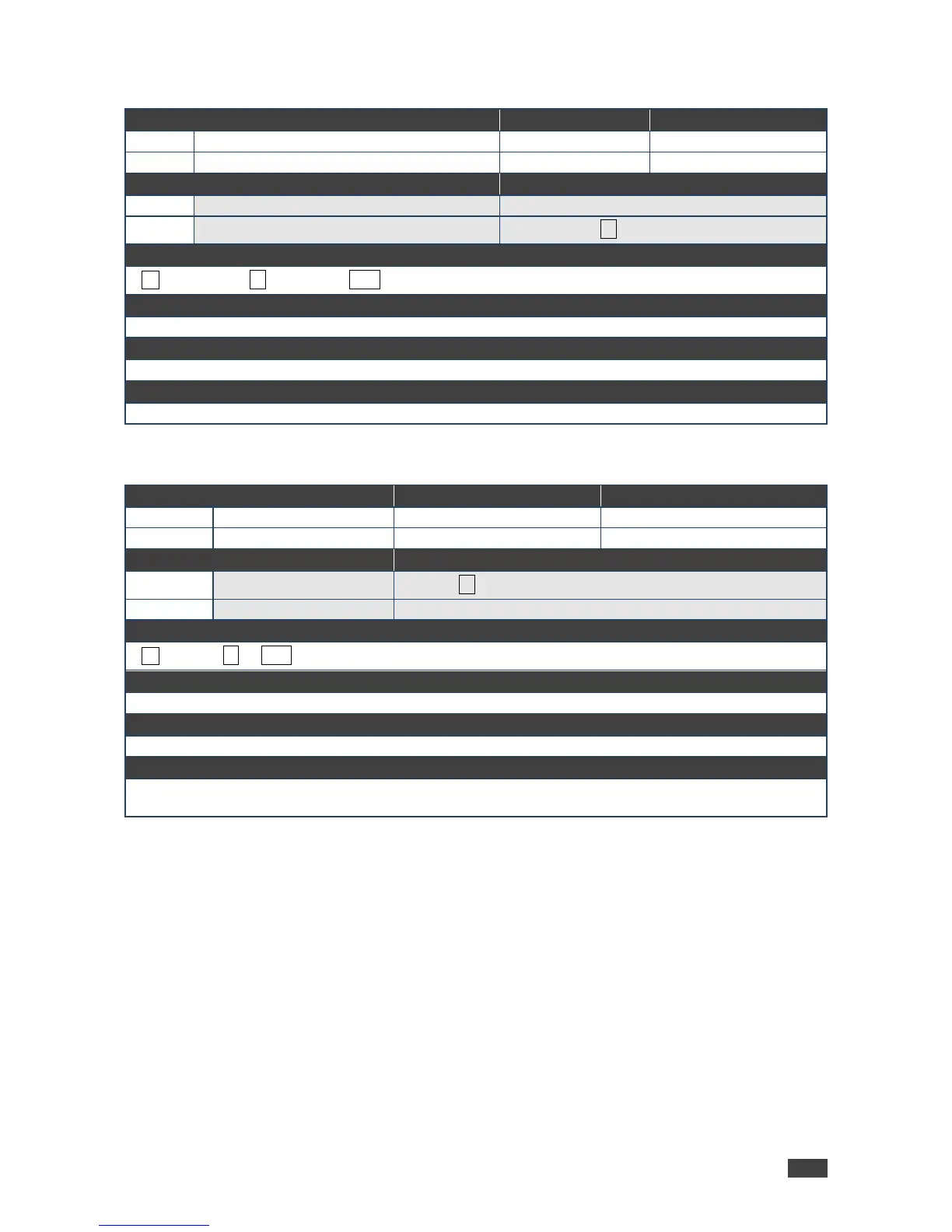
PROT-VER?
Command Name
Permission
Transparency
Set:
-
-
-
Get:
PROT-VER?
End User
Public
Description
Syntax
Set:
-
-
Get:
Get device protocol version
#PROT-VER?
Response
~nn@PROT-VER3000:version␍␊
Parameters
Version - XX.XX where X is a decimal digit
Response Triggers
Notes
RESET
Command Name
Permission
Transparency
Set:
RESET
Administrator
Public
Get:
-
-
-
Description
Syntax
Set:
Reset device
#RESET
Get:
-
-
Response
~nn@RESETOK␍␊
Parameters
Response Triggers
Notes
To avoid locking the port due to a USB bug in Windows, disconnect USB connections immediately after
running this command. If the port was locked, disconnect and reconnect the cable to reopen the port.