VS-62H - Defining the VS-62H 6x2 HDMI Matrix Switcher
4 Defining the VS-62H 6x2 HDMI Matrix
Switcher
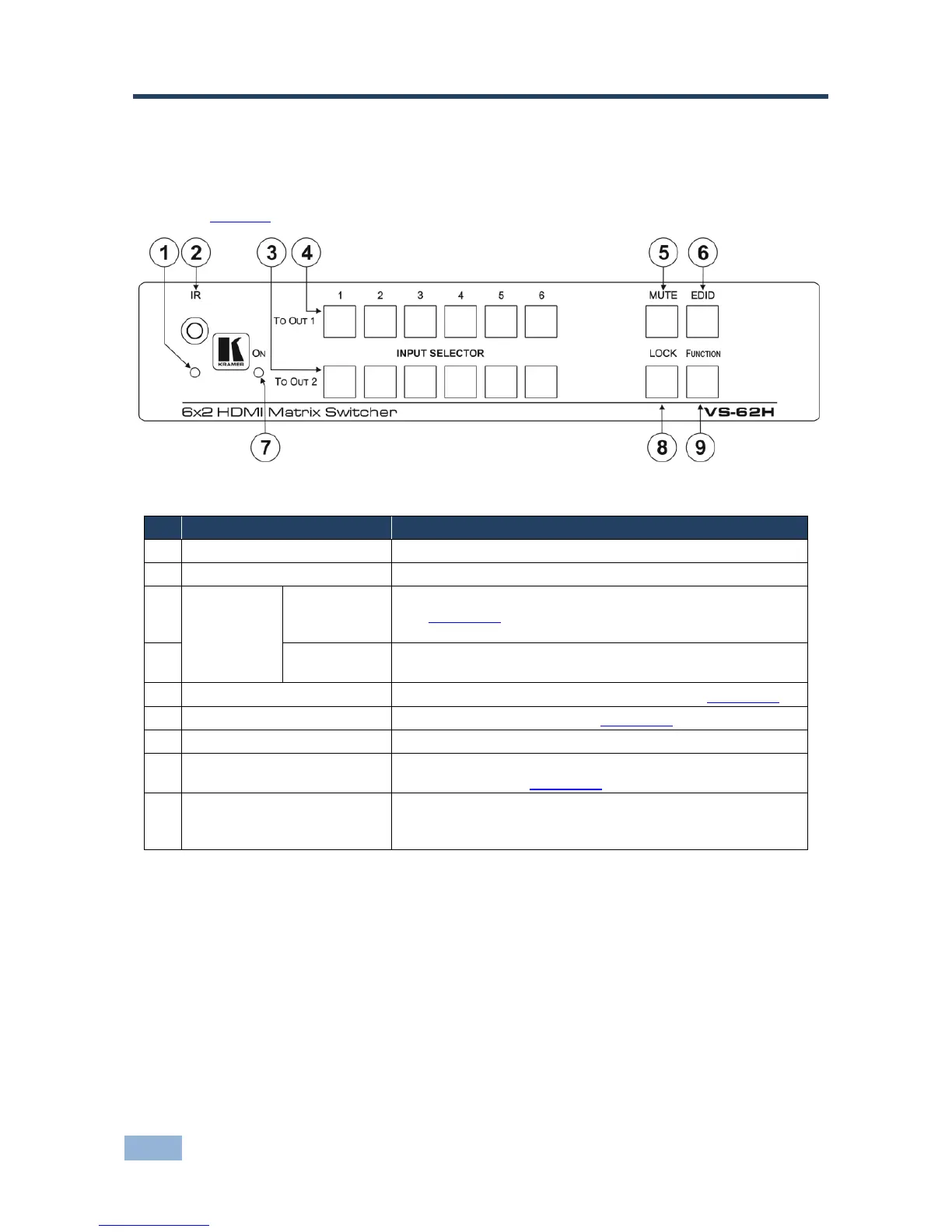
Figure 1 defines the front panel of the VS-62H.
Figure 1: VS-62H 6x2 HDMI Matrix Switcher Front Panel
Lights yellow when receiving an IR signal
Signal receiver for the infrared remote control transmitter
Press one of the six inputs to switch it to Output 2
(see Section 8.1).
Press the currently selected input button to mute the output
Press one of the six inputs to switch it to Output 1
Press the currently selected input button to mute the output
Press to toggle mute of both output signals (see Section 8.3)
Press to capture the EDID (see Section 8.2)
Lights green when the device is powered on
Press and hold to lock the front panel buttons. Press and hold
again to unlock (see Section 8.4)
Press to activate the test pattern generator. When the
generator is active, press one of the input buttons to select a
test pattern



 To Next Page