Page | 10
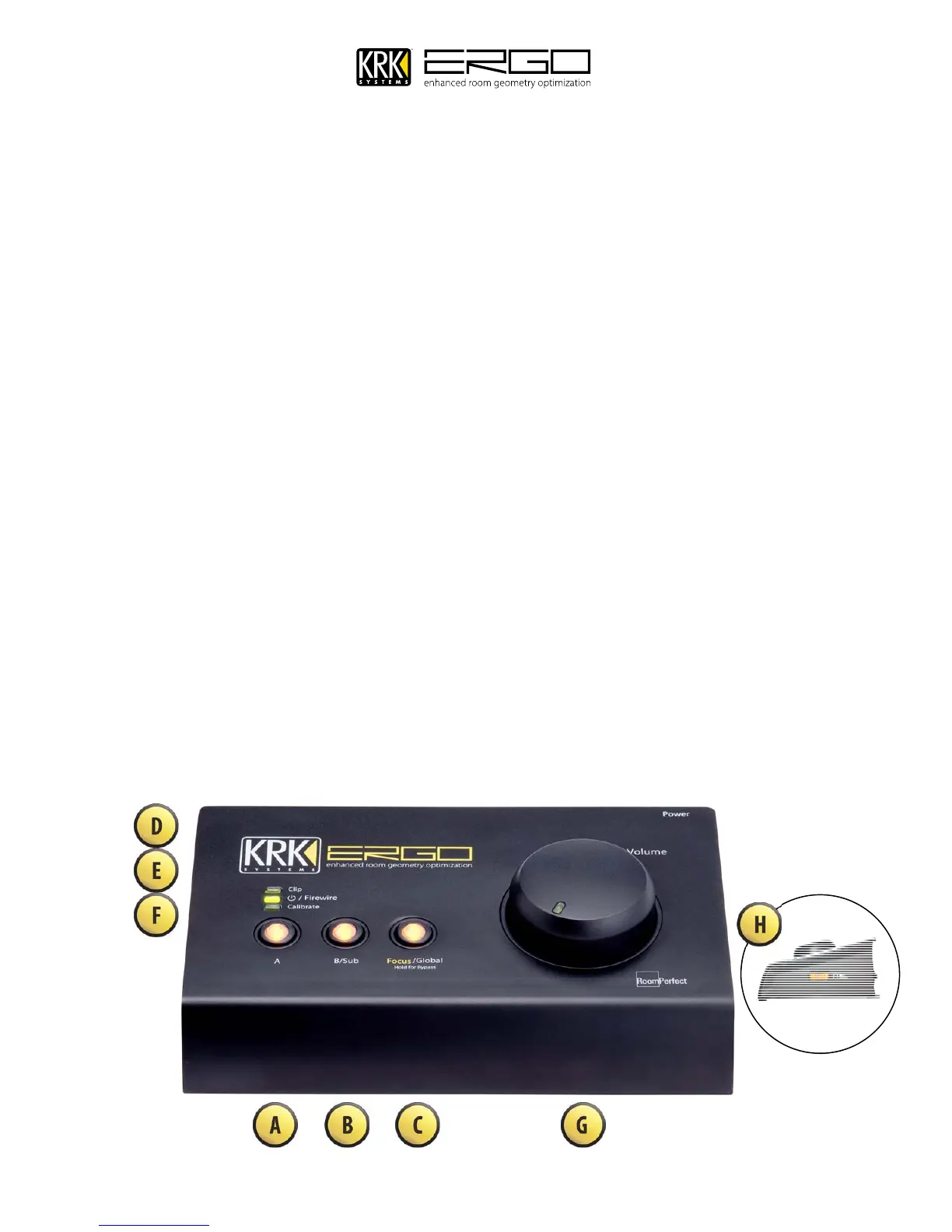
8. Front Panel Features
A – This button will select the A monitoring system if using in dual monitor mode, this button will
A.
enable/disable the main monitors if used in a 2.1 audio system..
B/SUB – This button will select the B monitoring system if using in dual monitor mode, this button will
B.
enable/disable the subwoofer if used in a 2.1 audio system.
Focus/Global/Bypass – This button switches between three modes: FOCUS (Illuminated), GLOBAL (off)
C.
and BYPASS (Flashing). Note: to put ERGO into bypass mode you must press and hold this button.
Clip Indicator – This will illuminate red when audio is 3dB below full scale, indicating a likely clip
D.
condition.
Power / Firewire Indicator – This will illuminate GREEN to show power is ON and the Firewire connection
E.
is operational. This will illuminate RED to show power is ON and the unit is in Stand-Alone mode.
Calibration Indicator – This will illuminate when the calibrate button is ON.
F.
Volume/Level Control – This large high resolution control adjusts the output level sent to your selected
G.
monitoring system
Headphones Level Control (Located on Side Panel) – The headphones output level control is an
H.
illuminated dial on the left hand side of the unit. NOTE: The high quality headphone amp in ERGO is
capable of providing a high output level to certain headphones, please start with a low level and rise slowly
to maintain comfortable and non-damaging levels. Your ears are the most important tools of your trade.



 To Next Page