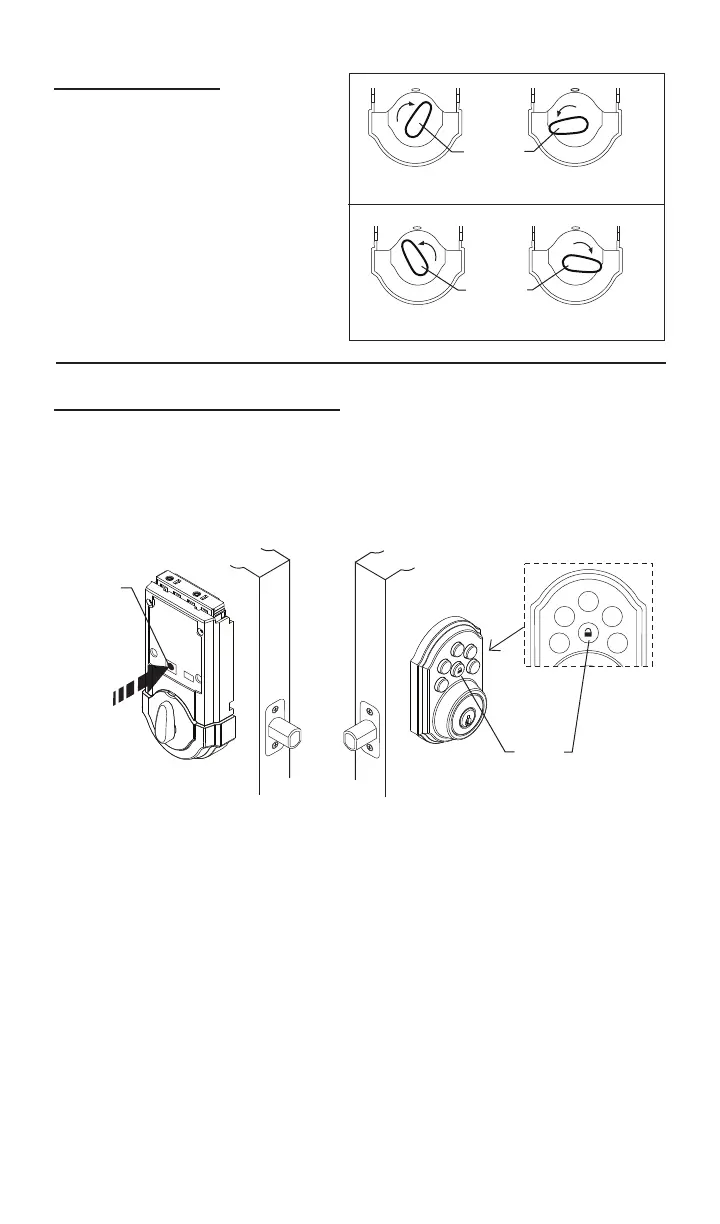
(LHD) LOCKED
(LHD) UNLOCKED
TURNPIECE
(RHD) LOCKED
(RHD) UNLOCKED
TURNPIECE
6
d.Seeexampleforturnpiece
positionforrighthanddoor(RHD)
andlefthanddoor(LHD)when
boltisfullythrown(locked)and
fullyretracted(unlocked).
8.Continued.......
a. Presstheprogrambutton on the interior unit once.
b. Enter in 4 to 8 digit codeontothekeypad.
c.Pressthe“LOCK”buttontosavecode.
d. Extendtheboltbypressingthe“LOCK”buttonandre-enterthecodeto
test.Theboltshouldretracttotheunlockedposition.Ifitdoesnotunlock,
repeatsteps(a)through(c).
a. Presstheprogrambutton on the interior unit twice.
b. Enter in 4 to 8 digit codeontothekeypad.
c.Pressthe“LOCK”buttontosavecode.
d. Extendtheboltbypressingthe“LOCK”buttonandre-enterthecodeto
test.Theboltshouldretracttotheunlockedposition.Ifitdoesnotunlock,
repeatsteps(a)through(c).
9.ProgrammingaUserCode.
● A programmed code can be from four (4) to eight (8) digits long.
●Up to 2 user codes can be entered.
●Excess delay in the programming steps once started will cause unit to
beep twice and will require you to restart from step (a).
Programmingthe1stusercode.
Programmingthe2ndusercode.
Program
Button
LOCK
Button




 To Next Page