4-38
4. Selecting the Printer Settings
1
2
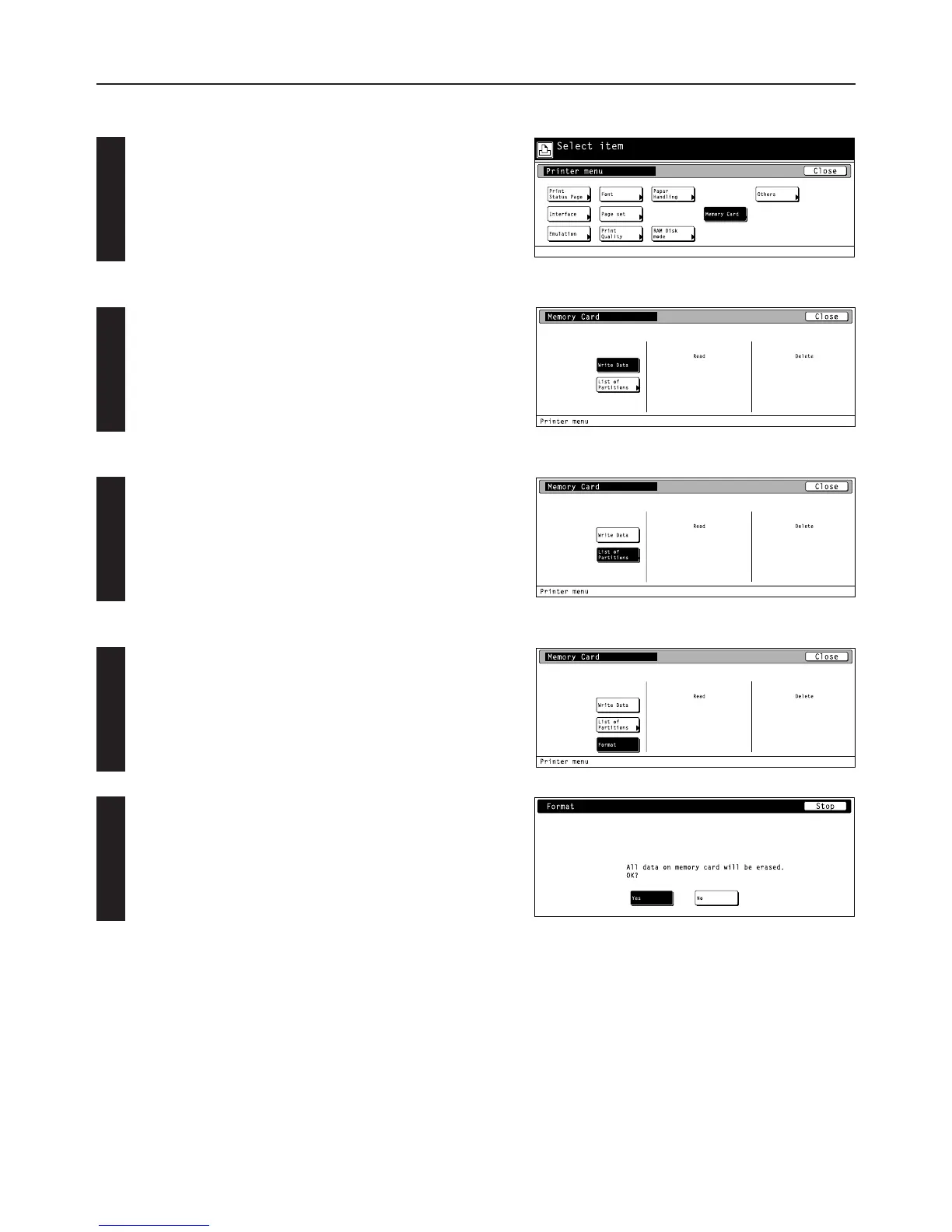
● Accessing the Memory Card settings screen
Touch the “Memory Card” key. The [Memory Card] screen will
appear.
1 Writing data
Touch the “Write Data” key. The display will return to the basic printer
screen and the machine will enter a “waiting for data” state.
• When data is received from a computer, “Processing” will be
displayed in the [Printer Menu] screen. Once the operation is
completed, “Waiting” will be displayed.
2 Partition List print out
Touch the “List of Partitions” key. A Partition List will be printed out.
3 Format memory card
Touch the “Format” key.
• ALWAYS format the memory card using this printer.
Touch the “Ye s ” key. The display will return to the basic printer
screen and the memory card will be formatted.
•“Processing” will be displayed in the basic printer screen while the
memory card is being formatted.
• If you select “No” here, the memory card will not be formatted and
the display will return to the [Memory Card] screen.



 To Next Page