3-33
Preparation before Use > Preparation for Sending a Document to a Shared Folder in a PC
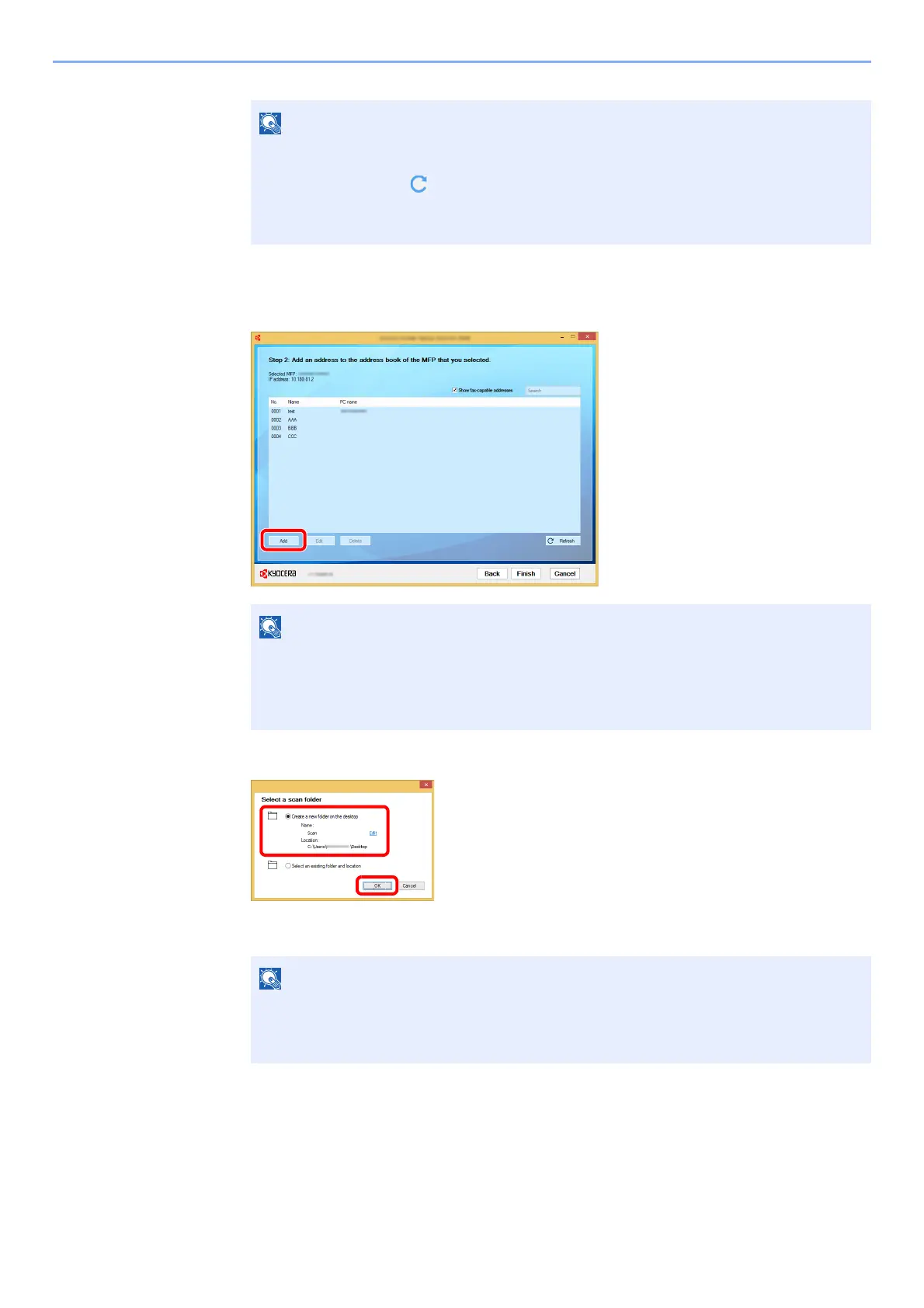
The address book of the device appears.
2 Select [Add].
3 Create a new folder.
Select "Create a new folder on the desktop" and click [OK] to create a new folder on the
desktop. (The default folder name is "Scan".)
• The machine cannot be detected unless it is on. If the computer fails to detect the
machine, verify that it is connected to the computer via a network cable and that it is
turned on and click [ Refresh].
• If user administration is valid on this machine, the user authentication screen appears.
Log in with administrator privileges or as a user with execution authority.
• Clicking on [Edit] after selecting the registered address allows you to change the
content of the registration.
• Unchecking the [Show fax-capable addresses] check-box will hide the address
containing the fax.
• Click [Edit] to change the desktop folder name.
• Selecting [Select an existing folder and address] allows you to select an existing
folder that is already set as a shared folder on the PC.






 To Next Page