12XT COAXIAL ENCLOSURE
user manual
VERSION 1.2
12XT_UM_ML_1.2
www.l-acoustics.com
18 en
Activate the LOAD PRESET menu from the LA4 amplified controller front panel and then select the desired preset.
Refer to the ‘‘LA4 - User Manual’’ for additional instructions. The preset is also accessible using the LA NETWORK
MANAGER software (refer to ‘‘LA NETWORK MANAGER - User Manual’’). Accessible controls in ‘‘FULL
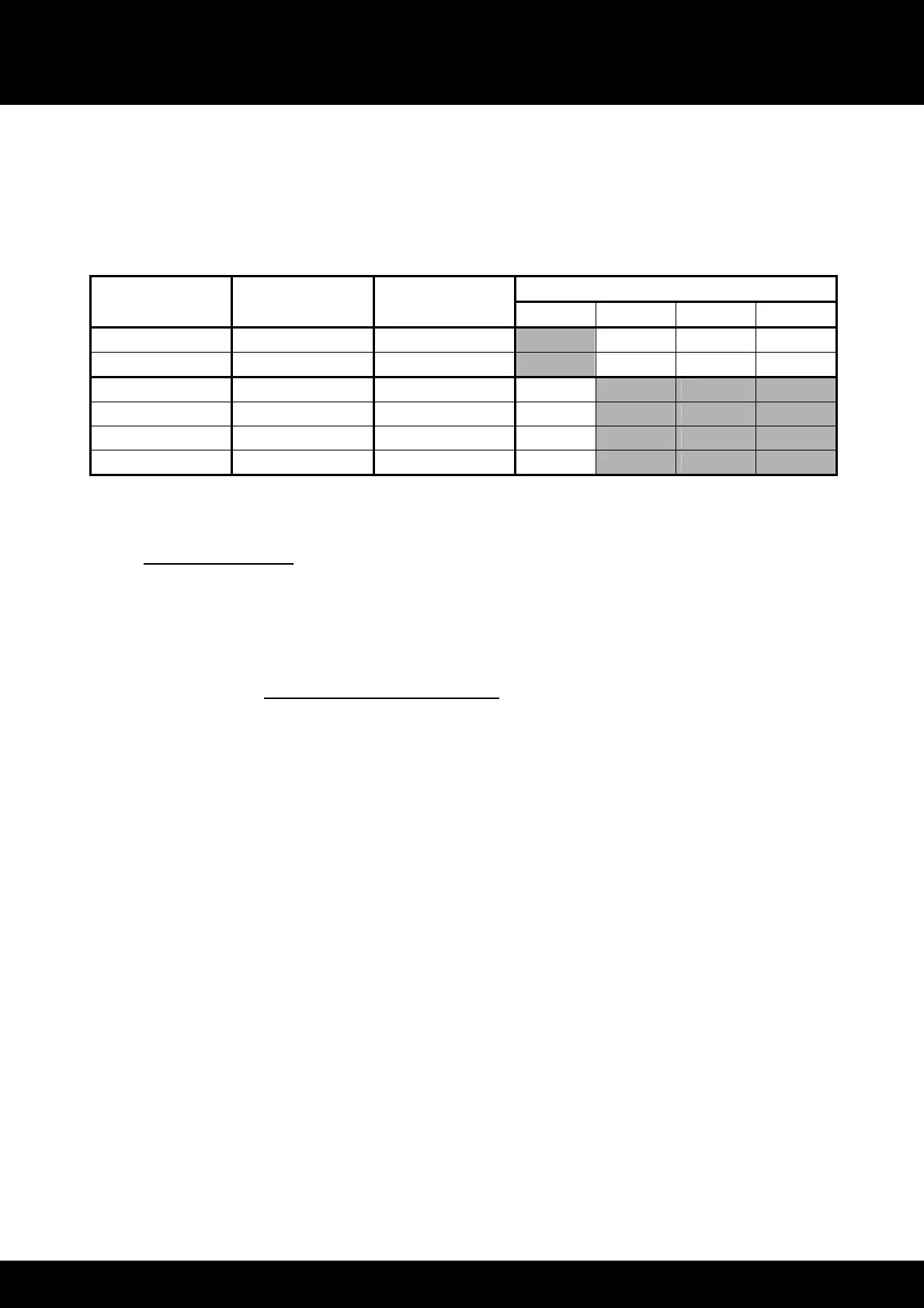
RANGE’’ mode for ACTIVE 12XT are shown in the following chart:
Table 5: Accessible controls in ‘‘FULL RANGE’’ mode for ACTIVE 12XT
Accessible (O) and blocked (X) parameters
LA4 Inputs/
Outputs
Elements
to connect
Preset
assignments*
Mute Gain Delay Polarity
IN A Input signal A IN_A X O O O
IN B Input signal B IN_B X O O O
OUT 1 ACTIVE 12XT LF_A O X X X
OUT 2
HF_A O X X X
OUT 3 ACTIVE 12XT LF_B O X X X
OUT 4
HF_B O X X X
* IN: input signal. A: channel A. B: channel B. LF: low frequency transducer. HF: high frequency transducer.
7.3.2 “HIGH-PASS” mode
In the ‘‘HIGH-PASS’’ mode the ACTIVE 12XT enclosures are 100 Hz high-pass filtered to allow for coupling with the
dedicated complimentary SB118 subwoofers. The bandwidth of the system is extended down to 32 Hz. The
recommended ratio is one ACTIVE 12XT for one SB118.
7.3.2.1 Connecting ACTIVE 12XT to LA4
The first two ACTIVE 12XT enclosures are connected to output channels 1 and 3 of the LA4 controller. An additional
ACTIVE 12XT enclosure can be connected in parallel with each of the first ones. Therefore a single LA4 amplified
controller can drive up to four ACTIVE 12XT enclosures (Figure 10).
Note: The system resources are optimized for two or four ACTIVE 12XT per LA4.


 To Next Page