Peripherals
Backseat Camera
Flashback3 & Flashback HD User’s Guide
Page 14 L3 Mobile-Vision 6.23.2017
Backseat Camera
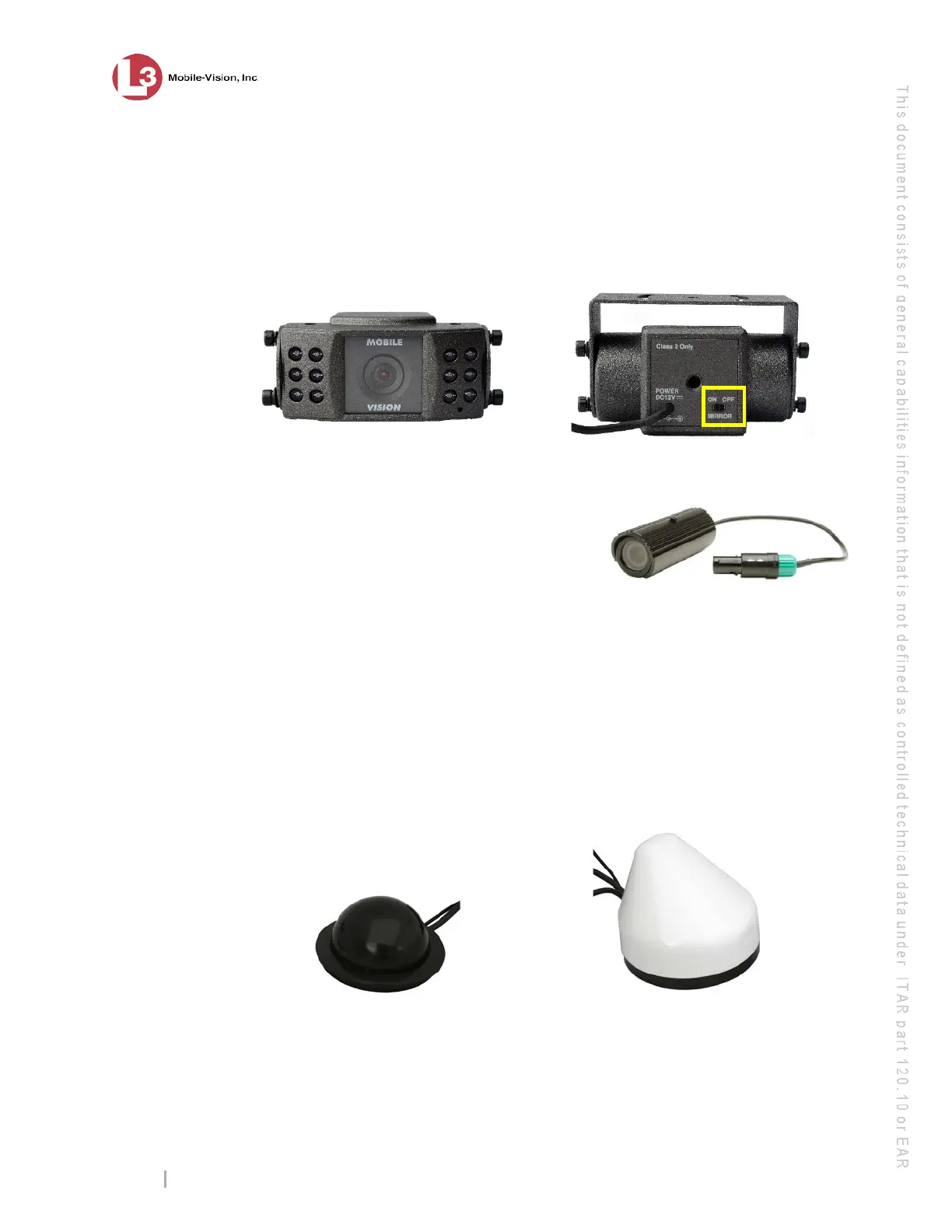
The optional backseat camera is typically used to record suspects seated in the
backseat of the vehicle. However, you may also point this camera towards the front
of the vehicle. If the camera is installed rear-facing, make sure the camera’s mirror
switch is in the On position, as pictured below. If the camera is installed forward-
facing, make sure the mirror switch is in the Off position.
Backseat Camera
Bullet Camera
The optional Bullet camera is a small,
cylindrical camera that enables you to capture
video from several different angles. The Flashback
supports up to three Bullet cameras, all of which use Camera
Channel 2. You connect these cameras to your Flashback using a special 3-cable
connector.
Antennas
During installation, your Flashback installer will drill a hole through the roof of your
vehicle and mount one of two antennas: our standard WiFi/GPS antenna, or the faster
Dual WiFi/GPS antenna, which is an optional upgrade. These antennas are used to:
Wirelessly connect to your agency’s internal network
Capture GPS satellite data.
Standard WiFi/GPS Antenna Dual WiFi/GPS Antenna (optional)
NOTE: ‘N’ download
speeds can only be
achieved with the
Dual WiFi/ GPS
antenna.



 To Next Page