DVR Settings
Changing the Audio Settings
Flashback3 & Flashback HD User’s Guide
Page 66 L3 Mobile-Vision 6.23.2017
7 P
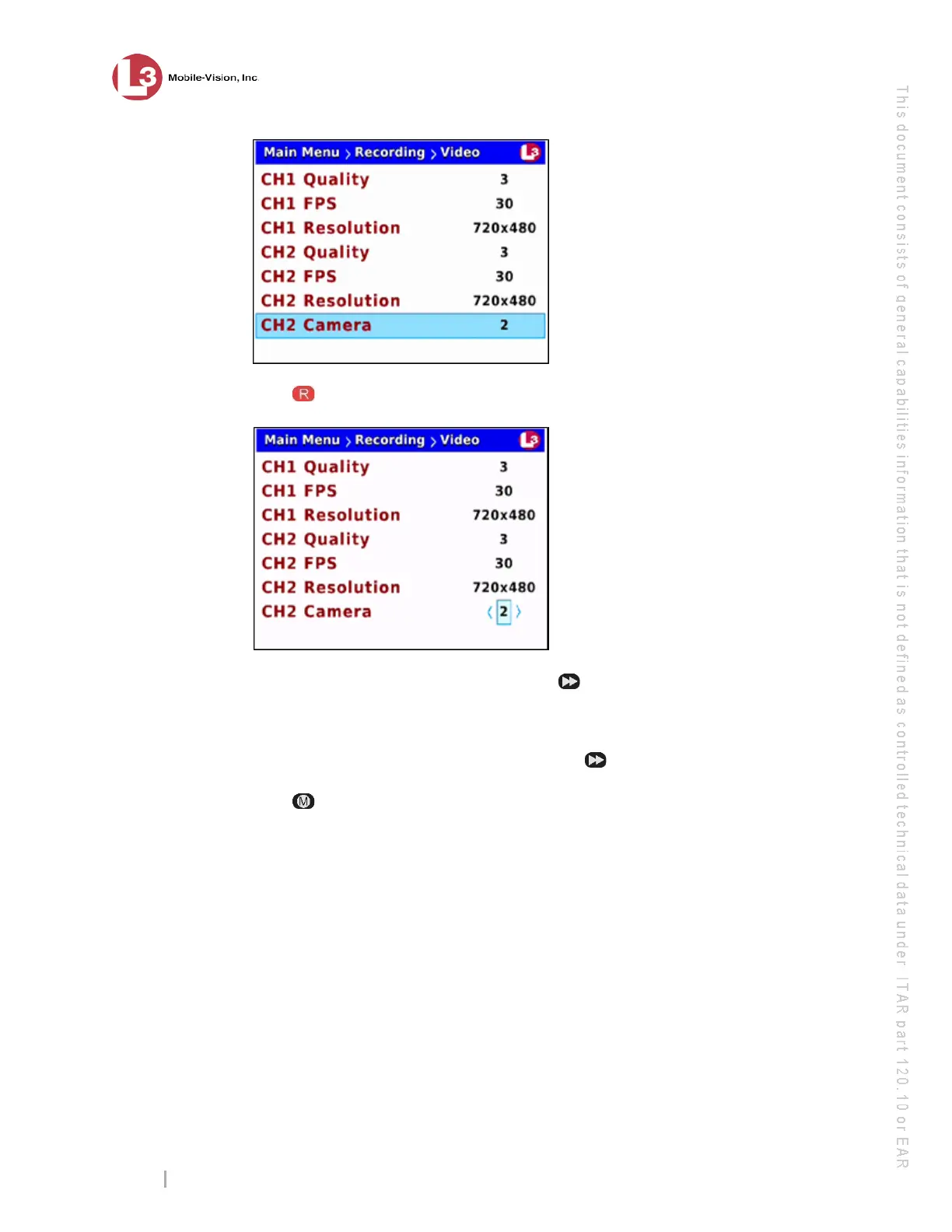
ress to select the CH2 Camera field.
8 I
f you will be recording on Channel 2, press until the correct number of cameras
displays (1-4).
– OR –
If you will not be recording on Channel 2, press until OFF displays.
9 Press twice to save your changes and exit the Video screen. The system will
automatically reboot.
Changing the Audio Settings
This section allows you to change the Flashback audio settings. For specific
instructions, see:
Turning the VLP1 Audio On/Off, next page
Turning the VLP2 Audio On/Off, page 69
Turning the In-Car Audio On/Off, page 71
Turning the Record ‘Beep’ On/Off, page 74
Turning the Keystroke ‘Beep’ On/Off, page 76
Turning the Pre/Post Audio On/Off, page 79
Changing the Gain Setting for the VLP1 Audio, page 81
Changing the Gain Setting for the VLP2 Audio, page 84
Changing the Gain Setting for the In-Car Audio, page 87.



 To Next Page