INSTRUCTIONMANUALFORTHEINSTALLER
Thissystemmakesitpossibletosetadifferentcoffeebrewingtemperatureforeachdeliverygroup.
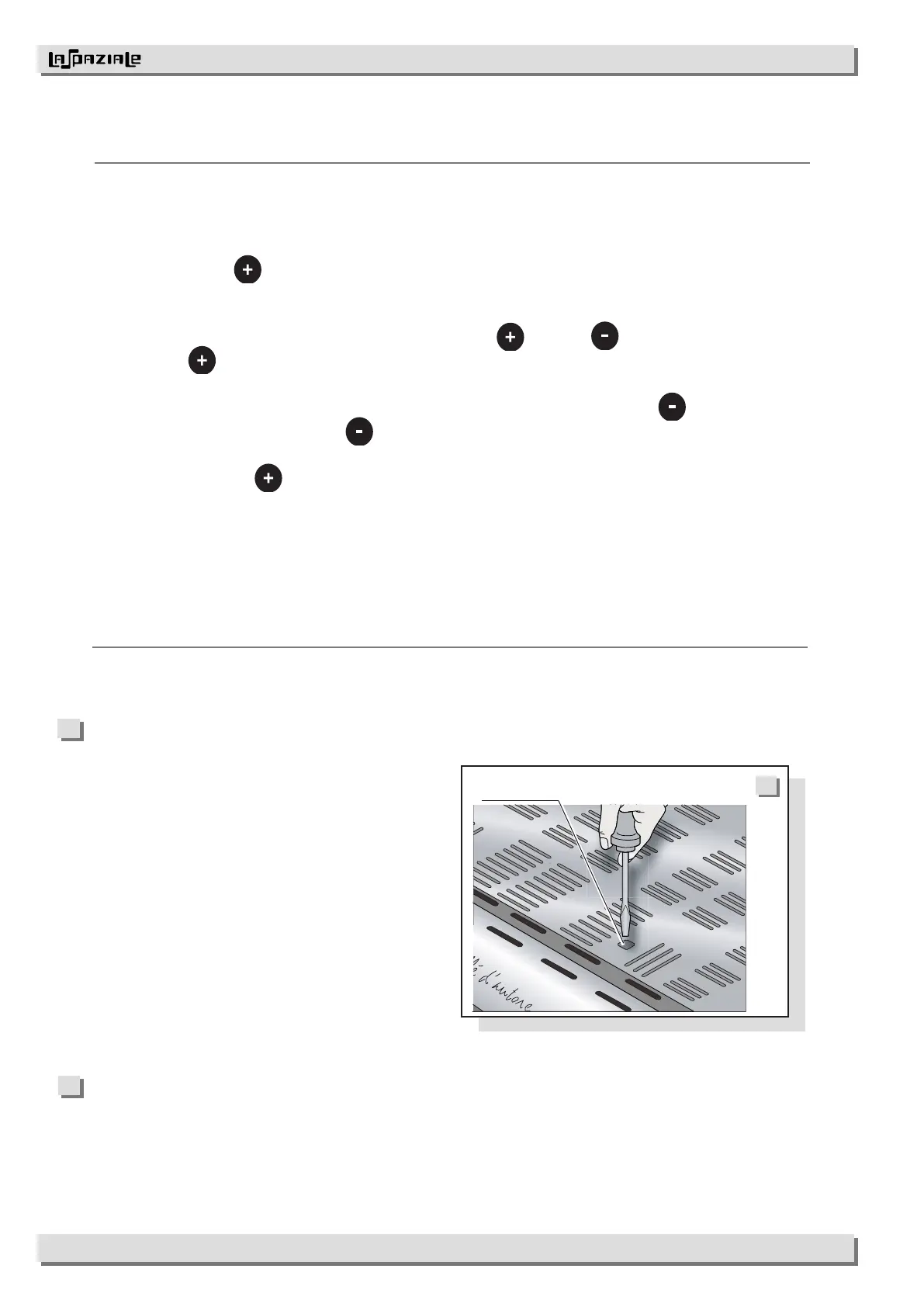
To vary the temperature on a group, use the
corresponding regulator alongside the group itself,
whichcanbereachedthroughtheopeninginthetop
ofthe,uppercupgrid(14)(Pict18).
Turntheadjustmentscrewanticlockwisetodecrease
thetemperature.
Turntheadjustmentscrewclockwisetoincreasethe
temperature.
Temperature
regulator
Itispossibletocalibratethemilksensorinordertoaligntherealtemperaturereadingofthe
(systemmilksensor)tothepresettemperature.
• Switchtheapplianceoff.
• Pressthebutton
(37)and,keepingitpressed,switchtheapplianceon.
Thesymbolsswitchononthecontrolpanelandtheyshowthezerovalueofthe
calibrationrange.
• Itispossibletochangethedatumpressingthebuttons
(37)and (38):everytimeyoupress
thebutton
(37)thesymbolsetc.startashing,everyledswitchingoncorresponds
toavaluevariationofsensedbythemilksensor.
• Itispossibletogobacknegativelyinthecalibrationrangepressingthebutton
(38).
• Everytimeyoupressthebutton
(38)thesymbolsetc.startashing,everyled
switchingoffcorrespondstoavaluevariationofsensedbythemilksensor.
• Pressingthebutton
(37)itispossibletogoonpositivelyinthecalibrationrange.
Switchingtheapplianceoffandonagain,thedatumisstored.
Themilksensorcalibrationhasarangeof,.




 To Next Page