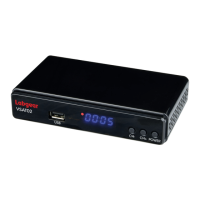
The Labgear LCOM1 is a versatile Combo HD Satellite & Terrestrial Receiver designed for indoor use, offering reception of both High-Definition satellite and terrestrial TV signals. It supports a wide range of video and audio formats, making it a comprehensive solution for home entertainment.
Function Description:
The LCOM1 functions as a digital TV receiver, capable of tuning into DVB-S/S2/S2X satellite and DVB-T/T2 terrestrial digital TV broadcasts. It upscales PAL content to 720p or 1080p resolution, ensuring a high-quality viewing experience. A key feature is its twin tuner capability, allowing users to simultaneously watch a terrestrial channel while recording a satellite channel, or vice versa. The device also supports PVR (Personal Video Recorder) and Timeshift functionalities when an external USB hard disk drive or flash memory is connected. Beyond TV reception and recording, the LCOM1 acts as a multimedia player, capable of playing back video, audio, and image files stored on USB media. It also offers network connectivity via an RJ45 Ethernet port or a USB Wi-Fi dongle, enabling access to online services like YouTube.
Important Technical Specifications:
- Processor: Montage M88CS8051B-T0OD with 8MB Flash Memory and 1GB DDR2.
- DVB-S/S2 Tuner:
- Input Frequency: 950 ~ 2150MHz
- Input Level: -80 ~ -20dBm
- Input Impedance: 75 Ω
- Demodulation: QPSK, BPSK, 16PSK
- FEC Mode: DVB-S 1/2, 2/3, 3/4, 5/6, 7/8; DVBS2X: 1/23/5, 2/3, 3/4, 4/5, 5/6, 8/9, 9/10 (QPSK); 3/5, 2/3, 3/4, 5/6, 8/9, 9/10 (8PSK)
- Symbol Rate: DVB-S: 2.0 ~ 45 MS/s
- DVB-T/T2 Tuner:
- VHF: 174 ~ 230MHz
- UHF: 470 ~ 862MHz
- RF Input Signal Level: -78 ~ -5dBm
- Demodulation: QPSK, BPSK, 16PSK
- Channel Decoding: ISO/IEC 13818-1, supporting 100Mbps (Serial) / 12.5Mbps (Parallel) bit stream rates.
- Video Decoding: ISO/IEC 13818-2, MPEG-2 MP@ML, MPEG-4, AVC (MP L4.1).
- Aspect Ratio: 4:3, 16:9
- Video Format: PAL-B / NTSC-M / PAL-N / PAL-M
- Video Resolution: 1080p, 1080i, 720p, 480p / 576p, 480i / 576i SD, compatible.
- Audio Decoding: ISO/IEC 13818-3, MPEG-1 Layer I and II, MPEG-2, MPEG-4 AAC.
- Output Mode: LPCM, RAW
- Sampling Frequency: 32, 44.1, 48KHz
- Volume Level: 24 Levels
- AV Output:
- Video de-emphasis: CCIR REC.405-1, 625LINES
- Video bandwidth: 5.5MHz
- Video output impedance: 75Ω
- Video output level: 1.0Vp-p
- Audio output: Stereo
- Audio output frequency: 20Hz ~ 20KHz
- Audio output impedance: Low
- Audio output level: A 1.0Vrms ± 2dB into 10K.
- Panel Interface: 1x Mini AV, 1x HDMI, 1x LNB In, 1x ANT In, 2x USB 2.0 Port, 1x Ethernet, 1x DC-IN, 1x Coaxial.
- Power: 12V/1A DC In, Max. 8W.
- Power Supply (ErP/EuP directive No. (EU) 2019 (1782)):
- Input voltage: 100-240 VAC
- Input AC frequency: 50/60Hz
- Output voltage: 12.0 V DC
- Output current: 1.0 A
- Output power: 12 W
- Average active efficiency (230V/50Hz): 84.96%
- Efficiency at low load (10%) (230V/50Hz): 77.27%
- No-load power consumption (230V/50Hz): 0.09 W
Usage Features:
- User-Friendly Interface: The receiver features a main menu that simplifies operation, with functions controlled via a small number of keys on the remote control.
- Channel Management: Supports storage of up to 2000 transponders and 4000 channels. It includes user-friendly auto search for both satellite and terrestrial channels, as well as manual search options. Channels can be organized into favorite lists, edited (renamed, deleted), locked with a password, or skipped.
- EPG (Electronic Programme Guide): Offers a 7-day EPG for terrestrial channels and a "now and next" EPG for satellite channels, allowing users to schedule future viewings and recordings.
- Recording and Timeshift: Equipped with twin USB 2.0 ports for PVR and Timeshift recordings. It supports external hard disk drives (HDDs) and flash memories (Pen drives) formatted with NTFS or FAT32. High-speed USB 2.0 drives are recommended for stable HD video recording.
- Multimedia Playback: Plays various multimedia files (video, audio, image) from connected USB storage.
- Connectivity: HDMI output for high-definition video and audio, coaxial port for digital audio output to Hi-Fi systems, and Mini AV for older display equipment. Ethernet port for network connection and USB Wi-Fi dongle support for wireless connectivity.
- Satellite Dish Alignment: Compatible with DiSEqC 1.0, 1.1, 1.2, and USALS motorized dish systems, simplifying setup for multiple satellites.
- Subtitles and Audio Description: Supports teletext, multilingual subtitles, and audio description where available.
- Parental Lock: Includes parental lock functions for restricting access to certain channels.
- Adjustable Aspect Ratio: Offers 4:3 Pan & Scan or 16:9 Widescreen modes.
- YouTube Playback: Access and playback YouTube videos when connected to the internet.
Maintenance Features:
- Software Updates: The System menu allows for receiver software updates via USB.
- Factory Reset: Option to perform a factory reset if necessary.
- Database Backup: Supports database backup to USB media.
- Cleaning: Disconnect power before cleaning. Use a clean, soft cloth; avoid abrasives or solvents.
- Surge Protection: Highly recommended to use surge protection systems to protect sensitive electrical components from spikes, surges, electric shock, and lightning strikes.
- Battery Replacement: When replacing remote control batteries (2x AAA Alkaline), observe polarity and do not mix old and new batteries or different types.

 Need help?

 To Next Page
 General