10
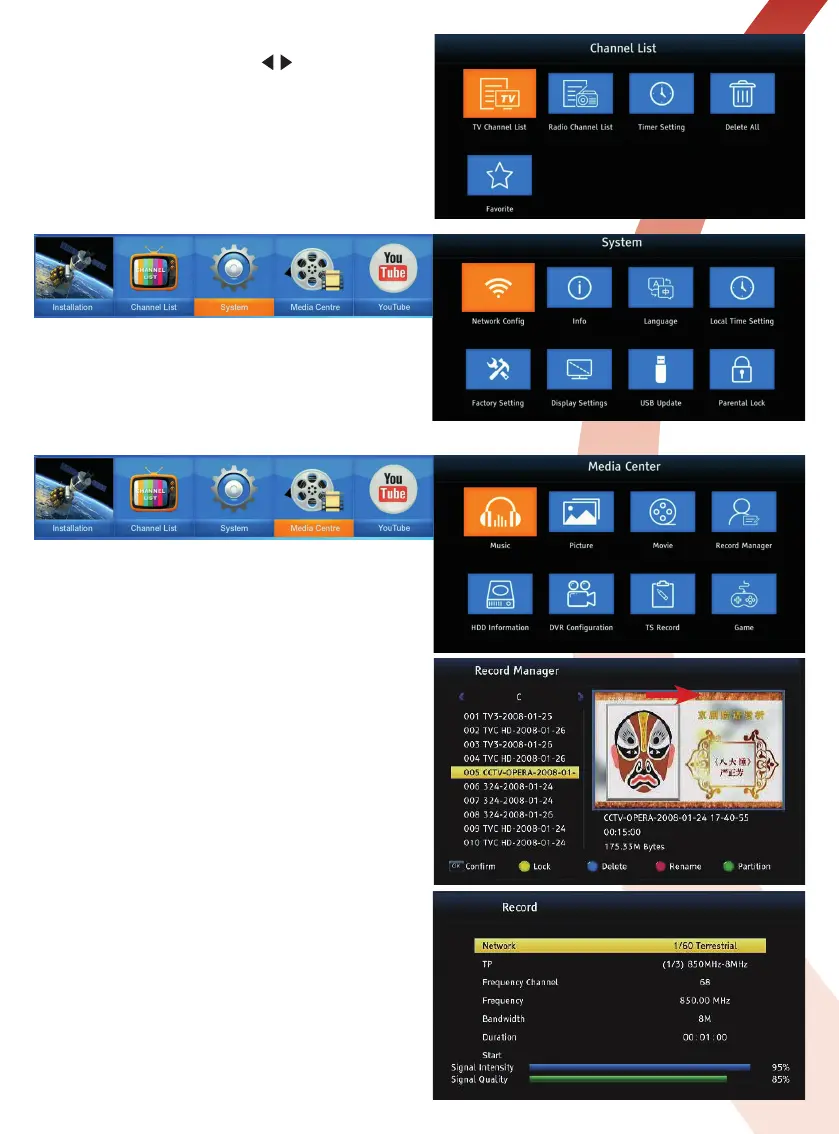
Radio Channel List
In the Channel List menu use the
/
keys then press
the OK key to open the Radio Channel List. To EDIT use
the same actions as used with the TV Channel List.
Favourite Menu
The Favourite function lets you recall by genre any
channels you have saved to categories in the TV
Channel List: Movies, News, Music, Sports, Childrens,
Education, Social and Culture. In the Favourite menu
you can edit the category titles.
System Menu
In the System menu you can make network
configurations (once you are connected to a network).
Set the OS language, local time and a parental lock.
Set the optimum output resolution to suit your display.
Control receiver software updates via USB and if
necessary perform a factory reset.
Media Centre Menu
The Media Centre menu lets you playback media files
stored on USB Hard Drives and USB Flash/Pen Drives
attached to the USB ports on the side and back of the
LCOM1 receiver.
The MUSIC submenu lets you playback stored music
files in MP3 and other popular formats.
The PICTURE submenu lets you playback stored photos
and images stored in jpeg and bmp format files in MP3
and other popular formats.
The MOVIE submenu lets you playback stored avi, mkv,
mpeg, ts, mp4 etc. format videos/movies.
Please Note:
Not all files with these extensions are playable - some files
may have unsupported codecs or settings.
The RECORD MANAGER submenu lists the TV
programmes you record. The list is fully editable and
recordings can be locked or deleted.
The HDD INFORMATION submenu displays information
about the Hard Drives connected to the USB ports.
The DVR CONFIGURATION submenu lets you configure
a partition for Timeshift recording.
The TS RECORD submenu lets you set the Transponder
to make Transport Stream recordings.
Please Note:
This is
only available when a hard disk or USB disk is connected
to the receiver.
The GAME submenu lets you play Othello or Tetris.


 To Next Page