11
Important Remote Control Functions
Live Programme Recording
This function is only available when a suitable Hard Drive is
connected to one of the USB ports.
1. Select a channel and press the REC button to record
the channel selected.
2. The information bar indicates which program you are
recording and viewing.
4. In order to terminate recording, press the STOP button.
Keep in mind that during recording, the information
bar may be hidden by means of the EXIT button.
In order to restore the bar, press REC again.
Twin Tuner
The receiver has separate tuners for the reception of
satellite (DVB-S/S2) and terrestrial (DVB-T/T2) signals.
This allows you to watch a satellite channel broadcast whilst
recording a terrestrial channel and vice versa - watch a
terrestrial channel while recording a satellite channel.
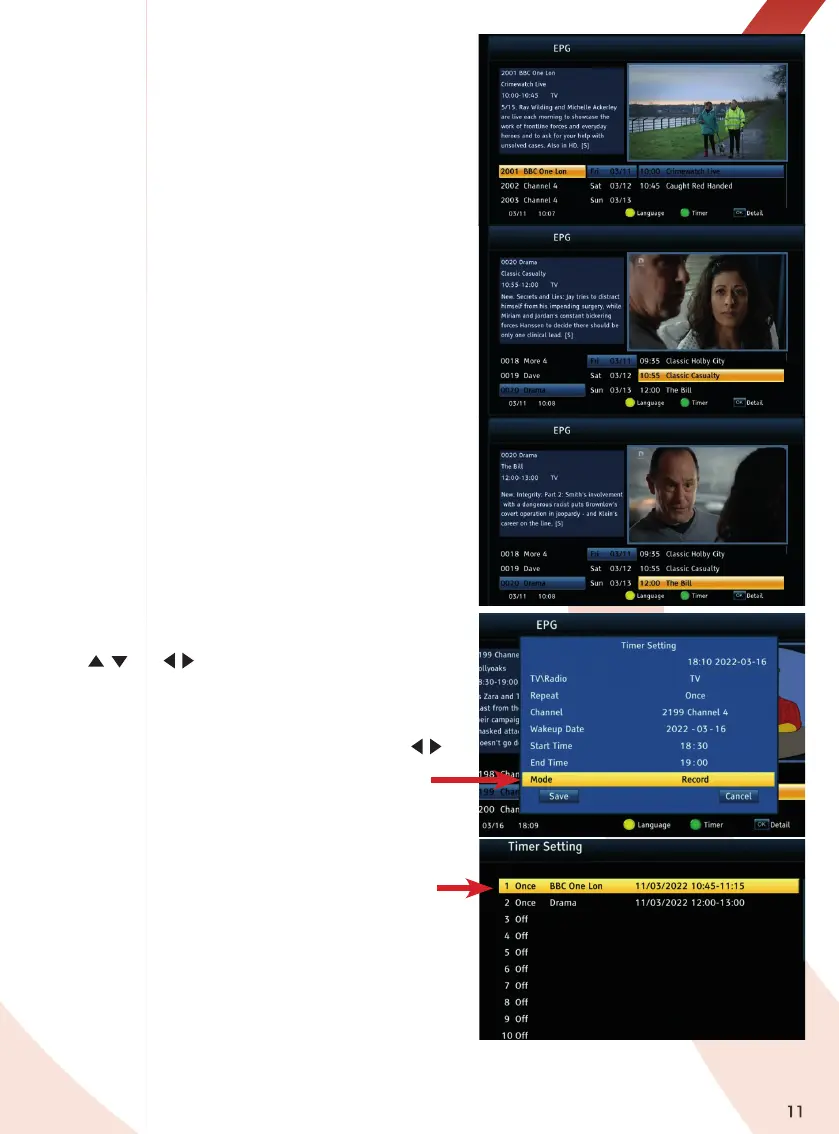
EPG - Electronic Programme Guide
The receiver features a 7 Day EPG for terrestrial channels
and a “now and next” EPG for satellite channels.
Press the EPG key to display the guide.
Use the
/ and
/
keys to view programmes in the EPG.
Using the Timer option you can schedule future viewings
and recordings of your favourite programmes automatically
in advance. To enter the Timer Setting submenu press the
GREEN key on the remote. All the programme timing details
are shown scroll down to highlight Mode and press the
/
keys to select the “View” or “Record” option. To record you
will need to ensure a suitable USB drive is connected.
Timer Setting - List of Recordings
You can review all the recordings scheduled by opening
the Channel List menu and then opening the Timer
Setting menu which lists the scheduled recordings.
To see the details or to edit or cancel a recording
highlight the recording and press OK to open the
Timer Setting submenu. again.


 To Next Page