8
Terrestrial channel search
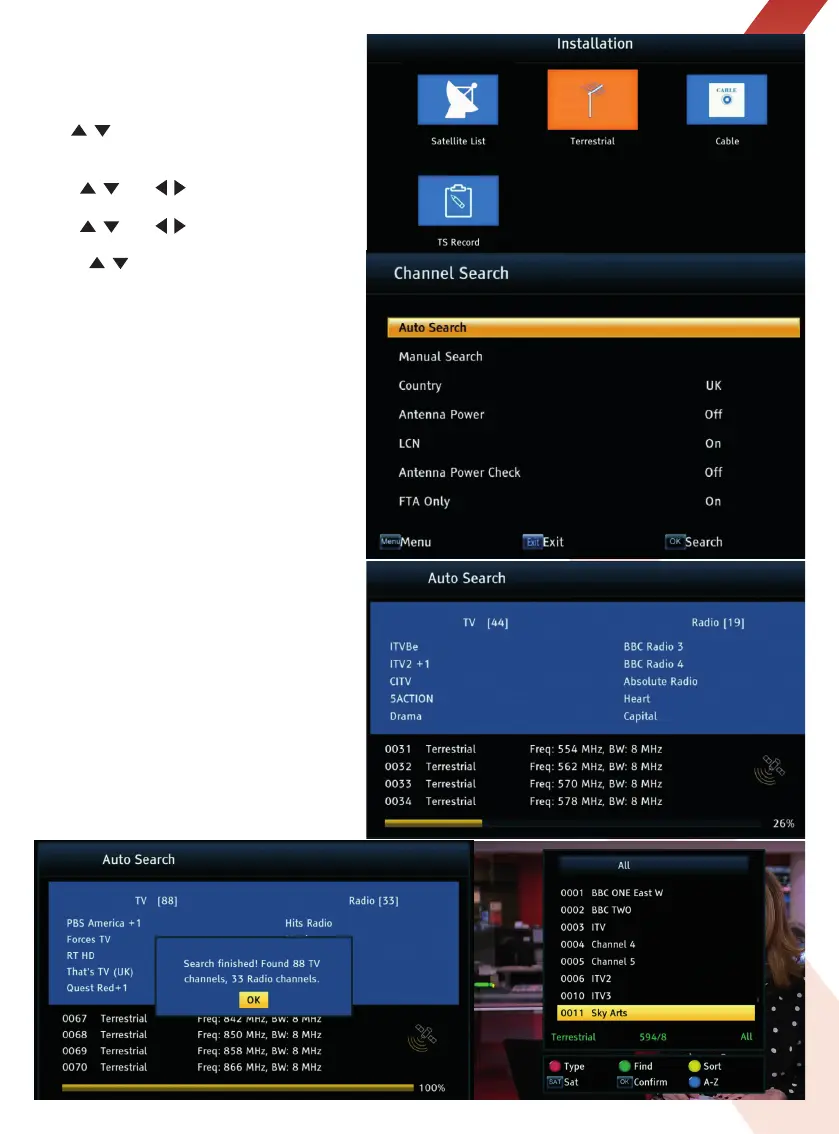
Open the Installation menu and select the
Terrestrial option and press OK to open the
Channel Search menu.
Press
/ key to select Auto Search
(recommended) press OK key to start.
1. Use
/ and
/
keys to select your
country.
2. Use
/ and
/
keys to select FTA (Free
to Air Channels) Only, On option.
3. Press
/ key to select Search, and press
OK key to start.
Auto Search - Recommended
Searches all available terrestrial channels
automatically - the receiver searches frequency
by frequency according to the search mode
saved for the Country you have selected.
Manual Search
You can search for channels manually if
channels that should be available locally do
not appear in the terrestrial channel list - the
receiver searches the channel frequency
choose in the manual search menu.
When the Auto Search is complete press the
OK key to save the list of channels found.
The screen will show the first channel in
the list.
Press the OK key again to see the list of
channels found.
The full list of channels found can be viewed
and edited in the TV Channel List.


 To Next Page