4
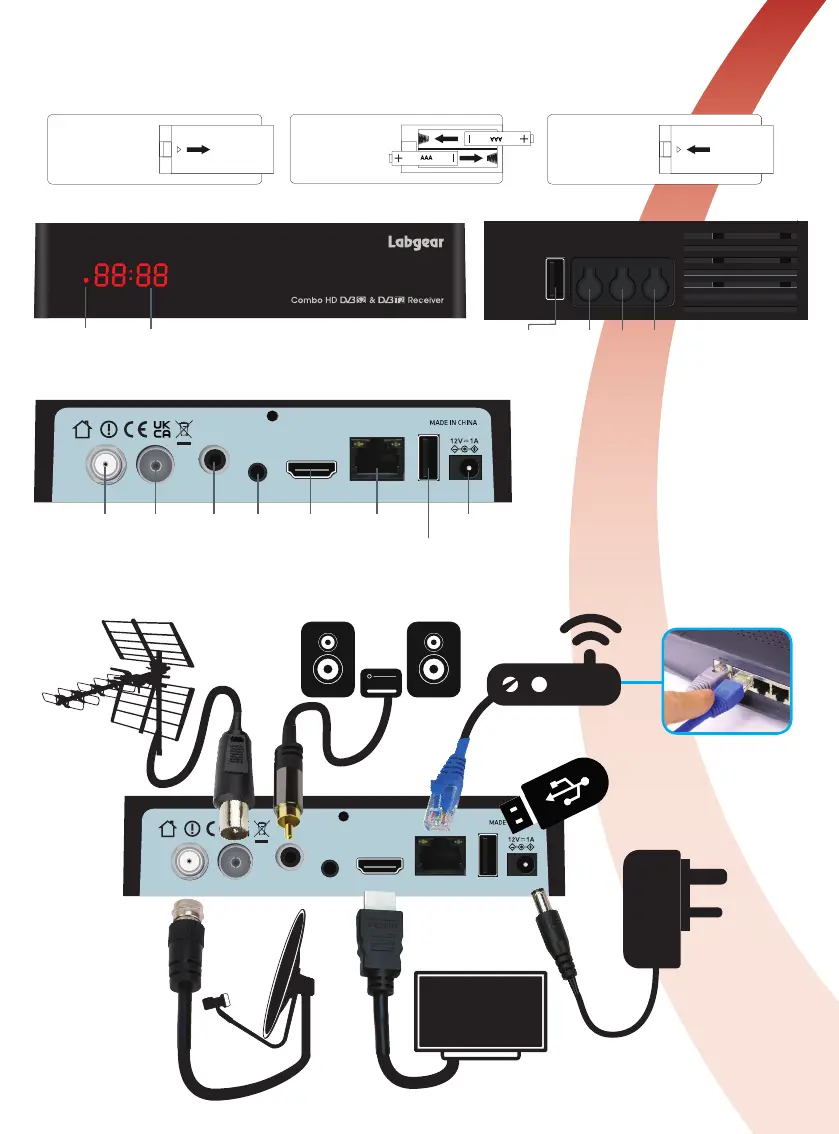
Installing Batteries in the Remote Control
Insert the batteries supplied (2x AAA Alkaline) into the remote taking care to observe the
polarity indicated in the battery compartment. When replacing batteries do not mix old and
new batteries, or batteries of different types.
Ethernet DC INAV HDMI USBCOAXIALLNB IN ANT IN
22W12
Satellite
LNB IN
TV
Aerial IN
Audio
Out
(Digital)
AV Out
(Analog)
HD AV Out
(Digital)
LAN/Network
Connection
Power Adaptor
Connection
USB 2.0 Port
for Flash Media, PVR,
Timeshift, Media Player,
LCOM 1
LED DisplayRemote
TV TV
USB CH+ CH- POWER
CH
Up
CH
Down
Standby/
ON
USB 2.0 Ports
for Flash Media, PVR,
Timeshift, Media Player,
Front Panel Side Panel
Back Panel
Connections
Ethernet DC INAV HDMI USBCOAXIALLNB IN ANT IN
22W12


 To Next Page