7
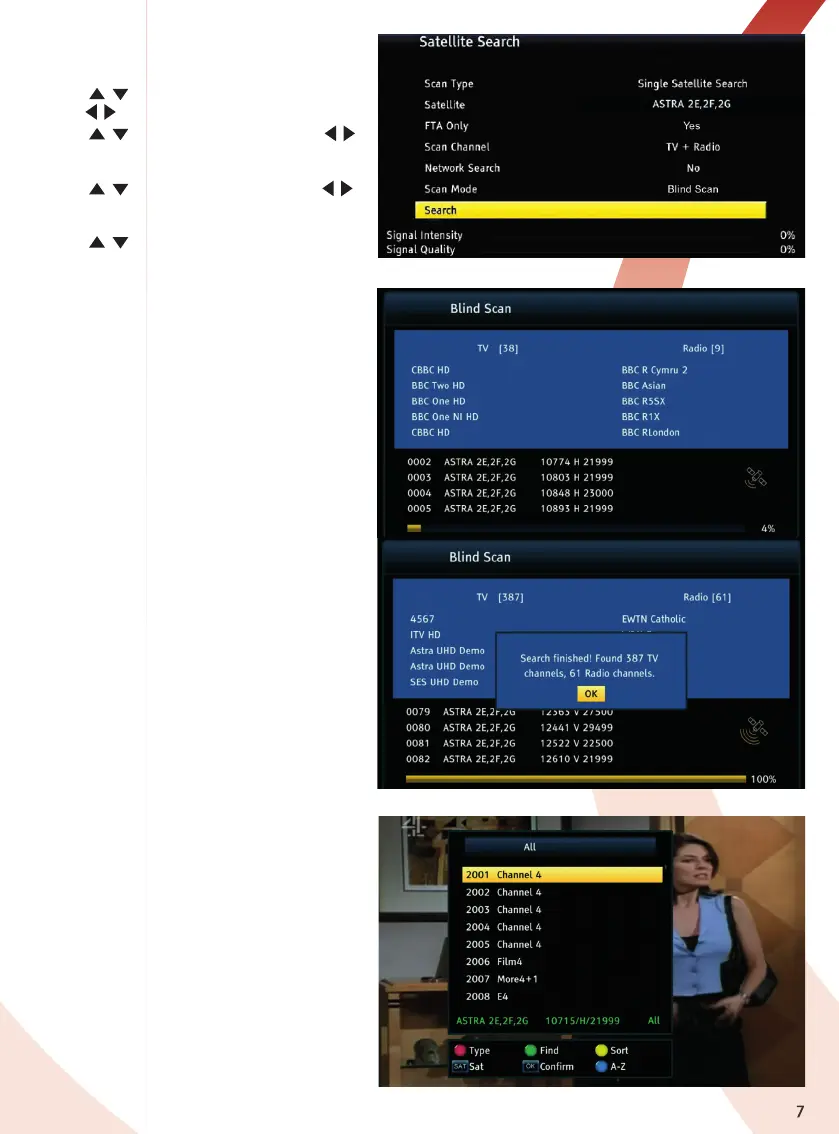
Satellite search
In this menu you can search channels from one
selected satellite.
1. Press
/ key to select FTA (Free to Air)
only,
/
key to select Yes/No.
2. Press
/ key to select Scan Channel,
/
key to select TV + Radio/TV Channel/
Radio Channel.
3. Press
/ key to select Search Mode,
/
key to select Blind Scan (recommended)/Full
Scan.
4. Press
/ key to select Search, and press
OK key to start.
1. Blind Scan is an automatic search for all
available satellite frequencies, which are then
scanned in turn for channels.
2. Full Scan – searches according to the
receivers pre-loaded TP list. Frequency by
frequency.
For satellite systems with motorised dishes you
can search multiple satellites.
When the Blind Scan is complete press the OK
key to save the list of channels found.
The screen will show the first channel in the list.
Press the OK key again to see the list of
channels found.
The full list of channels found can be viewed
and edited in the TV Channel List menu, see
page 9.


 To Next Page