ITA
11
Terza funzione
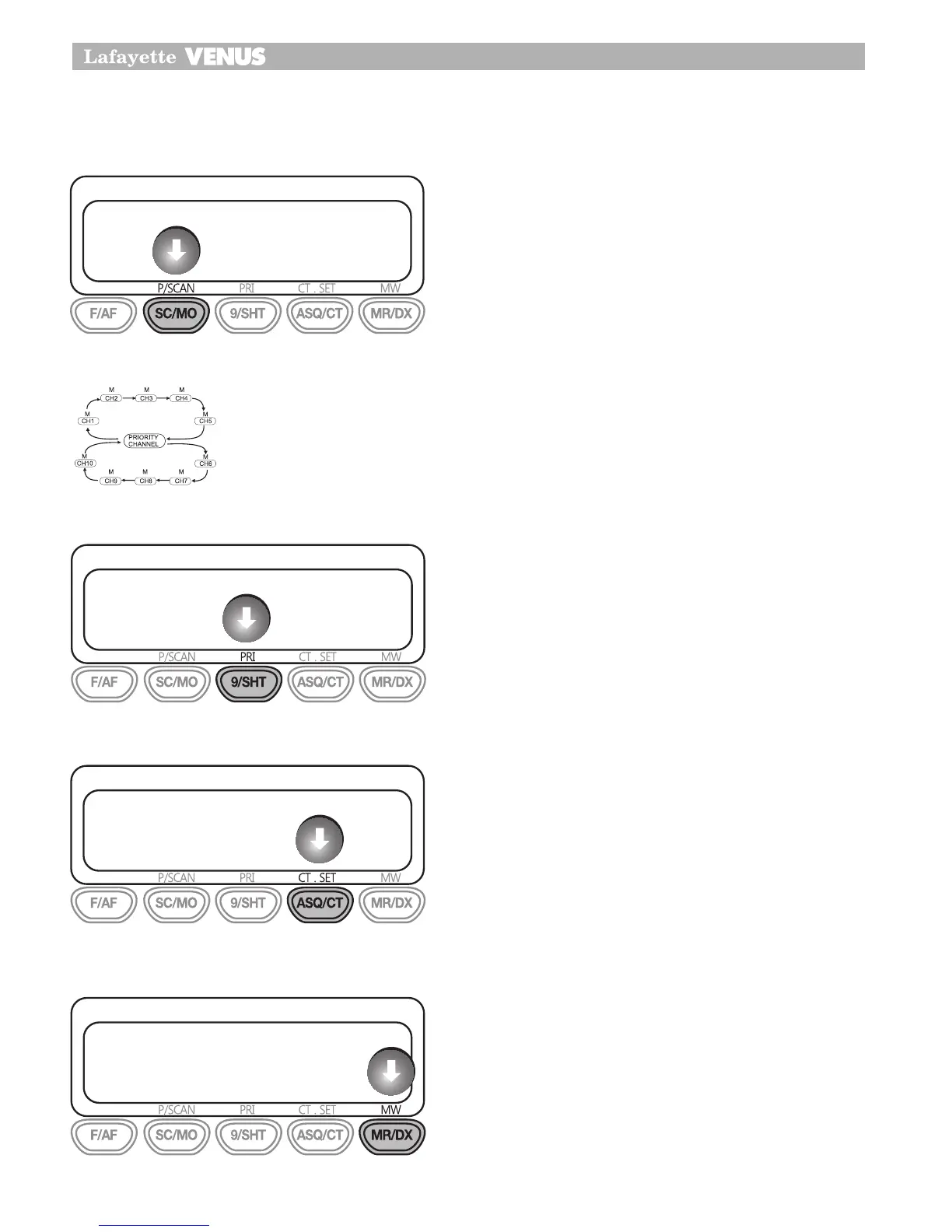
PSCAN (Scansione Prioritaria)
Con la funzione di scansione prioritaria è possi-
bile tenere sotto controllo l’attività su tutti i canali
compresi quello designato come prioritario. Questo
significa che il vostro canale prioritario verrà mo-
nitorato regolarmente durante la fase di scansione
in maniera tale da non perdere alcuna comunica-
zione. Ogni segnale ricevuto sul canale prioritario
avrà la precedenza su tutti gli altri segnali ricevuti
sugli altri canali.
Premendo il pulsante PSCAN sarà possibile monito-
rare il canale prioritario durante la scansione degli
altri canali nel modo P/Scan.
PRI (Canale prioritario)
Per memorizzare un canale come prioritario, preme-
re il pulsante Function ed il pulsante PRI. Sul display
apparirà la lettera “P” a conferma dell’avvenuta im-
postazione del canale prescelto come prioritario. Il
canale da voi impostato come prioritario verrà mo-
nitorato automaticamente durante la fase di scan-
sione Prioritaria.
Nota:
E’ possibile impostare solo un canale prioritario.
CT.SET
Questa funzione consente di ricevere segnali solo
da corrispondenti i quali adottano lo stesso codice
CTCSS vostro.
Premere F/AF e ASQ/CT, il canale CTCSS ap-
parirà in lampeggio.
Selezionare il canale 1 su 38 toni e ripetere il pro-
cesso dal punto 1 per concludere l’operazione.
MW (Scrittura in memoria)
Il pulsante MW viene utilizzato per memorizzare i
canali nelle posizioni disponibili di richiamo rapido
da M1 a M4. Per memorizzare i canali:
Selezionare il canale desiderato tramite la mano-
pola rotativa od i pulsanti UP e DOWN.
Premere il pulsante F/AF + MW
E’ possibile scegliere una posizione di memoria
da F/AF (M1) a ASQ (M4).
1�
2�
1�
2�
3�
24
Third Function
PSCAN (Priority SCAN)
With Priority Scan the Radio scans for activity, but in addition, it also inserts
your Priority Channel into the scan sequence.
This means that your Priority Channel will be monitored regularly while
scanning to censure that no calls are missed. Any signals received on your
Priority Channel will take precedence over any signal received on the other
channels.
Allows you to monitor a Priority Channel while scanning other channels in
the P/Scan mode.
PRI (Priority
)
To store a Priority channel, press the Function and PRI button. The letter “P”
will appear when the priority channel is set. The channel you selected as
your Priority Channel will then be automatically monitored during the Priority
Scan.
Note:
You can only store one channel as your priority channel
24
Third Function
PSCAN (Priority SCAN)
With Priority Scan the Radio scans for activity, but in addition, it also inserts
your Priority Channel into the scan sequence.
This means that your Priority Channel will be monitored regularly while
scanning to censure that no calls are missed. Any signals received on your
Priority Channel will take precedence over any signal received on the other
channels.
Allows you to monitor a Priority Channel while scanning other channels in
the P/Scan mode.
PRI (Priority
)
To store a Priority channel, press the Function and PRI button. The letter “P”
will appear when the priority channel is set. The channel you selected as
your Priority Channel will then be automatically monitored during the Priority
Scan.
Note:
You can only store one channel as your priority channel
24
Third Function
PSCAN (Priority SCAN)
With Priority Scan the Radio scans for activity, but in addition, it also inserts
your Priority Channel into the scan sequence.
This means that your Priority Channel will be monitored regularly while
scanning to censure that no calls are missed. Any signals received on your
Priority Channel will take precedence over any signal received on the other
channels.
Allows you to monitor a Priority Channel while scanning other channels in
the P/Scan mode.
PRI (Priority
)
To store a Priority channel, press the Function and PRI button. The letter “P”
will appear when the priority channel is set. The channel you selected as
your Priority Channel will then be automatically monitored during the Priority
Scan.
Note:
You can only store one channel as your priority channel
25
Third Function
CT.SET
This feature allows you to receive signals only from callers who have
selected the same CTCSS tone.
1. Press F/AF and ASQ/CT button, The CTCSS channel will be blinking.
2. You select CTCSS channel 1 to 38 tone and then repeat above 1 process
to fix CTCSS tone.
MW(Memory Write)
This MW button is used to store any channel in the each memory locations
at M1 to M4
To store channel.
•
Select the desired channel with Rotary knob or UP/DOWN
•
Press F/AF +MW
•
You can choose any memory location from F/AF(M1) to ASQ/CT(M4)
25
Third Function
CT.SET
This feature allows you to receive signals only from callers who have
selected the same CTCSS tone.
1. Press F/AF and ASQ/CT button, The CTCSS channel will be blinking.
2. You select CTCSS channel 1 to 38 tone and then repeat above 1 process
to fix CTCSS tone.
MW(Memory Write)
This MW button is used to store any channel in the each memory locations
at M1 to M4
To store channel.
•
Select the desired channel with Rotary knob or UP/DOWN
•
Press F/AF +MW
•
You can choose any memory location from F/AF(M1) to ASQ/CT(M4)


 To Next Page
 Loading...