ENG
27
Third Function
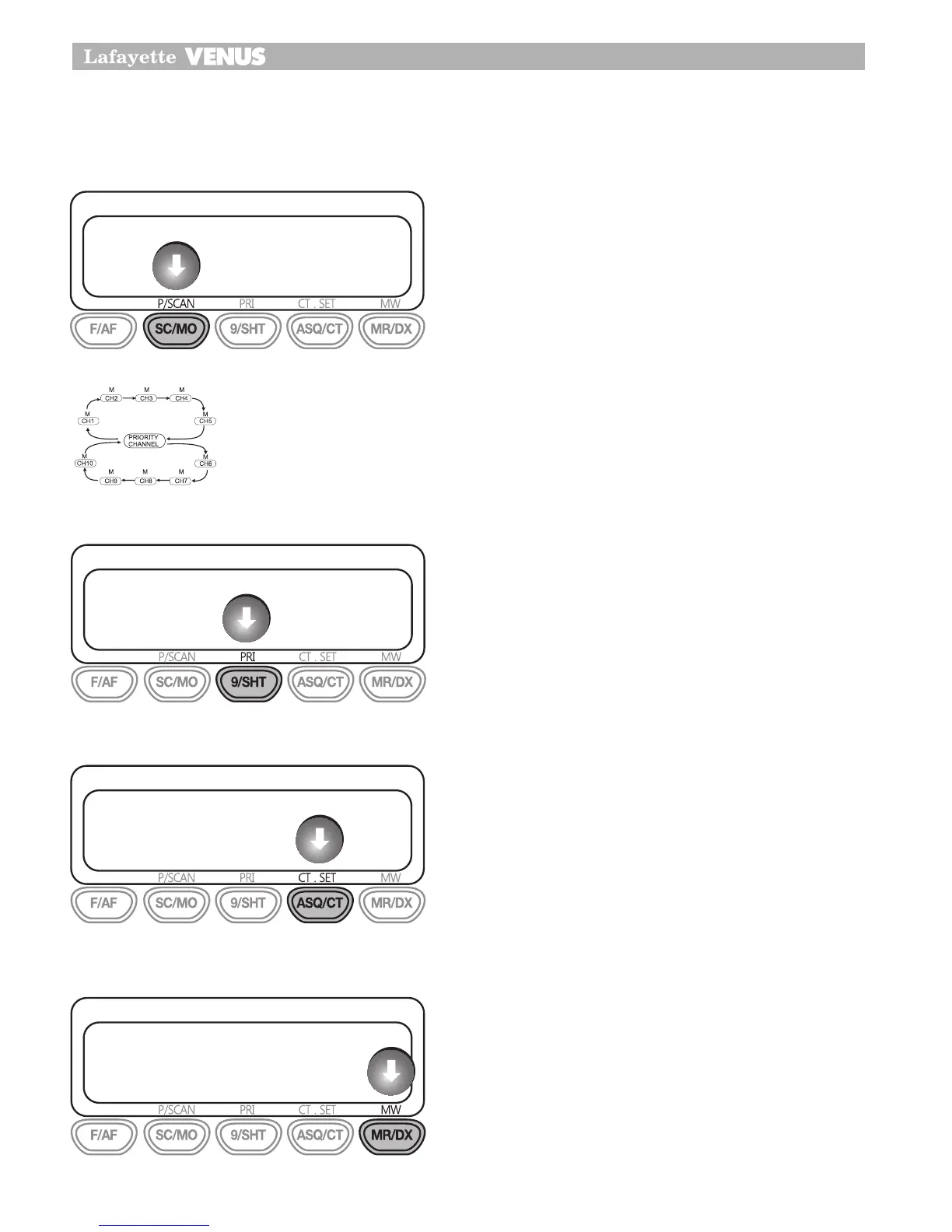
PSCAN (Priority SCAN)
With Priority Scan the Radio scans for activity, but
in addition, it also inserts your Priority Channel into
the scan sequence.
This means that your Priority Channel will be moni-
tored regularly while scanning to censure that no
calls are missed. Any signals received on your Prior-
ity Channel will take precedence over any signal
received on the other channels.
Allows you to monitor a Priority Channel while scan-
ning other channels in the P/Scan mode.
PRI (Priority)
To store a Priority channel, press the Function and
PRI button. The letter “P” will appear when the prior-
ity channel is set. The channel you selected as your
Priority Channel will then be automatically moni-
tored during the Priority Scan.
Note: You can only store one channel as your prior-
ity channel
CT.SET
This feature allows you to receive signals only from call-
ers who have selected the same CTCSS tone.
1Press F/AF and ASQ/CT button, The CTCSS
channel will be blinking.
2You select CTCSS channel 1 to 38 tone and then
repeat above 1 process to fix CTCSS tone.
MW (Memory Write)
This MW button is used to store any channel in the each
memory locations at M1 to M4 To store channel.
Select the desired channel with Rotary knob or
UP/DOWN
Press F/AF +MW
You can choose any memory location from F/AF
(M1) to ASQ/CT(M4).
1�
2�
3�
24
Third Function
PSCAN (Priority SCAN)
With Priority Scan the Radio scans for activity, but in addition, it also inserts
your Priority Channel into the scan sequence.
This means that your Priority Channel will be monitored regularly while
scanning to censure that no calls are missed. Any signals received on your
Priority Channel will take precedence over any signal received on the other
channels.
Allows you to monitor a Priority Channel while scanning other channels in
the P/Scan mode.
PRI (Priority
)
To store a Priority channel, press the Function and PRI button. The letter “P”
will appear when the priority channel is set. The channel you selected as
your Priority Channel will then be automatically monitored during the Priority
Scan.
Note:
You can only store one channel as your priority channel
24
Third Function
PSCAN (Priority SCAN)
With Priority Scan the Radio scans for activity, but in addition, it also inserts
your Priority Channel into the scan sequence.
This means that your Priority Channel will be monitored regularly while
scanning to censure that no calls are missed. Any signals received on your
Priority Channel will take precedence over any signal received on the other
channels.
Allows you to monitor a Priority Channel while scanning other channels in
the P/Scan mode.
PRI (Priority
)
To store a Priority channel, press the Function and PRI button. The letter “P”
will appear when the priority channel is set. The channel you selected as
your Priority Channel will then be automatically monitored during the Priority
Scan.
Note:
You can only store one channel as your priority channel
24
Third Function
PSCAN (Priority SCAN)
With Priority Scan the Radio scans for activity, but in addition, it also inserts
your Priority Channel into the scan sequence.
This means that your Priority Channel will be monitored regularly while
scanning to censure that no calls are missed. Any signals received on your
Priority Channel will take precedence over any signal received on the other
channels.
Allows you to monitor a Priority Channel while scanning other channels in
the P/Scan mode.
PRI (Priority
)
To store a Priority channel, press the Function and PRI button. The letter “P”
will appear when the priority channel is set. The channel you selected as
your Priority Channel will then be automatically monitored during the Priority
Scan.
Note:
You can only store one channel as your priority channel
25
Third Function
CT.SET
This feature allows you to receive signals only from callers who have
selected the same CTCSS tone.
1. Press F/AF and ASQ/CT button, The CTCSS channel will be blinking.
2. You select CTCSS channel 1 to 38 tone and then repeat above 1 process
to fix CTCSS tone.
MW(Memory Write)
This MW button is used to store any channel in the each memory locations
at M1 to M4
To store channel.
•
Select the desired channel with Rotary knob or UP/DOWN
•
Press F/AF +MW
•
You can choose any memory location from F/AF(M1) to ASQ/CT(M4)
25
Third Function
CT.SET
This feature allows you to receive signals only from callers who have
selected the same CTCSS tone.
1. Press F/AF and ASQ/CT button, The CTCSS channel will be blinking.
2. You select CTCSS channel 1 to 38 tone and then repeat above 1 process
to fix CTCSS tone.
MW(Memory Write)
This MW button is used to store any channel in the each memory locations
at M1 to M4
To store channel.
•
Select the desired channel with Rotary knob or UP/DOWN
•
Press F/AF +MW
•
You can choose any memory location from F/AF(M1) to ASQ/CT(M4)


 To Next Page
 Loading...