83-507-5002 Rev. A
65
7.11.2 Conditional Registers (continued)
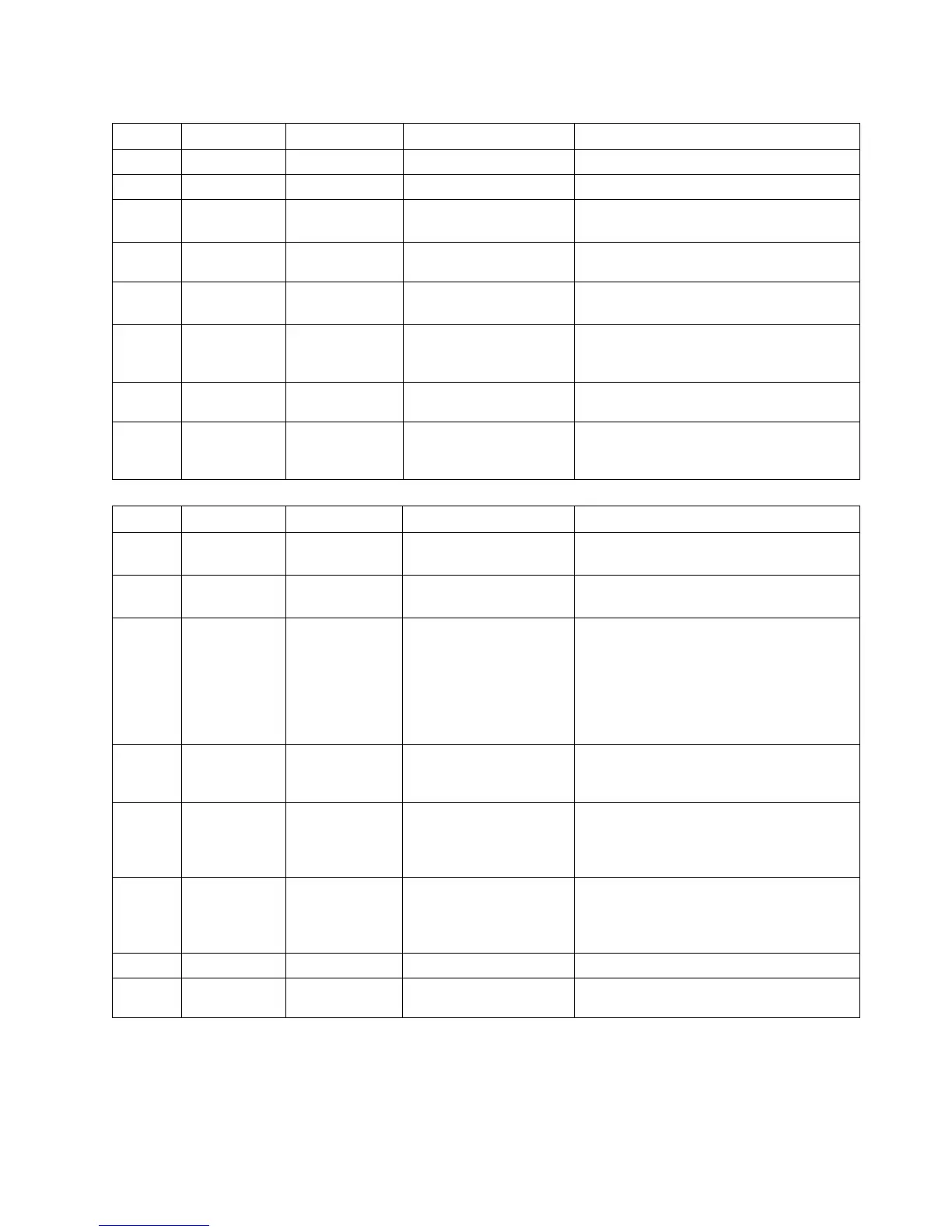
Table 7-8: Fault Condition Register
BIT Fault name Fault symbol Bit Set condition Bit Reset condition
0 (LSB) Spare bit SPARE Fixed to zero Fixed to zero
1 AC Fail AC AC fail has occurred. The AC input returns to normal.
2 Over
temperature
OTP OTP shutdown has
occurred.
The power supply cools down.
3 Foldback FOLD Foldback shutdown
has occurred
The supply output is turned On by
front panel button or OUT 1 command.
4 Over volt-
age
OVP OVP shutdown has
occurred.
The supply output is turned ON by
front panel button or OUT 1 command.
5 Shut Off SO Rear panel J1 “Shut
Off” condition has oc-
curred.
Rear panel J1 “Shut Off” condition has
been removed.
6 Output Off OFF Front panel OUT but-
ton pressed to Off.
The supply output is turned On by
front panel button or OUT 1 command.
7(MSB) Enable ENA Rear panel J1 Enable
terminal (J1-1&J1-14)
opened.
Rear panel J1 Enable terminals
closed.
Table 7-9: Status Condition Register
BIT Fault name Fault symbol Bit Set condition Bit Reset condition
0 (LSB) Constant
Voltage
CV Output is On and the
supply in CV.
Output is ON and the supply is not in
CV.
1 Constant
Current
CC Output is ON and the
supply in CC.
Output is ON and the supply is not in
CC.
2 No Fault NFLT
The power supply is
operating normally or
fault reporting is not
enabled.
See “OUT n” com-
mand in Section
7.7.5.
One or more faults are active and fault
reporting is enabled (using “FENAxx”).
3 Fault active FLT One or more faults
are enabled and oc-
cur.
Fault Event Register cleared (FEVE?).
4 Auto-
Restart En-
abled
AST Supply is in Auto-
Restart mode (from
Front Panel or serial
command).
Supply is in Safe-Start mode (from
Front Panel or serial command).
5 Fold
Enabled
FDE Fold protection is
enabled (from Front
Panel or serial
command).
Fold protection disabled (from Front
Panel or serial command).
6 Spare bit SPARE Fixed to zero. Fixed to zero.
7(MSB) Local Mode LCL Supply in Local mode. Supply in Remote mode or Local-
Lockout mode.
7.11.3 Service Request: Enable and Event Registers
The conditional Registers are continuously monitored. When a change is detected in a register bit
which is enabled, the power supply will generate an SRQ message.


 To Next Page